I am a keen home labber, using various mini PCs and NAS enclosures for personal entertainment, such as TV and movies, and as backups for personal and work data, such as website backups.
Ugreen have been making waves in the world of NAS enclosures over the past few years, offering substantially better hardware at a more responsible price than established brands such as Synology and QNAP. While UGOS can’t compete with Synology DSM, it competes well with other affordable options such as TerraMaster TOS. TOS has more applications, but I think that UGOS generally feels a bit more polished.
So far, I have reviewed the superb Ugreen NASync DXP4800 Plus, NASync DH4300 Plus and the most affordable option in their range, the DH2300 NAS.
At Computex, Ugreen launched the new GT series consisting of the four-bay DXP4800 GT and the two-bay DXP2800 GT.
I am reviewing the 2-bay model, but I wanted to compare the three 4-bay models X86 models.
Ugreen DXP4800 GT vs NASync DXP4800 Plus vs DXP4800 Pro Specification

| Specification | Ugreen NASync DXP4800 GT | Ugreen NASync DXP4800 Plus | Ugreen NASync DXP4800 Pro |
| Drive Bays | 4 × SATA 3.5″/2.5″ | 4 × SATA 3.5″/2.5″ | 4 × SATA 3.5″/2.5″ |
| CPU | AMD Ryzen Embedded (4-core, 8-thread) | Intel Pentium Gold 8505 (5-core, 6-thread) | Intel Core i3-1315U (6-core, 8-thread) |
| Maximum CPU Frequency | 3.7GHz | Up to 4.4GHz | Up to 4.5GHz |
| Memory (RAM) | 8GB DDR4 | 8GB DDR5 | 8GB or 16GB DDR5 |
| ECC Memory Support | Not specified | Yes | Not specified |
| Maximum RAM | 64GB | 64GB | 96GB |
| System Drive | 64GB eMMC | 128GB SSD | 128GB SSD |
| M.2 NVMe Slots | 2 × M.2 2280 | 2 × M.2 2280 | 2 × M.2 2280 |
| Maximum Storage Capacity | 144TB (4 × 32TB + 2 × 8TB) | 144TB (4 × 32TB + 2 × 8TB) | 144TB (4 × 32TB + 2 × 8TB) |
| RAID Modes | JBOD, Basic, RAID 0, 1, 5, 6, 10 | JBOD, Basic, RAID 0, 1, 5, 6, 10 | JBOD, Basic, RAID 0, 1, 5, 6, 10 |
| Operating System | UGOS Pro | UGOS Pro | UGOS Pro |
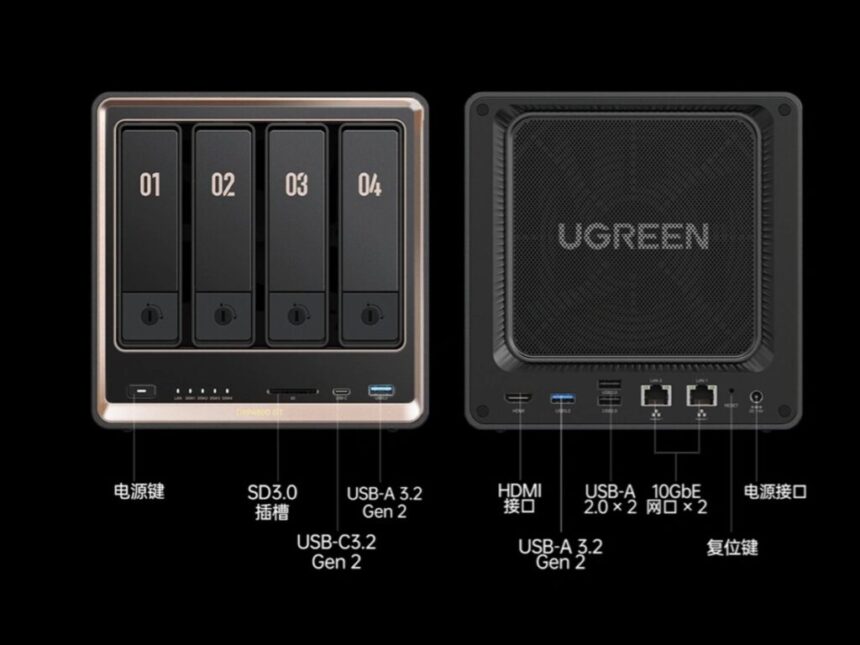
| Network Ports | 2 × 10GbE | 1 × 10GbE, 1 × 2.5GbE | 1 × 10GbE, 1 × 2.5GbE |
| USB-C | 1 × USB 3.2 Gen 2 (10Gb/s) | 1 × USB-C (10Gb/s) | 1 × USB 3.2 Gen 2 (10Gb/s) |
| USB-A | 2 × USB 3.2 Gen 2 (10Gb/s) | 1 × USB-A (10Gb/s), 1 × USB-A (5Gb/s), 2 × USB 2.0 | 1 × USB 3.2 Gen 2 (10Gb/s) |
| Thunderbolt 4 | No | No | No |
| HDMI Output | 4K 60Hz | 4K | 4K 60Hz |
| SD Card Reader | SD 3.0 | SD 3.0 | SD 3.0 |
| PCIe Expansion | No | No | No |
| Power Supply | 150W | 150W | 150W |
| Dimensions | Not specified | 257 × 178 × 178mm | Not specified |
AMD Ryzen Embedded r2514 vs Intel Pentium Gold 8505 vs Core i3-1315u
| Specification | AMD Ryzen Embedded R2514 | Intel Pentium Gold 8505 | Intel Core i3-1315U |
| Architecture Family | Picasso (12 nm) | Alder Lake (Intel 7 / 10 nm) | Raptor Lake-U (Intel 7 / 10 nm) |
| Total Cores / Threads | 4 Cores / 8 Threads | 5 Cores / 6 Threads | 6 Cores / 8 Threads |
| Core Configuration | 4 Standard Cores | 1 Performance, 4 Efficient | 2 Performance, 4 Efficient |
| Base Frequency | 2.1 GHz | 0.90 GHz | 0.90 GHz |
| Max Turbo Frequency | 3.7 GHz | 4.4 GHz | 4.5 GHz |
| Cache Memory | 4 MB L3 Cache | 8 MB Intel Smart Cache | 10 MB Intel Smart Cache |
| Supported RAM Speed | Up to DDR4 2666 MT/s | Up to DDR5/LPDDR5 | Up to DDR5 5200 MT/s |
| Integrated Graphics | AMD Radeon Graphics (8 Execution Units) | Intel UHD Graphics (48 Execution Units) | Intel UHD Graphics (64 Execution Units) |
| Base Power (TDP) | 15 W | 15 W | 15 W |
| Maximum Turbo Power | Not specified | 55 W | 55 W |
CPU Performance
This is where the GT positioning gets a little awkward. On paper, the AMD Ryzen Embedded R2514 sounds like the headline upgrade, and Ugreen’s own marketing leans heavily on the 4-core, 8-thread count and the “no throttling” messaging. The reality is more measured.
The R2514 is an embedded part built on the older Zen+ Picasso design at 12nm, and it returns a PassMark CPU Mark of 6,728 according to Ugreen’s own figures. That is the lowest of the three chips here. The Pentium Gold 8505 in the Plus sits noticeably higher, and the i3-1315U in the Pro is higher still. So while the GT has more threads than the Plus, both Intel parts pull ahead on aggregate multi-core throughput, and the i3 has the clear lead.
What the AMD chip does offer is an embedded design intended for continuous duty. Embedded silicon is validated for long, sustained operation, which suits a box that is expected to run every hour of the day. For the always-on file serving and background tasks that most home setups actually run, the R2514 has more than enough headroom. The threads do help when several lighter jobs run at once, so a backup, a couple of Docker containers, and some file traffic will sit alongside each other without much fuss.
If you intend to push the machine hard, the picture changes. The Pro is the one to pick for heavier transcoding, virtual machines, and dense container stacks. It is unfortunate that the most capable CPU lands in the model without dual 10GbE, because the pairing on the GT feels slightly mismatched. Dual 10GbE on the weakest of the three processors is an odd combination.
Transcoding
None of these chips is a transcoding powerhouse, and that is worth being clear about. The two Intel parts carry Intel UHD integrated graphics with Quick Sync, which handles hardware transcoding in Plex and Jellyfin reasonably well for common codecs. The i3-1315U in the Pro is the strongest here, with more execution units and newer media support, so it copes best with multiple simultaneous streams.
The AMD R2514 in the GT uses Radeon graphics with just 8 execution units. AMD’s integrated media engine is generally less effective than Intel Quick Sync for NAS transcoding workloads, and the small EU count does not help. For a single direct-play stream this is a non-issue, since no transcoding takes place. If your media server regularly transcodes several streams at once, the Intel models are the safer choice, and the Pro especially so.
RAM
The GT uses DDR4, while both the Plus and Pro use DDR5. On performance grounds, DDR5 is the more modern choice and offers higher bandwidth, which marginally helps the Intel models in memory-bound tasks.
DDR4 is not purely a downside, though, and it may even be a quiet advantage for some buyers. With current memory pricing, DDR4 modules are considerably cheaper than DDR5. Looking at Scan, taking the GT to 32GB costs around £250, whereas a comparable DDR5 upgrade in the Plus or Pro sits closer to £400. If you plan to run memory-hungry workloads such as virtual machines or large caches, the cheaper upgrade path on the GT is genuinely useful. The GT also supports ECC memory with a compatible module, which the supplied RAM does not provide. ECC is more typically a feature of business and enterprise storage, where memory error correction protects long-running data sets, so its inclusion here points the GT slightly away from the pure home audience Ugreen describes.
A small clarification on capacities. The GT tops out at 64GB of total RAM, while the Pro can reach 96GB. If you want the highest memory ceiling, the Pro remains ahead.
Storage Options
All three units share the same headline figures: four SATA bays, two M.2 2280 NVMe slots, and up to 144TB of total capacity. They also share the same RAID options, covering JBOD, Basic, and RAID 0, 1, 5, 6 and 10.
The GT separates itself with U.2 support. On the DXP4800 GT, two of the front bays (SATA1 and SATA2) accept U.2 NVMe SSDs, with the remaining bays handling standard SATA drives. U.2 is an enterprise interface, and U.2 drives offer far higher sustained throughput and better endurance than SATA, which makes them suited to high-frequency read and write work or as a fast tier alongside slower archival drives. This is a capability the Plus and Pro do not have, and it reinforces the sense that the GT is aimed at a slightly more specialist user than its marketing suggests.
In practice, U.2 NVMe SSDs are expensive and uncommon in home setups, so this feature will appeal to a narrow group. For most buyers, the SATA bays plus the two M.2 slots will cover everything they need, and those M.2 slots are common across all three models. The M.2 slots on the GT run at Gen3 x2, which is adequate for a cache or a dedicated app pool rather than headline NVMe speeds.
Networking
This is the GT’s strongest argument. It is the only model of the three with dual 10GbE. The Plus and Pro both pair a single 10GbE port with a slower 2.5GbE port.
Two 10GbE ports give you more aggregate bandwidth, which is useful for link aggregation, for serving multiple high-speed clients at once, or for keeping a fast network path free while another is busy. For a small office running several workstations off shared storage, or anyone moving very large files between multiple fast machines, the dual 10GbE on the GT is a real benefit.
It is worth being realistic about who needs this. A single 10GbE connection already saturates the throughput of most hard drive arrays, so a single fast client editing from the NAS will not see any benefit from the second port. The dual 10GbE pays off when several fast clients hit the storage at the same time, or when you specifically want aggregation. For a single-user home setup, one 10GbE port is usually plenty, and the Plus or Pro covers that comfortably.
The pairing also raises the same question as the CPU section. Dual 10GbE genuinely shines when paired with strong processing and fast storage, and the GT has the weakest CPU of the three. The dual 10GbE would arguably have suited the more powerful Pro better.
Price Comparison and Alternative Options
The RRP of the Ugreen DXP4800 GT is €659.99 / £589.99. Early-bird discount brings it down to €527.99, then going to €589.99. That works out at £570 RRP, then £456 and £509.72 respectively. The press release only states that a 10% discount will be available at launch.
The Ugreen NASync DXP4800 Plus is listed on Amazon for an RRP of £620 and available for £527. On Amazon.DE, the price is €589.99.
The DXP4800 Pro is listed at £690, available for £589, and I can’t find this listed on other Amazon EU stores, but Keeper indicates it was €670.
Overall
The Ugreen DXP4800 GT seems like a bit of an odd NAS to launch when Ugreen already has two excellent X86 NAS enclosures and a more affordable ARM-based enclosure.
There is not a huge difference in pricing, with there being around a £120 difference in RRP between the DXP4800 GT and the much more powerful DXP4800 Pro.
The DXP4800 GT benefits from dual 10GbE, giving you much more theoretical bandwidth, but I feel like that would have been better suited on the more powerful DXP4800 Pro.
Along with the dual 10GbE, this supports U.2 and ECC DDR4, which would make this more appealing as a business-oriented NAS. For a small business, I could see the appeal of this as a backup server.
With the current market for PC components, the DDR4 could be a selling point. Looking at Scan, upgrading this to 32GB would cost around £250, but using DDR5 in the NASync DXP4800 Plus would cost closer to £400.
I have been using the 2-bay model for the past couple of weeks, and it has been excellent so far, and Ugreen have one of the most appealing ranges of NAS enclosures at the moment.
At the end of the day, which four-bay model is best comes down to your needs and budget.
Best Options
| Feature | Best Option |
| Raw CPU performance | DXP4800 Pro |
| Networking | DXP4800 GT (dual 10GbE) |
| Memory technology | DXP4800 Plus / Pro (DDR5) |
| Maximum RAM capacity | DXP4800 Pro (96GB) |
| Value for virtualisation and containers | DXP4800 Pro |
| Value for high-speed file serving | DXP4800 GT |
| General home and media server use | DXP4800 Plus |

I am James, a UK-based tech enthusiast and the Editor and Owner of Mighty Gadget, which I’ve proudly run since 2007. Passionate about all things technology, my expertise spans from computers and networking to mobile, wearables, and smart home devices.
As a fitness fanatic who loves running and cycling, I also have a keen interest in fitness-related technology, and I take every opportunity to cover this niche on my blog. My diverse interests allow me to bring a unique perspective to tech blogging, merging lifestyle, fitness, and the latest tech trends.
In my academic pursuits, I earned a BSc in Information Systems Design from UCLAN, before advancing my learning with a Master’s Degree in Computing.
I’m proud to share that Vuelio has consistently ranked Mighty Gadget as one of the top technology blogs in the UK. With my dedication to technology and drive to share my insights, I aim to continue providing my readers with engaging and informative content.
I work directly with the companies he reviews products for or their chosen PR agency.
For Social Media, you can find me on: