I have previously reviewed the superb Ugreen NASync DXP4800 Plus, which I still use today as my main NAS, albeit running on Unraid rather than UGOS.
I have also reviewed and continue to use a more affordable, power-efficient Ugreen NASync DH4300 Plus,Ugreen NASync DH4300 Plus purely for backups. It backs up my phone photos and makes a great Google Photos alternative, and I use the excellent rclone backup feature to back up all my servers.
Ugreen has just launched the GT series, and I have written a separate comparison of the four-bay NASync DXP4800 GT against the NASync DXP4800 Plus and NASync DXP4800 Pro. This review covers the two-bay model, the Ugreen DXP2800 GT.
The DXP2800 GT is essentially the same machine as the four-bay DXP4800 GT, just with two bays instead of four, and it drops the second 10GbE port. Because the internals are shared across the GT line, and because my daily-driver NAS is the DXP4800 Plus, I have made most of my comparisons against the DXP4800 Plus throughout this review.
If you have not read my comparison piece, the main point to understand is that the GT series runs on an AMD Ryzen Embedded R2514 chipset. This is less powerful in raw multithreaded throughput than the Intel Pentium Gold 8505 in the DXP4800 Plus, and it uses older, slower DDR4 memory rather than DDR5.
On the plus side, the GT can accept up to two U.2 NVMe drives across its two front bays, and the four-bay version adds dual 10GbE networking. With the current scarcity and high price of memory, I actually regard the DDR4 here as a small bonus, because it is considerably cheaper to upgrade DDR4 than the DDR5 used on the higher-spec models.
The result is an unusual product. It sits below the Plus and Pro models on paper in some respects, while quietly offering features such as U.2 and ECC support that you would normally associate with more expensive enterprise-leaning units. The sections below work through what that means in practice.
Specification
The table below compares the two-bay DXP2800 GT against my daily-driver DXP4800 Plus. I have kept the focus on the differences that change how each unit behaves day to day, rather than every line item.
| Specification | Ugreen NASync DXP2800 GT | Ugreen NASync DXP4800 Plus |
|---|---|---|
| Drive bays | 2 x SATA 3.5″/2.5″ | 4 x SATA 3.5″/2.5″ |
| CPU | AMD Ryzen Embedded R2514 (4-core, 8-thread) | Intel Pentium Gold 8505 (5-core, 6-thread) |
| Maximum CPU frequency | 3.7GHz | Up to 4.4GHz |
| PassMark CPU Mark (multi) | 6,728 | Around 9,372 |
| Memory | 8GB DDR4 | 8GB DDR5 |
| ECC support | Yes, via a separately purchased ECC module | Yes |
| Maximum RAM | 64GB (2 slots) | 64GB (2 slots) |
| System drive | 64GB eMMC | 128GB SSD |
| M.2 NVMe slots | 2 x M.2 2280 (Gen3 x2) | 2 x M.2 2280 |
| Front-bay U.2 support | Yes (both bays) | No |
| Maximum storage capacity | 80TB (2 x 32TB + 2 x 8TB M.2) | 144TB (4 x 32TB + 2 x 8TB) |
| RAID modes | JBOD, Basic, RAID 0, RAID 1 | JBOD, Basic, RAID 0, 1, 5, 6, 10 |
| Operating system | UGOS Pro | UGOS Pro |
| Network ports | 1 x 10GbE | 1 x 10GbE, 1 x 2.5GbE |
| USB-C | 1 x USB 3.2 Gen 2 (10Gb/s) | 1 x USB-C (10Gb/s) |
| USB-A | 2 x USB 3.2 Gen 2 (10Gb/s), 2 x USB 2.0 | 1 x USB-A (10Gb/s), 1 x USB-A (5Gb/s) |
| HDMI output | 4K 60Hz | 4K |
| SD card reader | None | SD 3.0 |
| Thunderbolt 4 | No | No |
| Power supply | 72W (DC 12V / 6A) | 150W |
A few points are worth pulling out of that table.
The CPU gap is the headline difference. The Pentium Gold 8505 posts a PassMark multi-core score of roughly 9,372 against the R2514’s 6,728, so the Plus has around a third more aggregate multithreaded throughput, plus a much stronger single P-core that turbos to 4.4GHz. The R2514 counters with eight threads against the Pentium’s six, and as an industrial embedded part it is designed to hold its clocks under sustained 24/7 load. For a NAS that mostly shuffles files, runs a handful of Docker containers and serves media, the difference is smaller in daily use than the benchmark gap suggests, but it is real and you will feel it under heavy parallel workloads.
ECC is the line that needs a caveat. My own spec sheet originally listed ECC as “not specified” for the GT, but Ugreen’s launch materials confirm the GT series does support ECC, provided you buy a compatible ECC module separately. The stock RAM in the box is not ECC. So ECC is available, it just is not active out of the box and costs extra to enable.
The other notable omission for the two-bay model is the SD card slot. The four-bay DXP4800 GT ships with an SD 3.0 reader aimed at photographers, and the DXP4800 Plus has one too, but the DXP2800 GT does not. If you import from camera cards regularly, that is a genuine downgrade against the Plus.
Unboxing / Design


The DXP2800 GT follows the same design language Ugreen has settled on across the NASync range. The front is a dark, glossy panel framed by a copper-toned bezel, with the two drive bays labelled 01 and 02. Below the bays sits a row of front-facing connectivity and status indicators: a power button, LAN, DISK1 and DISK2 activity LEDs, a USB-C port and a USB 3.2 (USB-A) port. The DXP2800 GT branding is printed along the bottom of the bezel.
It is a smart-looking unit that would not look out of place on a desk rather than hidden in a cupboard, although the glossy front does attract fingerprints and dust. The drive bays use lockable trays, which is a nice touch on a unit you might leave somewhere accessible.

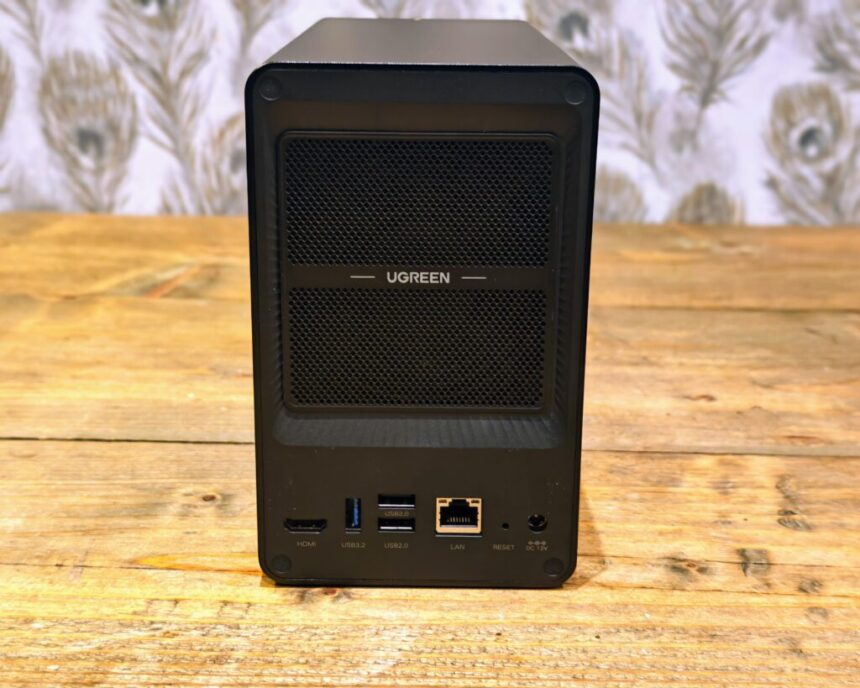
Around the back you get the bulk of the connectivity. There is an HDMI output, a USB 3.2 (USB-A) port, two USB 2.0 ports, the single RJ45 10GbE LAN port, a recessed reset button and the DC 12V power input. A large mesh grille dominates the rear panel, behind which sits the single cooling fan and the Ugreen logo. The vent area is generous for a two-bay unit, which bodes well for keeping drive temperatures sensible.
Compared with the DXP4800 Plus, the most obvious physical difference beyond the bay count is the rear networking. The Plus pairs its 10GbE port with a 2.5GbE port, which is genuinely useful for link aggregation, a dedicated management interface or simply connecting to two different network segments. The DXP2800 GT has a single 10GbE port only, so you lose that flexibility.
Assembly and M.2 Slots


The two M.2 slots are in a different location to the DXP4800 Plus. On this unit they are placed inside the enclosure, somewhat awkwardly, to the left of the first drive bay.
I found the installation a little fiddly. It is dark inside the enclosure, and my hand inevitably blocked what light there was while I was trying to seat the drives and locate the retaining screws. It was not a serious problem, and it is a one-time job, but it is worth setting aside a few minutes and a torch rather than rushing it.
On the positive side, placing the M.2 slots near the front bays and within the airflow path should mean they benefit from the cooling provided by the rear fan. NVMe drives can run warm under sustained load, so airflow over them is preferable to tucking them into a sealed pocket.
The slots are M.2 2280 running at PCIe Gen3 x2. That is enough to comfortably saturate a 10GbE link with a single drive, so the Gen3 x2 limitation is not a practical bottleneck for this class of device. Where it matters is if you intend to run an NVMe-only pool for maximum local throughput, in which case you are capped well below what a Gen4 x4 slot would allow. For caching, system services and Docker, it is fine.
Memory is accessed from the underside of the unit through a removable panel. There are two SO-DIMM slots, one occupied by the stock 8GB DDR4 module and one free, so upgrading is straightforward and does not require dismantling the chassis. As I mentioned earlier, with DDR4 pricing being far more sensible than DDR5 at the moment, a RAM upgrade on this unit is one of the cheaper ways to add headroom for virtual machines and containers.
The front bays themselves support standard 3.5-inch and 2.5-inch SATA drives, and crucially they also accept U.2 NVMe SSDs. That dual-mode support is one of the more interesting aspects of the GT series and is covered in more detail below.
U.2 and Storage Tiering
The U.2 support deserves its own mention because it is unusual at this price point. Both front bays on the DXP2800 GT can take either a SATA drive or a U.2 NVMe SSD. U.2 drives are enterprise parts built for sustained read and write workloads, with far better endurance than typical consumer SSDs and much higher throughput than SATA.
In practice this opens up a tiered storage approach that most consumer NAS units cannot match. You can run SATA hard drives in the front bays for bulk, cold storage and archiving, switch to U.2 NVMe in the front bays when you need a fast scratch or working pool for tasks such as high-resolution video editing, and use the internal M.2 slots for a separate high-speed pool dedicated to Docker and system services.
The realistic caveat is that U.2 drives are expensive and not something most home users will buy. For the target buyer of a two-bay NAS, this is more of a future-proofing and flexibility feature than something you will use on day one. It is good to have the option, and it is a genuine point of difference against the DXP4800 Plus, which does not offer U.2 in its bays.
Initial Set-up and UGOS Interface


Setup is essentially the same as the DXP4800 Plus and the rest of the NASync range. You power on, the unit walks you through a welcome guide, you create an admin account, and then you are dropped into the UGOS Pro desktop.
UGOS Pro continues to be one of the better consumer NAS operating systems I have used. The desktop metaphor is clean, the icons are clear, and the system tray gives you live CPU, RAM and network throughput readouts at a glance. For anyone coming from a Windows background, it is immediately intuitive.
The Storage app handles drive setup. On first run it presents a short welcome panel covering its main features, including flexible storage layouts, real-time SMART and drive health monitoring, error alerts and external storage management. Creating a storage pool is a guided process. You select the drives you want to include, choose a RAID type, then create a volume on top of the pool.

On the two-bay DXP2800 GT, your RAID options are limited by the bay count. You get Basic, JBOD, RAID 0 and RAID 1. RAID 1 is the sensible default and is the option UGOS recommends, mirroring your two drives so that the failure of one drive does not lose your data. The DXP4800 Plus, with its four bays, adds RAID 5, 6 and 10, which give you better capacity efficiency and more resilience options. This is simply a consequence of having more bays, not a software limitation, but it is a meaningful difference if data protection across more than two drives matters to you.
When you create a volume you choose between the ext4 and Btrfs file systems. UGOS describes ext4 as offering high stability and performance for large-capacity storage, while Btrfs adds snapshotting, copy operations, per-folder space quotas and stronger data integrity protection. For most users who want snapshots and the extra safety features, Btrfs is the better pick, with the usual trade-off of slightly higher overhead. If you simply want maximum raw performance and do not need those features, ext4 is the leaner choice.
UGOS also supports SSD caching. Through the Hard Drive section, you can take an M.2 SSD and assign it as a read or read-write cache for a storage pool, stepping through volume selection, cache mode, cache RAID type, SSD selection and capacity allocation. The interface sensibly recommends reserving around 20 percent of the cache capacity to reduce drive wear. For a two-bay unit running mechanical drives, a read cache can noticeably improve responsiveness for frequently accessed files, although the benefit depends heavily on your workload.
BIOS Settings


Being x86 based, the DXP2800 GT exposes a full American Megatrends Aptio BIOS, and you can reach it during boot in the usual way. It is a standard text-mode BIOS with mouse support, organised across Main, Advanced, Security, Boot and Save and Exit tabs. There is more in here than most consumer NAS units expose, and a few settings are worth understanding before you start changing things.
The Main tab confirms the hardware. My unit reported the AMD Ryzen Embedded R2514 with Radeon Graphics, a base clock of 2.1GHz, and 8192MB of DDR4 running at 2667 MT/s. The CPU configuration page lists the module as PiccasoCpu, which confirms the chip is based on AMD’s Picasso platform, an older Zen+ design with Vega graphics. That lines up with the modest CPU Mark and explains both the lower power draw and the weaker transcoding position discussed above. The Main tab also shows the storage layout clearly: both internal M.2 slots (M2-KEYM1 and M2-KEYM2) registered as populated in my unit, while the two U.2 bays (U2-1 and U2-2) showed as empty, since I was running SATA hard drives rather than U.2 drives.
On the CPU configuration page, SVM Mode is enabled by default, which is AMD’s hardware virtualisation. That matters if you intend to run the Virtual Machine app in UGOS or virtualise under another operating system, because without it nested virtualisation and VM acceleration will not work. NX Mode and PSS support are also enabled.
The Security tab confirms a TPM 2.0 device is present, reporting firmware version 3.92 from AMD with the SHA256 PCR bank active and the platform, storage and endorsement hierarchies all enabled. A working TPM 2.0 is useful if you plan to run Windows in a VM, or for any operating system or service that expects a hardware root of trust.
Two power-related settings in the Advanced tab are worth checking on first setup. The AC Power Lost Policy defaults to “Power off”, which means that after a power cut the NAS stays off rather than restarting on its own. If you want the unit to come back automatically after an outage, which is the behaviour most people expect from an always-on device, you will need to change this to power on. Wake on PME is enabled by default, so wake-on-LAN style behaviour is available, while EuP is disabled.
The most relevant section for tinkerers is the WatchDog Settings page, because this is where earlier Ugreen units could trip up an alternative operating system. On previous models you had to disable the watchdog to avoid boot loops when running something other than UGOS. On the DXP2800 GT, the WDT Switch is already set to Disabled out of the box, with the remaining watchdog defaults as follows:
- WDT Switch: Disabled
- WDT Keyboard Reset: Enabled
- WDT Mouse Reset: Enabled
- WDT PWRGD3 Enable: Disabled
- WDT KRST Enable: Enabled
- WDT Timeout: 60 seconds
- KRST Timeout: 30 seconds
Because the master WDT Switch is already off, you may not need to touch anything here to run Unraid or another OS, which is a welcome change from the older units. I will confirm this fully once I have run an alternative OS for an extended period, but the default state is encouraging.
The Boot tab is where you control boot order, and it is informative in its own right. The default first boot device is listed as “Hard Disk: debian (MMC – CG1051)”, which tells you two things: UGOS Pro boots from the internal eMMC, and it is built on Debian under the hood. The remaining fixed boot order runs NVMe, then USB device, then network, then CD/DVD. My unit showed a SanDisk USB device and, under the network entry, a Marvell AQC113 controller, which is the 10GbE network chip. The AQC113 is a known quantity and is generally well supported under Linux, which bodes well for anyone planning to run Unraid or TrueNAS. To boot an alternative OS from USB, you move the USB device up the fixed boot order or select it from the boot override menu, exactly as you would on a standard PC.
Available Apps

The available apps are essentially the same as my previous Ugreen NAS reviews, accessed through the App Center.
The catalogue covers the usual bases. For media, there is Theatre, Music, Photos, Jellyfin and DLNA. For backup and sync there is Sync and Backup, Snapshot, File Version Explorer and Cloud Drives. For more advanced users there is Docker, Virtual Machine, SAN Manager and qBittorrent, alongside utilities such as a built-in Firefox browser, an Online Office suite, a text editor, the SiYuan note-taking app and Home Assistant. System tools such as Storage, Control Panel, Task Manager, Security and Vault round things out.
The one new addition over my earlier reviews is the Surveillance Centre, which allows you to connect to ONVIF and RTSP cameras and record footage. That is significant enough to warrant its own section below.
The real limitation of UGOS, as I have said in previous reviews, is that the first-party app catalogue is still relatively narrow compared with the likes of Synology. The saving grace is Docker, which is fully supported and lets you self-host more or less anything you want. If you are comfortable with containers, the gaps in the native app list stop being a real constraint. If you are not, you may occasionally find UGOS lacks a first-party app for something you assumed would be built in.
AI Features

The DXP2800 GT carries two distinct strands of AI functionality: the on-device photo recognition built into the Photos app, and the object detection that forms part of the new Surveillance Center.
Photo Recognition and Model Management

The Photos app includes a Model Management area that houses the AI recognition models, the same suite found across the wider NASync range. All of it runs locally on the NAS rather than in the cloud, which is the main privacy advantage over services such as Google Photos. The models available are:
- People recognition, which identifies and groups people across your images and videos
- Text recognition, which reads and indexes text content inside images so it becomes searchable
- Similar and duplicate photo recognition, which categorises near-identical and duplicate shots to help reclaim storage
- Pet recognition, which identifies 39 cat and dog breeds
- Sensitive content recognition, which detects and blurs explicit images automatically
- Model training package, which lets you train a custom model to recognise specific objects from your own sample photos
- Image recognition, which powers natural-language image search and scene or object detection
Each model is shown as “Not configured” until you enable it, and you can pick and choose rather than running everything at once, which is sensible given the processing involved.
The point to weigh up is processing time. On the Intel-based DXP4800 Plus, indexing a 220,000-image library for face recognition took around 12 hours, against roughly 36 hours on the slower ARM-based DH4300 Plus. The R2514 in the GT sits between those two in raw capability and lacks the Intel QuickSync acceleration, so a first-time index of a large library will take a while and will keep the CPU busy in the background until it finishes. Once the initial pass is done, ongoing recognition of newly added photos is far less demanding. The accuracy of these models is reasonable rather than class-leading. In my experience across the range, face grouping is dependable, text and duplicate detection are useful, and the broader scene and object search is more hit and miss than Google’s equivalent, but the on-device, no-subscription approach is the trade-off many buyers are looking for.
Surveillance Station
The Surveillance Center is the headline new app for the GT series and turns the NAS into a network video recorder for IP cameras. It works with cameras using the standard ONVIF and RTSP protocols, supports automatic discovery of cameras on the same subnet, and allows manual addition of cameras on other subnets by IP address. Once a camera is connected, you can set its storage location, retention period, capacity limit, recording mode and a friendly name, and recording starts automatically.
On paper it is a capable bit of software. It supports up to eight camera channels, with the count based on physical channels rather than the number of cameras, so a dual-channel camera occupies two channels. There is a multiscreen live view with custom layouts, real-time PTZ control for cameras that support pan, tilt and zoom, a timeline-based playback view with a calendar for jumping to specific dates, video filtering by all recordings or events only, and per-user permission controls that let an administrator restrict standard users to view-only access or block them entirely.
The Surveillance Center looked promising initially. It detected the cameras on my network and I was able to begin adding them without issue.
Unfortunately, this is where I hit a wall. The current version is only compatible with H.264, and all of my cameras use H.265. As a result I have not been able to add them or test the recording, playback and AI object-detection functionality properly. For a feature that is being positioned as a reason to buy the GT series, the H.264-only limitation is a real problem in 2026, because a large proportion of modern IP cameras default to H.265 for its much better compression and lower storage footprint. If your cameras are older or you can force them into an H.264 stream, you may be fine. If they are H.265, as mine are, the feature is currently of no use to you.
I will revisit this if and when Ugreen adds H.265 support, because the underlying app design is sound and the integration into the NAS notification system is sensible. As it stands, though, I cannot recommend buying the GT series mainly for surveillance until H.265 support arrives.
Performance – File Transfer
I have 10GbE at home, but my setup currently runs over SFP. I have an SFP adaptor in my main PC connecting to my Ubiquiti UniFi switch, and then use an SFP to RJ45 module to connect to a server.
When I connected the Ugreen to the SFP to RJ45 module, it did not negotiate the full 10GbE link speed, which I suspect is down to the adaptor rather than the NAS itself. I therefore had no option but to test transfers at 2.5GbE.
That is an unfortunate limitation of my test environment rather than the unit, and I want to be clear about it so the numbers are read in the right context. At 2.5GbE, a single mechanical drive in this unit comfortably saturates the link for large sequential transfers, landing in the region of 280 to 290MB/s, which is exactly what you would expect when a 2.5GbE connection is the ceiling. Small-file performance is lower, as it always is, and is dominated by drive latency and protocol overhead rather than the network.
What this means for a buyer is straightforward. Over a 2.5GbE network, the DXP2800 GT will not be your bottleneck for everyday file serving with mechanical drives, because the network caps you first. The 10GbE port only earns its keep if you have 10GbE infrastructure end to end and either fast SSD storage or a striped array capable of feeding it. With two mechanical drives in RAID 1, you will not see anything close to 10GbE for sustained sequential transfers regardless, because a pair of mirrored hard drives simply cannot read or write that fast. To genuinely exploit the 10GbE port on a two-bay unit, you would be looking at U.2 or NVMe storage.
This is where the two-bay form factor and the 10GbE port sit in slight tension. For context, my DXP4800 Plus, with four mechanical drives in RAID 5 over 10GbE, returns sustained sequential transfers in the region of 500 to 600MB/s, and even then the drives are the bottleneck rather than the network. A two-bay unit in RAID 1 cannot get close to that, because RAID 1 mirrors rather than stripes, so writes are limited to the speed of a single drive (typically around 200 to 250MB/s for a modern 3.5-inch drive) and reads only modestly higher. On the four-bay DXP4800 GT, a four-drive array has a realistic chance of pushing well beyond 2.5GbE on sequential workloads, and the dual 10GbE ports make more sense. On a two-bay unit, the single 10GbE port is most useful in combination with NVMe or U.2, or for serving many clients at once rather than maxing out a single transfer. It is still a welcome inclusion, and it is more than most two-bay competitors offer, but set your expectations according to the drives you put in.
I will update this section with full 10GbE figures once I have resolved the adaptor issue in my own network.
Performance – Media Playback


Media playback is an area where the choice of CPU has a direct effect, and it is where the DXP4800 Plus pulls ahead.
The Pentium Gold 8505 in the Plus includes Intel QuickSync version 8, with hardware decode for HEVC (H.265), AVC (H.264) and AV1, among others. Intel QuickSync is the most mature and widely supported hardware transcoding engine in the consumer NAS space, and Plex, Jellyfin and Emby all lean on it heavily. In my testing on the Plus, a single 4K HEVC file transcoded to 1080p H.264 in real time with CPU usage barely above 20 percent, and two simultaneous 1080p transcodes stayed similarly low. If you transcode a lot of media on the fly, particularly H.265 content to lower bitrates for remote streaming, the Plus is the stronger choice.
The R2514 in the DXP2800 GT uses an AMD Radeon Vega integrated GPU. It does have video decode and encode hardware, but AMD’s transcoding support in media server software is historically less consistent and less well supported than Intel QuickSync. For direct play, where the client simply receives the file as-is and decodes it locally, the GT is perfectly capable and the CPU barely breaks a sweat. For heavy on-the-fly transcoding to multiple clients, it is more of an unknown quantity, and I would not buy this unit expecting QuickSync-class transcoding.
There is one media feature that is new and genuinely useful here. The GT series supports direct HDMI playback, currently labelled as a beta feature. Using the Ugreen NAS app, you can find a video stored on the NAS and cast it to the HDMI output, so the unit drives a connected TV or monitor directly rather than streaming over the network. It supports H.264, H.265 and other mainstream encoding formats for this direct playback, and outputs at up to 4K 60Hz.

In practice, this is a nice option if the NAS lives near a television, because it sidesteps the network and any client-side transcoding entirely, playing the file straight out of the box to the screen. As a beta feature it comes with the usual caveats. Ugreen notes that you may need to switch audio tracks if sound is missing or out of sync, and that high resource usage, screen flickering or shaky playback can occur, in which case replaying the video or contacting support is the suggested fix. It is a promising addition, but treat it as work in progress rather than a finished, polished feature.
If your media use is direct playback to compatible client devices such as a modern TV, an Apple TV, an Nvidia Shield, or a recent phone, the DXP2800 GT will handle it without issue. If you need a server that transcodes heavily for several simultaneous remote users, the Intel-based DXP4800 Plus remains the safer recommendation.
Power Draw and Fan Noise
The DXP2800 GT ships with a 72W power supply rated at DC 12V and 6A, which is less than half the 150W brick on the DXP4800 Plus. That is partly the smaller bay count and partly the efficiency of the AMD embedded platform, which is designed for always-on operation.
For my power testing I use a TP-Link Tapo P110M smart plug with energy monitoring, which is Matter-enabled and feeds readings into Home Assistant. As a reference point, my four-bay DXP4800 Plus drew between 39W and 45W under light load while transferring files, dropped to around 32W in the evening with drives idle, and peaked at about 64W during heavier operations. That works out at roughly £84 per year running 24/7 at around 24p per kWh.
The DXP2800 GT should sit below those figures, because it has half the drive bays and a lower-power embedded chip, and the smaller 72W supply reflects that. With two mechanical drives and the system idle, you can expect draw to be low, climbing modestly when the drives are active and higher again under sustained CPU load. As ever, the drives themselves are usually the single largest contributor to a NAS power budget, so your exact figures will depend heavily on which disks you fit and on the drive sleep settings, which default to 20 minutes and can be dropped to 10. I will add measured idle and load figures for the DXP2800 GT once testing is complete, but the design points firmly towards this being a frugal unit, and over a year of continuous running the saving against a four-bay system is meaningful on an electricity bill.
Fan noise comes from the single rear fan behind the large mesh grille. On the DXP4800 Plus, the 140mm fan is quiet at idle and barely audible from more than a metre away, spinning up under load without becoming intrusive, and the drive noise is more noticeable than the fan. I expect the two-bay GT to behave similarly, helped by the generous vent area relative to only two drives. As with the Plus, the loudest component in normal use will be the mechanical drives rather than the fan, so your choice of disks will largely determine what you hear. The unit is quiet enough to sit in a living space or next to a television, particularly if you pair it with the direct HDMI playback feature. I will confirm the fan behaviour under sustained load in the update.
Installing / Booting into Unraid or a different NAS OS
While I like UGOS, the native app catalogue is limited, as discussed above. You can, of course, install almost anything you want through Docker, but I am a long-time Unraid user, and Unraid remains my preferred NAS operating system for personal media, running the usual Plex and *arr stack.
Like the other x86 Ugreen NAS enclosures, you can access the BIOS to switch the boot device from the eMMC system drive to a different drive. As covered in the BIOS section, UGOS boots from the internal eMMC (listed as a Debian install), so to run Unraid you simply move the USB device up the boot order or pick it from the boot override menu and boot from your Unraid USB stick.
With the previous Ugreen NAS units, you needed to disable the watchdog to prevent boot loops. On the DXP2800 GT the WatchDog Settings page shows the WDT Switch already set to Disabled by default, so you may not need to change anything at all to keep an alternative OS running. I will confirm this over a longer test period, but it is a clear improvement over the earlier units where this step caught people out.
One further encouraging detail from the BIOS is that the 10GbE controller is a Marvell AQC113, which is well supported under Linux. That reduces the risk of the network port not being recognised under Unraid or TrueNAS, which is a common pain point with less mainstream 10GbE chips.
The broader point is that the GT series, being x86 based, is genuinely flexible. If you outgrow UGOS or simply prefer another platform, you are not locked in. You can run Unraid, TrueNAS or another operating system, which is one of the strongest arguments for buying an x86 NAS over an ARM-based one. The DXP2800 GT inherits that flexibility, and the two-bay form factor suits a focused Unraid build or a lightweight TrueNAS box well.
Price and Alternative Options
The RRP of the Ugreen DXP2800 GT is €509.99 / £459.99, with a 10 percent launch discount available on both GT models through the Ugreen NAS official store and Amazon. That brings the launch price down to around £413.99.
For context, the four-bay DXP4800 GT carries an RRP of €659.99 / £589.99, again with a 10 percent launch discount. The DXP4800 Plus is listed on Amazon at an RRP of £620 and has been available for around £527, while the DXP4800 Pro sits at £690 with availability around £589.
So the DXP2800 GT is the most affordable way into the GT series, and at roughly £414 at launch it is priced sensibly for a two-bay x86 NAS with a 10GbE port, U.2 capability and ECC support. The pricing looks fair rather than aggressive. It undercuts the four-bay models substantially, as you would expect, and the gap to the DXP4800 Plus is large enough that the choice between them comes down to what you actually need rather than a marginal saving.
The fair comparison is this. If you want maximum capacity, the broadest RAID options, the strongest transcoding and that extra 2.5GbE port, the DXP4800 Plus is worth the extra outlay and remains my pick for a do-everything home NAS. If you have only modest capacity needs, want lower power draw, value the U.2 and ECC flexibility, and are happy with two bays in RAID 1, the DXP2800 GT covers those bases for meaningfully less money.
Against the wider market, Ugreen continues to compete strongly. The two-bay NAS space has plenty of options from Synology, QNAP, Asustor and TerraMaster, but very few of them combine x86 flexibility, a 10GbE port, U.2 support and ECC capability at this price. Synology’s comparable two-bay units tend to be more locked down and increasingly fussy about drive compatibility, while matching the GT’s connectivity usually costs more. That combination of features for the money is the DXP2800 GT’s strongest argument.
Overall
I continue to be impressed with what Ugreen has been doing across its product range, and the NAS line in particular. The company has come from nowhere to build one of the most appealing line-ups in the consumer NAS market, and in my opinion it has comfortably overtaken TerraMaster, which used to be my favourite budget option.
The GT series is, admittedly, a slightly odd launch. It technically sits below Ugreen’s other x86 NAS products in some respects, while offering enterprise-leaning features such as U.2, ECC support and, on the four-bay model, dual 10GbE. The DXP2800 GT is the smallest and cheapest expression of that, and it inherits the same character: a capable, flexible two-bay unit with a couple of features you would not expect at the price, alongside a CPU and memory pairing that is a step behind the Plus.
I suspect this launch has been shaped in part by the current state of the hardware market. A growing number of manufacturers are shipping products with older hardware or less memory than you might expect, partly because the cost of RAM has made it difficult to do otherwise without raising prices sharply. Viewed in that light, the DDR4 and the embedded AMD chip are pragmatic choices rather than corners cut, and the DDR4 in particular is cheaper to upgrade than the DDR5 in the pricier models.
The DXP2800 GT is not a groundbreaking product, and there are real limitations to weigh up. The Surveillance Center’s H.264-only support makes its marquee new app unusable with H.265 cameras like mine. The single 10GbE port is hard to fully exploit with only two mechanical bays. Transcoding is a weaker proposition than on the Intel-based Plus. The M.2 slots are fiddly to populate. And the two-bay model loses the SD card reader found on its siblings.
Set against that, you get a genuinely flexible x86 platform that will happily run UGOS, Unraid or TrueNAS, a low-power design, easy and affordable DDR4 upgrades, U.2 and ECC support that are rare at this price, and the same polished UGOS Pro software I have praised across the rest of the range. At around £414 at launch, it is a sensibly priced and well-rounded two-bay NAS.
If you need capacity, heavy transcoding and more RAID options, spend the extra on the DXP4800 Plus. If you want a compact, efficient, flexible two-bay NAS and can work around the limitations above, the DXP2800 GT is an easy unit to recommend, particularly in the context of the current hardware market.
Ugreen DXP2800 GT NAS Review
85%
Summary
The DXP2800 GT is as a flexible and affordable two-bay NAS that prioritises expandability and connectivity over outright performance. While the AMD platform cannot match the stronger Intel-based DXP4800 Plus for transcoding and heavy workloads, the combination of 10GbE networking, U.2 drive support, ECC compatibility and the ability to run alternative operating systems such as Unraid or TrueNAS makes it stand out in a crowded market. There are some rough edges, particularly the limited surveillance camera compatibility and two-bay storage constraints, but at its launch price it offers an unusually strong feature set for users who want a compact, power-efficient NAS with room to grow.
Pros
- Excellent value for features
- Supports U.2 NVMe drives
- Flexible x86 platform
- 10GbE networking included
- Affordable DDR4 memory upgrades
Cons
- Weaker media transcoding performance
- H.265 cameras unsupported currently
- Only two drive bays
- M.2 installation is fiddly
- No integrated SD card reader

I am James, a UK-based tech enthusiast and the Editor and Owner of Mighty Gadget, which I’ve proudly run since 2007. Passionate about all things technology, my expertise spans from computers and networking to mobile, wearables, and smart home devices.
As a fitness fanatic who loves running and cycling, I also have a keen interest in fitness-related technology, and I take every opportunity to cover this niche on my blog. My diverse interests allow me to bring a unique perspective to tech blogging, merging lifestyle, fitness, and the latest tech trends.
In my academic pursuits, I earned a BSc in Information Systems Design from UCLAN, before advancing my learning with a Master’s Degree in Computing.
I’m proud to share that Vuelio has consistently ranked Mighty Gadget as one of the top technology blogs in the UK. With my dedication to technology and drive to share my insights, I aim to continue providing my readers with engaging and informative content.
I work directly with the companies he reviews products for or their chosen PR agency.
For Social Media, you can find me on: