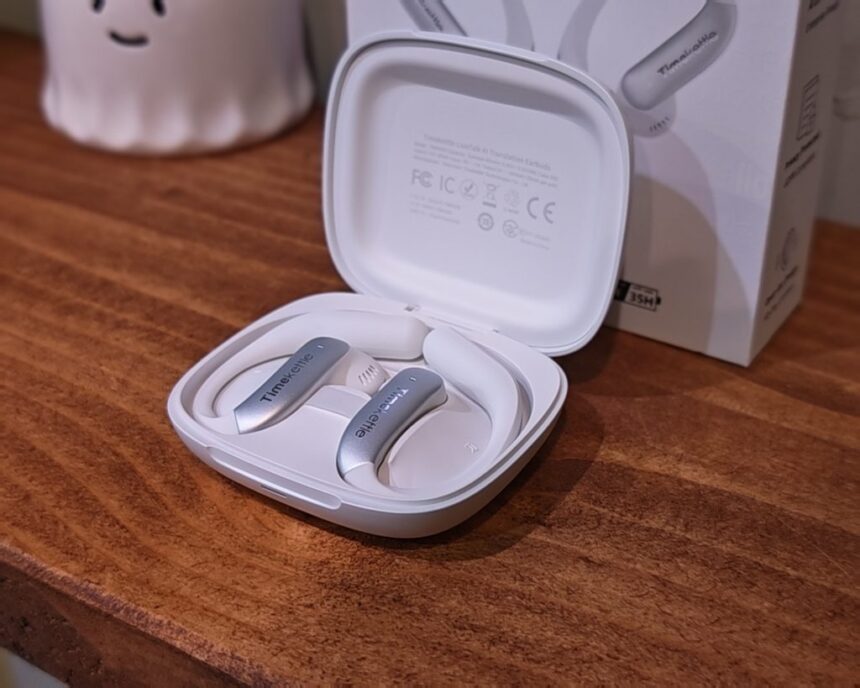
The last time I reviewed a translation device was back in 2022 with the Timekettle Fluentalk T1.
The industry has changed a lot since then, thanks to AI. There has been an influx of products that offer AI transcription and summaries, such as Plaud and Memoket Gem, with the transcription and summaries powered by LLMs like ChatGPT.
Timekettle has also adopted AI in its most recent LiveTalk AI earbuds. While these offer offline translation with a basic translation engine, AI is then used to provide better accuracy and summaries.
The LiveTalk sits below the W4 range in Timekettle’s line-up. It is aimed at travellers, students and people with lighter business needs, and it doubles as a pair of everyday open-ear earbuds for music and calls. At £129, it is a lot cheaper than the £380 W4 Plus, but it also comes with a subscription model for translation minutes, which I will cover in more detail below.
Specification
| Category | Feature | Specification |
|---|---|---|
| General | Model | LiveTalk |
| Product type | AI translation earbuds | |
| Design | Open-ear fit with flip-top charging case | |
| Colours | Polar Black, Star Silver, Deep Sea Blue | |
| Compatibility | Smartphone OS | Android 10 or later, iOS 14 or later |
| Smartphone Bluetooth | BLE 5.0 or later | |
| Earbud Bluetooth | 5.3 | |
| Multipoint | Up to 2 devices at the same time | |
| Audio | Driver | 11 mm |
| Impedance | 16 ohms | |
| Functions | Music playback and phone calls | |
| Call noise reduction | ENC with 2 microphones per earbud plus AI noise reduction | |
| Sentence detection | RNNVAD AI voice activity detection | |
| Translation (app) | Face-to-Face | Two-way interpretation, sharing one earbud or using the phone speaker |
| Live Listening | The phone’s microphone picks up nearby speech and plays the translation through the earbuds | |
| Media Translation | Original media audio and translated speech heard together through the earbuds | |
| History and recordings | Translation history export and saved audio recordings | |
| Earbuds | Dimensions | 53.4 x 34 x 13.4 mm |
| Weight | 6.9 g each | |
| Battery | 60 mAh per earbud | |
| Charging time | 45 minutes | |
| Battery life | Up to 8 hours of music, 4+ hours of translation | |
| Charging case | Dimensions | 75 x 66 x 25 mm |
| Weight | 74.9 g (including earbuds) | |
| Battery | 500 mAh, recharges the earbuds 3 times | |
| Charging time | 110 minutes | |
| Total battery life | Up to 35 hours with case | |
| Charging | USB-C, 5 V / 1 A input, 20 cm USB-C to USB-C cable included | |
| Packaging | Box dimensions | 109 x 150 x 35 mm |
| Total weight | 220.2 g |
TimeKettle LiveTalk AI Translation Earbuds vs W4 Plus
| Feature | LiveTalk | W4 Plus |
|---|---|---|
| Positioning | Everyday interpreter and music earbuds | Professional AI interpreter earbuds |
| Target users | Travellers, students, younger buyers and people with light business needs | Business professionals, cross-border teams and frequent multilingual communicators |
| Main uses | Travel, everyday conversations, language learning, socialising and music | Meetings, conferences, calls and multilingual work |
| Design | Open-ear, 6.9 g per earbud | Semi-in-ear, 5.7 g per earbud |
| Operating system | Babel OS 3.0 | Babel OS 3.0 |
| Voice capture | On the phone for One-on-One, on the earbuds for voice calls, dual microphones with no bone-voiceprint sensor | On the earbuds: bone-voiceprint sensor plus dual microphones, used for One-on-One and voice calls, picks up quiet speech accurately |
| Languages | 54 languages, 108 accents, 25 offline language packs | 54 languages, 108 accents, 25 offline language packs |
| Specialised translation | No | Yes, 5 domains: General, Tech and Internet, Manufacturing and Industry, New Energy and Green Tech, Biotech and Pharma |
| Translation refinement | Yes | Yes |
| Conversation memory | No | Yes |
| Live summary | Listen mode only | Yes |
| One-on-One translation | Yes | Yes |
| Listen mode | Listen only | Listen and reply |
| Voice call translation | Yes | Yes |
| Media translation | Yes | Yes |
| Music focus | Music is a core feature, with an 11 mm titanium diaphragm driver and EQ | Translation and professional communication come first |
| Earbud battery | 60 mAh, up to 4 hours of translation, up to 8 hours of music | 60 mAh, up to 3 hours of translation, up to 6 hours of music |
| Multipoint Bluetooth | Yes | No |
| Price | £129 RRP | £380 RRP |
| Translation plan | 200 free minutes a month, then £5.99 a month for 300 extra minutes or £9.99 a month for unlimited | Unlimited for $14.99 a month (US pricing) |
Features & Languages Supported
Translation modes
All translation runs through the Timekettle app, which offers four main modes.
Face-to-Face is for conversations in person. The phone’s microphone picks up both speakers and the translated speech plays through the earbuds, so each person can talk in their own language. There are two ways to use it. In One-earbud Shared Mode, you give one earbud to the other person, which Timekettle recommends for longer conversations. In Earbuds-Phone Shared Mode, you wear both earbuds and the other person hears the translation through the phone speaker, which is better for quick exchanges with a shopkeeper or receptionist.
Timekettle’s AI Translation Refinement can tidy up translated sentences so they read more naturally. Because the phone does the listening, you have to hold it out or put it on a table during the conversation. The W4 Plus picks up your voice through the earbuds instead, with a bone-voiceprint sensor, which is more discreet and copes better with quiet speech.
Live Listening is meant for situations where you mostly need to understand someone else, such as lectures, guided tours, museum visits and presentations. The phone listens all the time, and you get translated audio in the earbuds and translated text on the screen. It also creates AI summaries in real time, so you can look back over the main points of a long session. This is the only mode on the LiveTalk with live summaries, and it only listens. The W4 Plus lets you reply too.
Voice Call Translation works on standard phone calls and on supported internet calling apps such as WhatsApp, Zoom and Google Meet. You hear the other caller’s speech translated in the earbuds, and your own speech is translated for them. The other person does not need the app or any special hardware. This mode uses the earbud microphones rather than the phone.
Multimedia Translation translates foreign-language audio and video playing on a phone or computer, so it covers online meetings, courses, podcasts and YouTube videos. You hear the original audio and the translated speech together.
The app can also export translation history and save audio recordings, which is useful for students looking back at lecture notes.
Languages and offline support
The LiveTalk supports 54 languages and 108 accents, the same as the W4 Plus after the October update. There are 25 offline language pairs available to download at no extra cost, which is handy when you’re abroad without reliable data or don’t want roaming charges. Not every language pair is available offline, so it is worth checking the list before you travel if you plan to rely on it.
What the LiveTalk lacks compared with the W4 Plus is the specialist translation domains (technology, manufacturing, green energy, biotech and pharmaceuticals) and conversation memory, which carries context through a long discussion. Neither is likely to matter for travel or study, but they show which product is aimed at professional use.
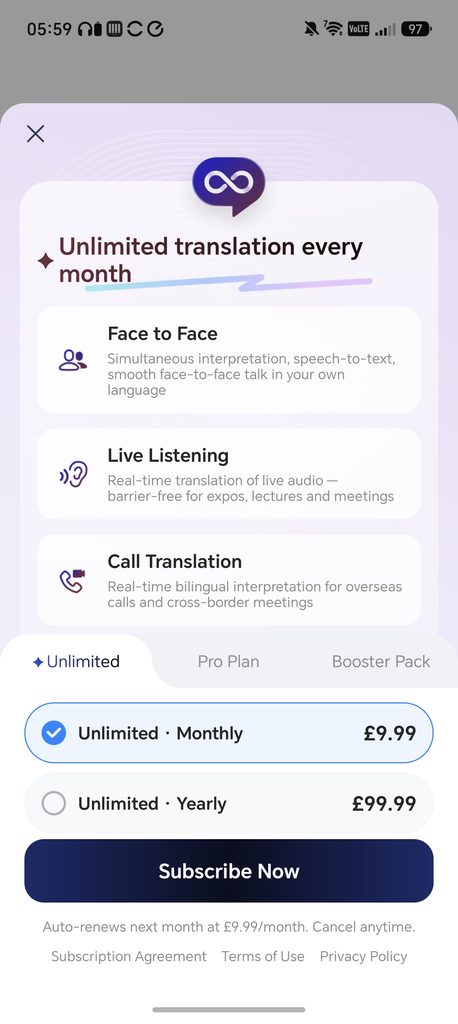
Translation also isn’t free without limits. The LiveTalk includes 200 free minutes a month, and after that it costs £5.99 a month for an extra 300 minutes or £9.99 a month for unlimited use. Annual plans are £59.99 for Pro and £99.99 for Unlimited, and there is also a one-off Booster Pack of 600 minutes that does not expire. That is cheaper than the W4 Plus plan at $14.99 a month, but heavy users should count it in the total cost.
Offline translation, AI Refinement, the AI Live Summary, the personal glossary and an AI Language Tutor are all included on every plan, including the free one. The subscription only changes how many online translation minutes you get.
Audio and music
Timekettle has put more effort into music playback than is usual for translation earbuds. Each earbud has an 11 mm dynamic driver with a titanium diaphragm and a high-damping PU surround, which Timekettle says gives cleaner detail at the top end. The open-ear ear-hook design holds the driver in a consistent place by the ear, which Timekettle calls its Direct-to-Ear acoustic design.
For calls, each earbud has two microphones with environmental noise cancellation (ENC) and AI noise reduction.
Design
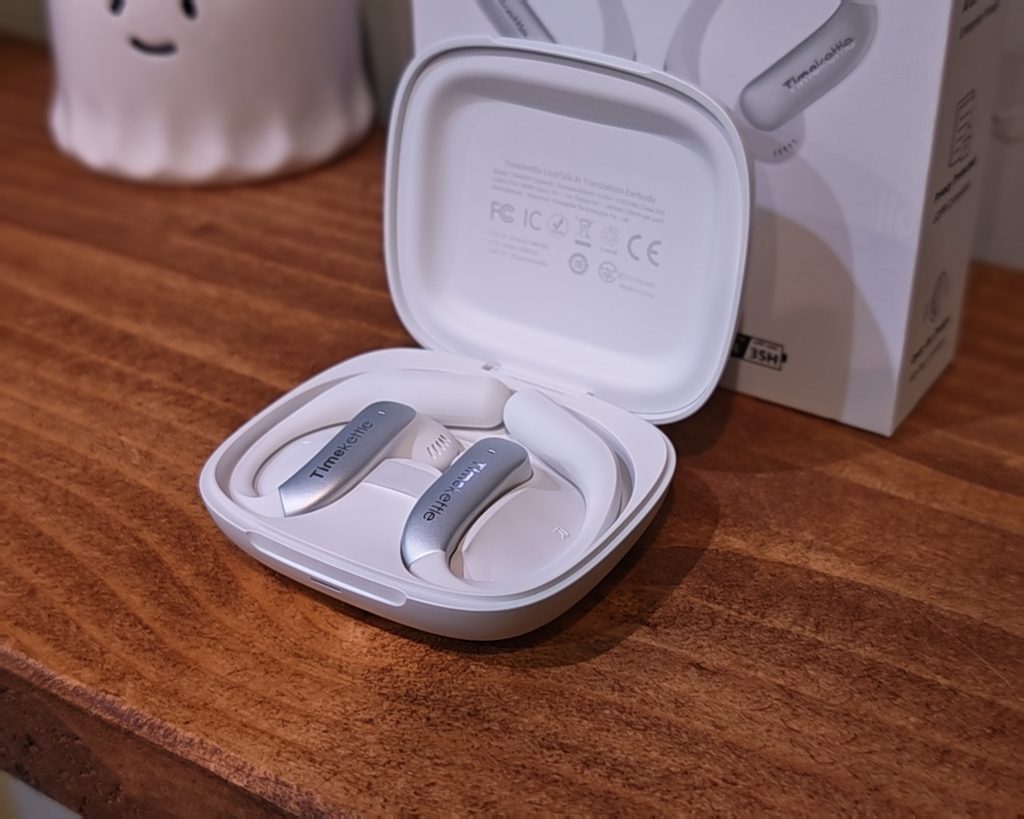
The LiveTalk uses an open-ear design. Rather than sitting inside your ear canal, the speaker rests just outside it, and a flexible hook wraps over the top of the ear to hold it in place. My review sample is the Star Silver version, which is mostly white with a brushed silver panel on the outside of each earbud carrying the Timekettle logo. It is also available in Polar Black and Deep Sea Blue.
Each earbud weighs 6.9 g, which is light for an ear-hook design, although it is a little heavier than the 5.7 g W4 Plus. There are no ear tips, so the fit relies entirely on the hook. The upside is that nothing is pushed into your ear, and you can still hear what is going on around you, which matters when you are walking around an unfamiliar city. The downside is that hooks always compete for space with glasses, and the open design does nothing to block out background noise.
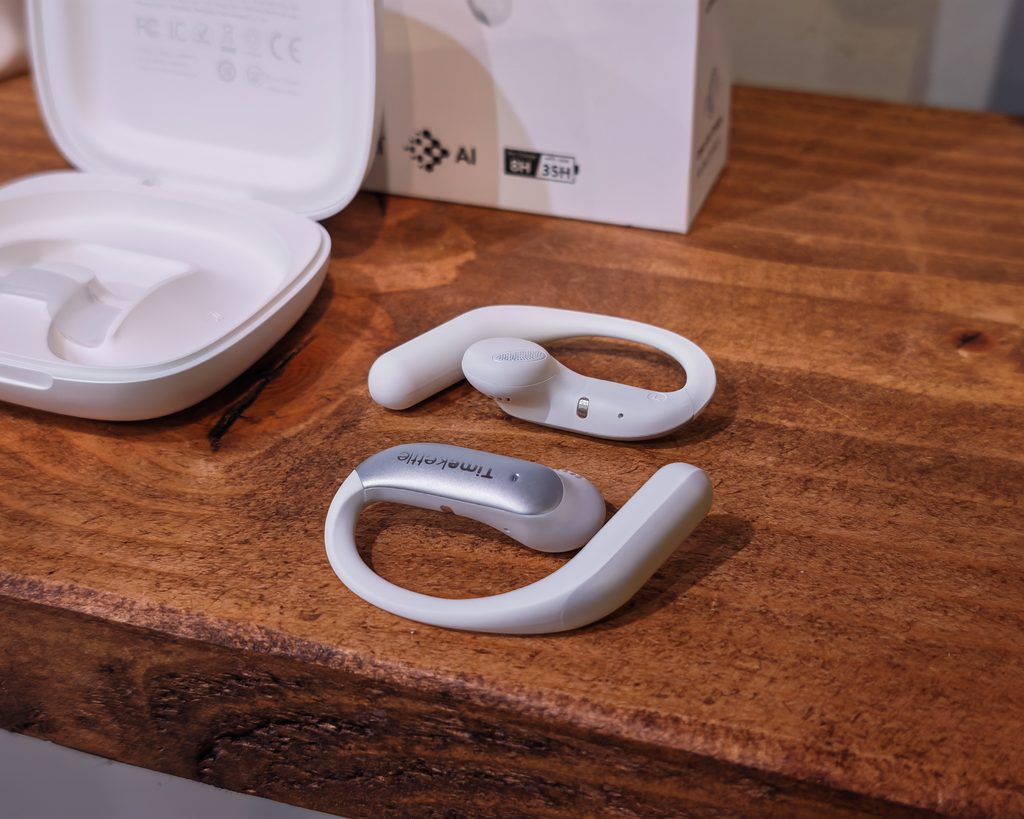
The charging case is a compact flip-top design measuring 75 x 66 x 25 mm, and it weighs 74.9 g with the earbuds inside. It is wider than a typical earbud case because it has to hold the hooks, but it still fits in a jacket pocket without any trouble. It is made from glossy white plastic and charges via USB-C. There is no mention of wireless charging in the specification.
In the box, you get the earbuds, the case and a short 20 cm USB-C to USB-C cable. There is no charger included.
Set Up
Set up is straightforward. You download the Timekettle app for Android or iOS, create an account and then pair the earbuds through the app. Once connected, the earbuds are linked to your account and the free plan allowance appears on the home screen. When I first connected mine, it showed 0/0 minutes, but this updated to 200/200 a minute or so later.
The earbuds also pair as a normal Bluetooth headset, so you can use them for music and calls without opening the app.
Dual connection is turned off by default and has to be enabled in the app if you want the earbuds connected to a phone and a laptop at the same time. Timekettle states that multipoint translation only works in Voice Call and Multi-Media modes. In practice, this means you can join a Zoom call on your laptop and run the translation from the app on your phone without installing anything on the computer.
To start a translation session, you choose a mode and then pick the source and target languages. In Live Listening, the app labels these as the live source language picked up by the phone and the earbud playback language, and it reminds you to place the phone near the audio source.
TimeKettle App
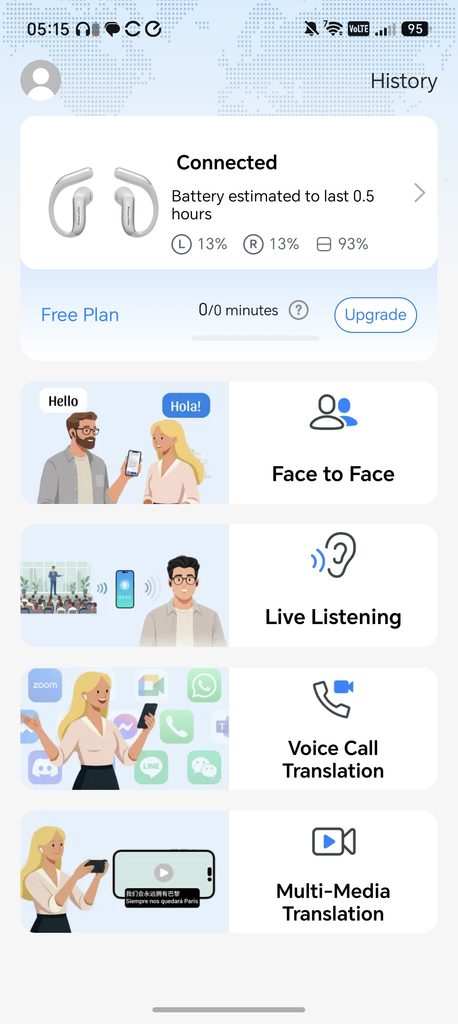
The home screen of the app is simple. At the top, it shows the battery level of each earbud and the case, along with an estimate of how much use you have left. Below that is your current plan and remaining minutes, followed by large tiles for the four translation modes. A History button in the top corner holds your past sessions, transcripts and recordings.
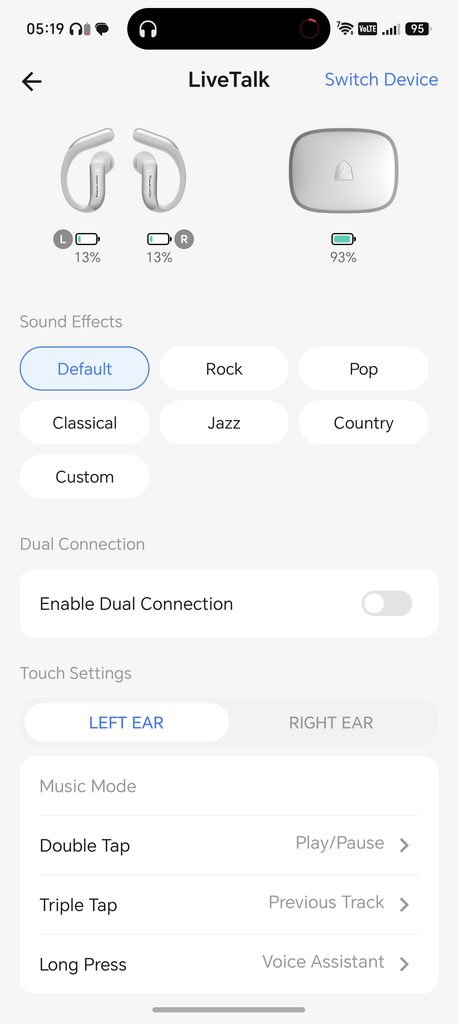
The app offers six EQ presets (Default, Rock, Pop, Classical, Jazz and Country) and a custom EQ. When translation starts, the earbuds switch automatically to a separate translation EQ that boosts the vocal frequencies and cuts low-end rumble, so speech stays clear in noisy places.
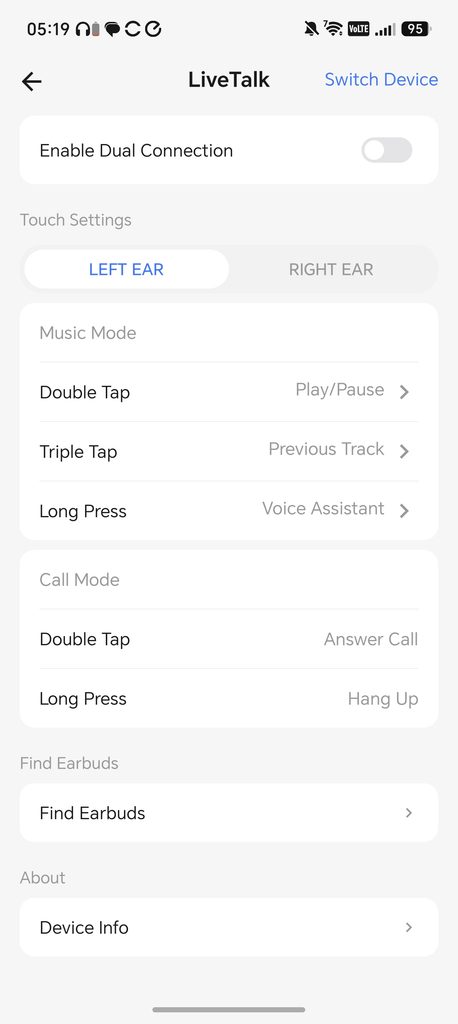
The device page also has the dual connection toggle, a Find Earbuds feature and touch control settings. The music controls can be customised for each earbud. By default, a double tap plays or pauses, a triple tap goes to the previous track and a long press opens your voice assistant. The call controls are fixed, with a double tap to answer and a long press to hang up. There is no option for volume control on the earbuds, which is a minor frustration.
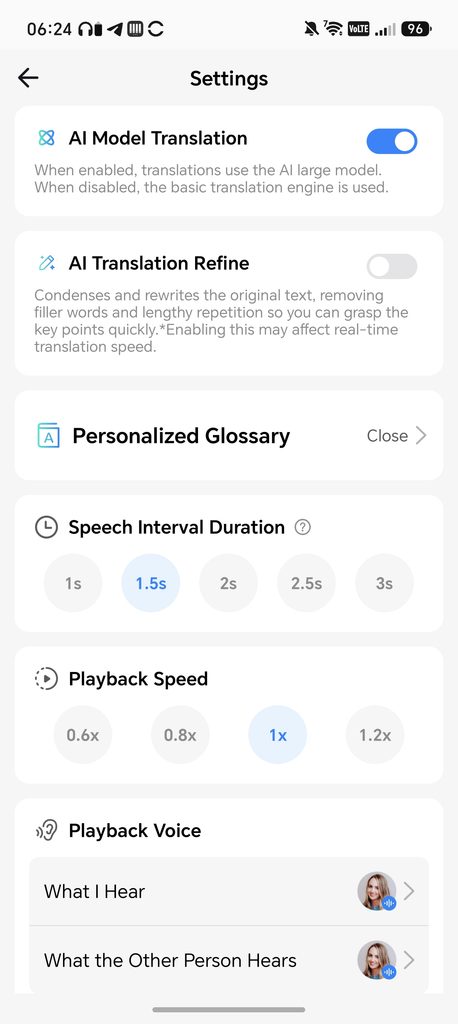
The translation settings are more interesting and give you a reasonable amount of control:
- AI Model Translation is on by default and uses an AI large language model. Turning it off switches to the basic translation engine.
- AI Translation Refine condenses and rewrites the original text, removing filler words and repetition so you can follow the key points. Timekettle warns that this may slow down real-time translation, and it was switched off in my settings.
- Personalised Glossary lets you add your own terms, such as names or technical words, so they are translated consistently.
- Speech Interval Duration sets how long a pause has to be before the app treats a sentence as finished, from 1 to 3 seconds. The default is 1.5 seconds.
- Playback Speed can be set from 0.6x to 1.2x.
- Playback Voice lets you choose separate voices for what you hear and what the other person hears.
The speech interval setting is worth experimenting with. A shorter interval should reduce the delay before translation starts, but it risks the app cutting people off mid-sentence. A longer interval gives better context but makes the lag more noticeable.
On privacy, Timekettle states that translations are encrypted and not used for AI training, and it claims GDPR, COPPA and FERPA compliance. I can’t verify those claims, but it is reassuring that the company addresses it, as you are effectively streaming conversations to cloud servers.
Performance
There are four modes when using these:
- Face-to-face translation
- Live listening
- Voice call translation
- Multimedia translation
I recently went on a trip to Valencia and Madrid, so I used this as an opportunity to test them. I mainly used live listening so I could understand what people said to me, though I used face-to-face translation a couple of times.
Additionally, I did some synthetic testing by watching Spanish YouTube videos.
Performance was generally good. As I can barely speak Spanish, I can’t be sure how accurate the translation is, but when watching a YouTube video with subtitles, the earbuds seemed to match what was output on the screen. The main thing is that I could understand what was being said.
The main issue, which is to be expected, is the delay in translation. Starting a live listening session, there was a 10-second delay before it started to show the English text and read it back to me. It does seem to start catching up, but there is still a noticeable lag of around 5 seconds or so.
As a test, I compared this to Google Translate in live listening mode. Google started translating faster. There were differences in the translation, but the overall result was the same, with me being able to understand what the other party said.
Within the app there is a setting to switch AI model translation off. I had hoped switching this off would stop using your credits, but my minutes continued to go down using this. It is also worth knowing that a session keeps running until you stop it, so minutes are used even when nobody is talking. If you leave Live Listening running through a long tour, it will eat into the 200 free minutes quickly.
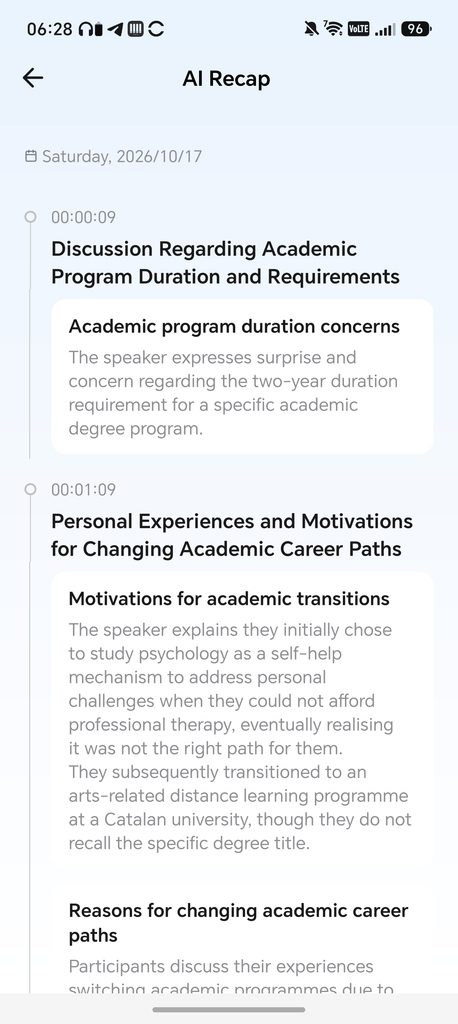
This also offers some basic AI summaries similar to Plaud. If you click the AI icon, it will give a basic overview of what is being said. The AI Recap is laid out as a timeline, with timestamps, a heading for each topic and a short summary underneath. In one of my tests, a casual Spanish conversation about university courses was summarised clearly, and the recap even used UK spelling such as “programme” and “realising”.
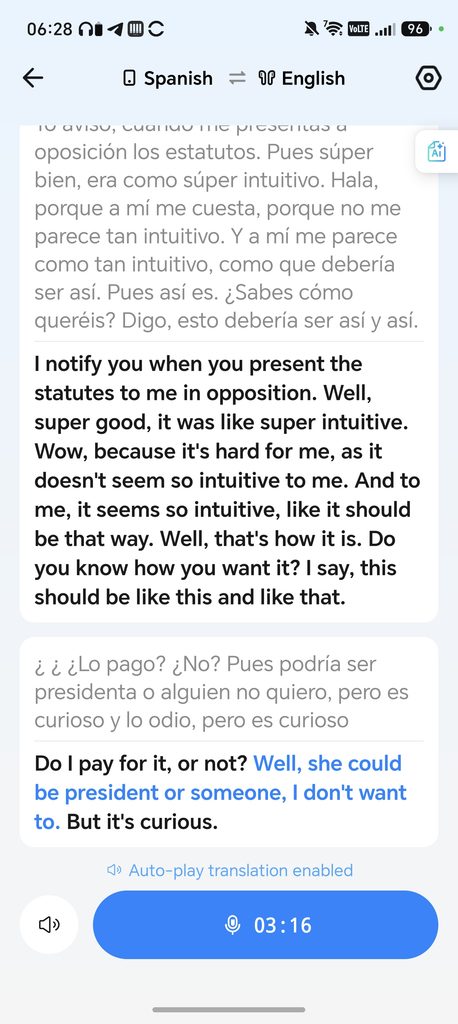
What I found interesting is that the summary was often easier to follow than the live translation. Casual, fast speech produced some clumsy results. One line came out as “Do I pay for it, or not? Well, she could be president or someone, I don’t want to. But it’s curious.”, which is not particularly useful on its own. The original Spanish transcript was also a little garbled at that point, so the problem seems to start with speech recognition rather than the translation itself. The AI summary smooths over a lot of this, but it can’t fix mistakes in the underlying transcript. The app also doesn’t separate speakers in Live Listening, so overlapping voices make the transcript harder to follow.
Face-to-face translation worked well enough for short exchanges, but the delay makes it feel stilted. You speak, wait a few seconds, and then the other person hears the translation, so it works best with short sentences and a bit of patience on both sides. Having to hold the phone out also makes it less natural than the W4 Plus, which captures your voice through the earbuds.
The Multimedia mode is probably the most practical for language learners. Translated audio arrives a few seconds after the original, and you can turn off the translation audio and just read the text if hearing both is distracting. On Android, the translation can appear in a floating window over other apps such as YouTube.
For other audio, such as music, performance isn’t great. Open-ear designs do come with trade-offs. There’s no seal against the ear, so bass is usually weaker than on in-ear models, there’s no active noise cancellation and sound leaks out at higher volumes. For travel and keeping aware of your surroundings, that’s a sensible choice, but anyone after rich bass on a noisy commute will be better off with a regular pair of in-ear earbuds.
They are fine for podcasts, audiobooks and background music, and vocals are clear, which suits the translation focus. The EQ presets make only small differences, and the custom EQ is the better option if you want to add some warmth.
Battery Life
Each earbud has a 60 mAh battery, and Timekettle quotes more than 4 hours of continuous translation or up to 8 hours of music playback. The 500 mAh case provides three full recharges, and the total battery life is quoted as 35 hours.
The 35-hour figure doesn’t quite add up. Eight hours from the earbuds plus three full recharges works out at 32 hours, so the headline figure probably assumes lower volume or partial top-ups. Either way, it is enough for a long weekend away without needing to charge the case.
The app’s battery estimate seems realistic. With both earbuds at 13%, it estimated around half an hour of remaining use, which lines up with the 4-hour translation claim.
Translation drains the earbuds faster than music, and it also uses your phone’s battery, because the phone handles the microphone, the screen and the data connection. On a day of sightseeing with Live Listening running regularly, your phone is likely to need charging before the earbuds do. Carrying a power bank is a good idea.
Charging is reasonably quick. Timekettle claims a 10-minute charge gives up to 2.5 hours of use, and a full charge takes 45 minutes. The case takes 110 minutes to charge fully at 5 V / 1 A, which is slow by modern standards but not a problem if you charge it overnight.
Price and Alternative Options
The TimeKettle LiveTalk AI Translation Earbuds have an RRP of £129, and at the time of writing, timekettle.co had them discounted to £109.
You should also factor in the subscription. The 200 free minutes a month will be enough for occasional holiday use, but if you use Live Listening regularly, you will soon need the Pro plan at £5.99 a month or £59.99 a year, or the Unlimited plan at £9.99 a month or £99.99 a year. Over two years, the Unlimited plan would cost more than the earbuds themselves.
Other Timekettle options include:
- Timekettle M3: £140 RRP, but was available for £109 at the time of writing.
- Timekettle W4: £300
- Timekettle W4 Plus: £380
- Timekettle W4 Pro: £449
The W4 Plus is the better choice if you need translation for work, as it captures your voice through the earbuds and supports specialist terminology. However, it costs nearly three times as much and lacks multipoint, so for travel I think the LiveTalk is the more sensible option.
There are then plenty of affordable options from random brands on Amazon. The Paekole Translation Earbuds appear to be the best-reviewed. These claim to have a £160 RRP but are discounted to £38.50, with 198 supported languages and no subscription.
It is also worth checking what your phone can already do. Google Translate has a free conversation mode and offline language downloads, Samsung’s Galaxy AI includes an Interpreter mode on recent Galaxy phones, and Apple offers Live Translation on recent AirPods paired with a compatible iPhone. None of these is quite as convenient as a dedicated app with four modes, but they cost nothing extra if you already own the hardware.
Overall
As with my past reviews of translation products, I think these devices suit people whose first language isn’t English. While it is embarrassing to speak only one language, the reality is that most tourists can get by with English in most of the world.
As an English speaker, trying to use this as a tourist would probably cause more confusion and frustration when the other party likely speaks half-decent English.
Devices like these will inevitably come in handy for more adventurous travellers if you venture into more local areas or smaller towns.
If English isn’t your first language, translation devices would be extremely useful when travelling.
As for the TimeKettle LiveTalk AI Translation Earbuds, they have worked well for me. From my testing, the translation is accurate, or at least accurate enough for both parties to understand each other.
My main issue is the subscription fee. I am fairly sure the previous Timekettle products I have reviewed did not have a subscription fee and then, of course, you have access to Google Translate on your phone, which can also do offline translation.
The other drawback is the delay. A 10-second wait before Live Listening starts and a lag of around 5 seconds after that is workable for following a tour guide or a lecture, but it makes face-to-face conversations feel slow. Google Translate started faster in my testing, and it is free.
There are still clear strengths. The open-ear design is a good fit for travel, the four modes cover most situations you are likely to face abroad, and the AI Recap is a useful addition for lectures and tours. Multipoint support, a 6.9 g weight and decent battery life make them practical as everyday earbuds too, even if music quality is only average.
Overall, the LiveTalk is a reasonable option if you travel regularly to countries where English isn’t widely spoken, or if you want to follow foreign-language lectures, tours or videos. At the discounted price of £109, it is good value compared to the W4 range. However, if you only travel occasionally and already have a capable smartphone, the free tools on your phone will cover most of what you need without an ongoing subscription.
TimeKettle LiveTalk AI Translation Earbuds Review
65%
Summary
I found the Timekettle LiveTalk useful for following Spanish conversations and videos, with understandable translations and helpful AI summaries. The lightweight open-ear design and multipoint connectivity add practicality, but noticeable translation delays make conversations feel stilted, and music quality is unremarkable. It is a reasonable option for regular translation use, although subscription costs weaken its value when free smartphone alternatives may be sufficient.
Pros
- Translations were generally easy to follow.
- AI summaries provide useful context.
- Lightweight earbuds retain environmental awareness.
- Multipoint supports phone and laptop.
Cons
- Translation delays interrupt conversational flow.
- Regular use incurs subscription costs.
- Music playback lacks bass weight.

I am James, a UK-based tech enthusiast and the Editor and Owner of Mighty Gadget, which I’ve proudly run since 2007. Passionate about all things technology, my expertise spans from computers and networking to mobile, wearables, and smart home devices.
As a fitness fanatic who loves running and cycling, I also have a keen interest in fitness-related technology, and I take every opportunity to cover this niche on my blog. My diverse interests allow me to bring a unique perspective to tech blogging, merging lifestyle, fitness, and the latest tech trends.
In my academic pursuits, I earned a BSc in Information Systems Design from UCLAN, before advancing my learning with a Master’s Degree in Computing.
I’m proud to share that Vuelio has consistently ranked Mighty Gadget as one of the top technology blogs in the UK. With my dedication to technology and drive to share my insights, I aim to continue providing my readers with engaging and informative content.
I work directly with the companies he reviews products for or their chosen PR agency.
For Social Media, you can find me on: