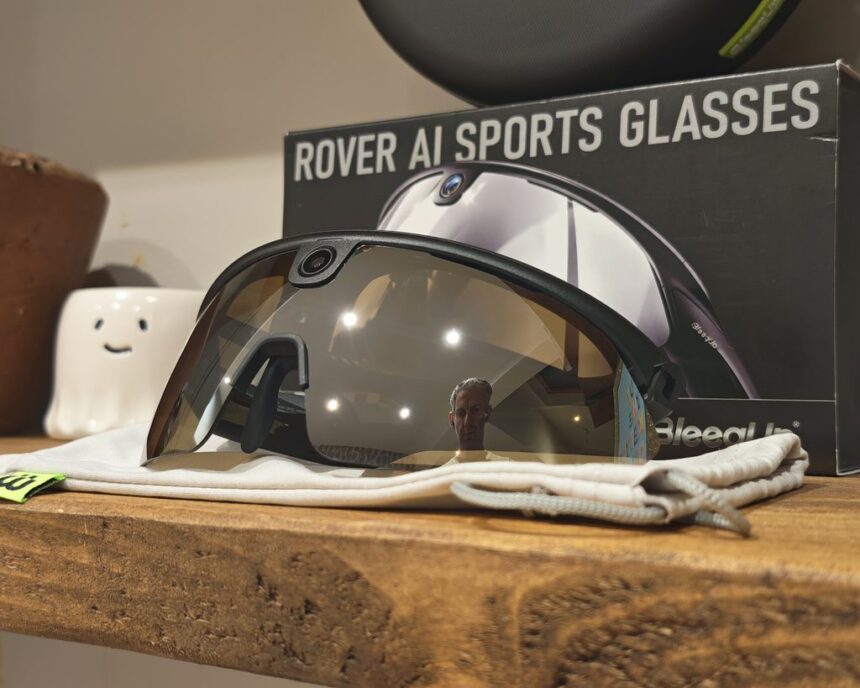
The BleeqUp Rover AI sports glasses are a relatively unique and appealing device for cycling or running enthusiasts, combining an action camera with fitness tracking in a pair of sports glasses.
While there are several brands offering smart sports glasses, from my limited research, the only alternative option offering similar features is the Oakley Meta Vanguard AI Glasses, which cost more money and require a Garmin watch to access fitness data.
The Rover is the second generation of BleeqUp’s camera glasses and sits above the original Ranger. It keeps the same 16 MP Sony sensor, 120° field of view and 3K video, but adds a tilting camera, double the storage, better water resistance, HDR and night video, and a long list of AI features covering training, safety and video editing. I have been using it on runs along the seafront at home, in Kristiansand in Norway and at the Valencia Half Marathon, although that last one didn’t quite go to plan.
Rover vs Ranger Specification
| Specification | Rover | Ranger |
|---|---|---|
| Weight | 53 g | 49 g |
| Water resistance | IP65 | IP54 |
| Nose pad | Three-axis adjustable | Three-axis adjustable |
| Storage | 64 GB | 32 GB |
| Camera sensor | 16 MP Sony | 16 MP Sony |
| Field of view | 120° | 120° |
| Adjustable camera lens tilt | -10°, 0°, 15° | No |
| Electronic image stabilisation (EIS) | Yes | Yes |
| Photo resolution | 4656 x 3496 pixels | 4656 x 3496 pixels |
| Video recording | 1080p at 30/60 fps; 3K at 30/60 fps | 1080p at 30/60 fps; 3K at 30/60 fps |
| Video aspect ratios | 16:9 landscape; 9:16 portrait | 16:9 landscape; 9:16 portrait |
| Loop recording | Yes | Yes |
| Night mode video | Yes | No |
| Real-time HDR video | Yes | No |
| AI hazard detection | Yes | No |
| AI Video Roadbook | Yes | No |
| AI clip search | Yes | No |
| Breathing monitoring and analysis | Yes | No |
| Voice commands | Yes | No |
| AI Sports Voice Assistant | AI Sports Q&A; AI Activity Recap | No |
| AI Master Creator | AI Master Motion; AI Master Remix | AI Master Motion; AI Master Remix |
| Audio | 2 x full-range speakers | 4 x speakers |
| Walkie-talkie channel | Yes | Yes |
| Walkie-talkie groups | Yes | No |
| Battery | 260 mAh | 260 mAh |
| Battery life | Around 1 hour of video, up to 8 hours of audio | Around 1 hour of video, up to 8 hours of audio |
| Power Plus battery support | Yes, 1,600 mAh | Yes, 1,600 mAh |
Unboxing / Design
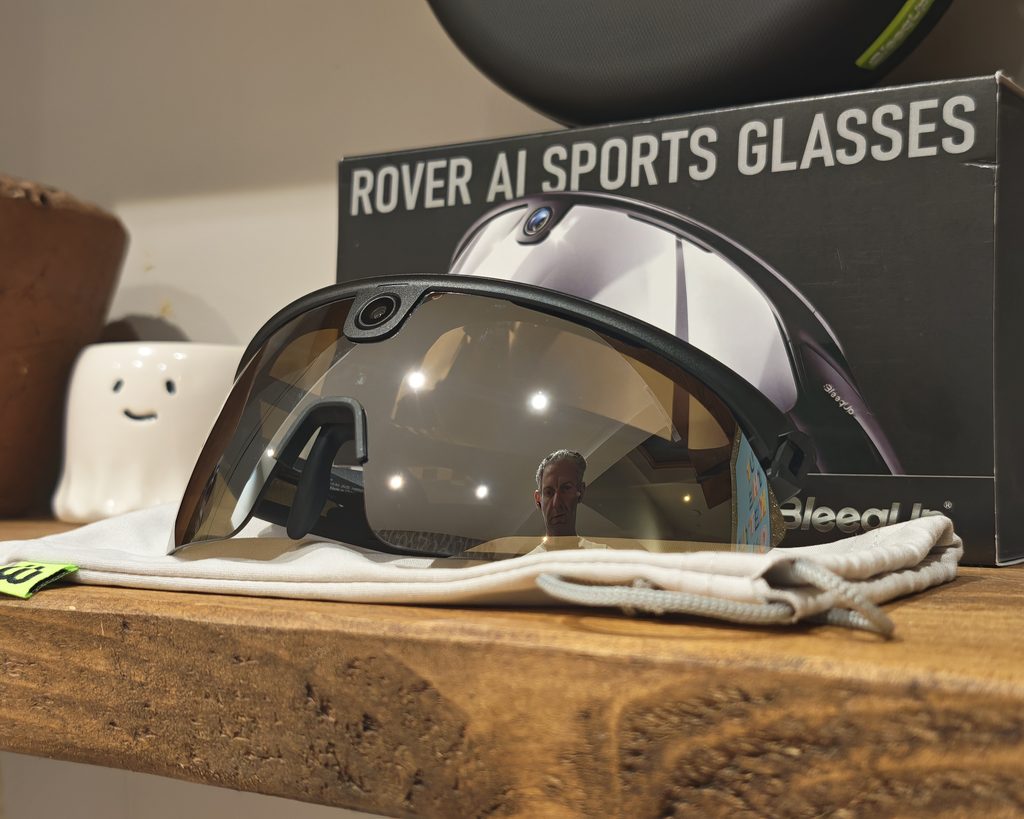
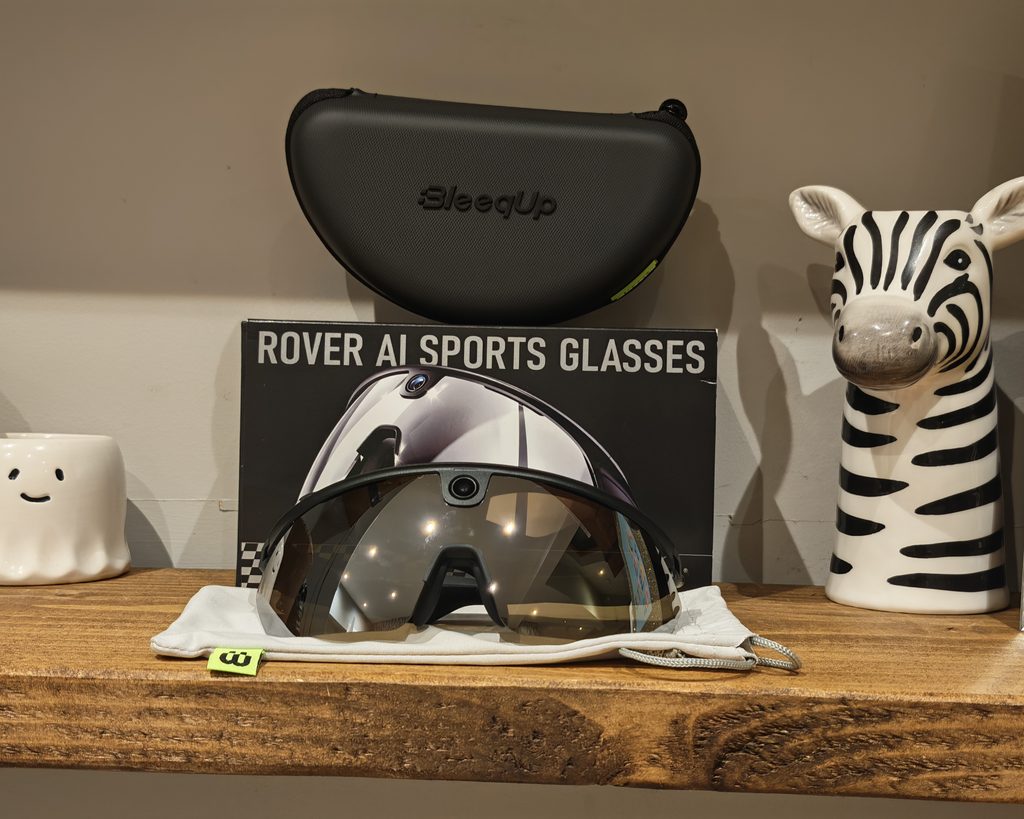
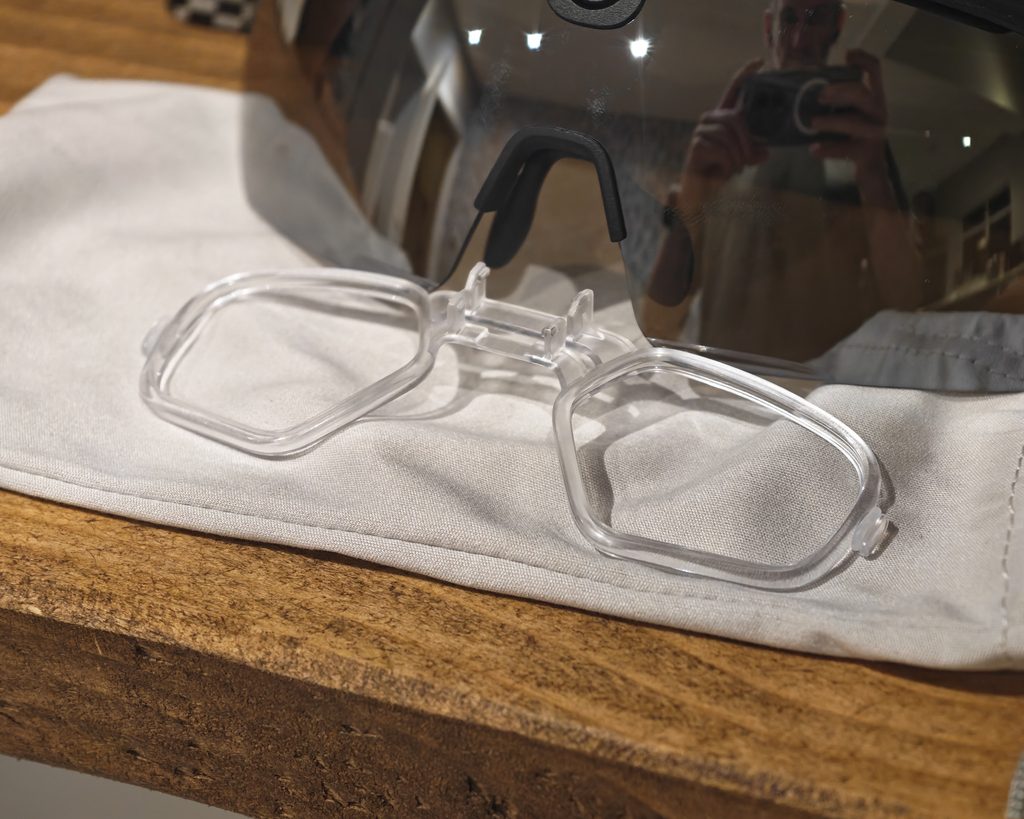
The Rover comes in a compact black box with the glasses pictured on the front. Inside you get the glasses, a zipped hard-shell carrying case, a microfibre drawstring pouch that doubles as a cleaning cloth, a magnetic charging cable, a clear prescription insert and the usual paperwork. I’m glad the hard case is included. These are £427 glasses with a camera on the front, and I wouldn’t want them loose in a saddle bag or rucksack.
The design follows the shield style that has become popular with cyclists over the last few years. There’s a single large wraparound lens with a half frame running along the top. My sample came with the silver mirrored lens, which is a Category 3 tint. That makes it a good fit for bright, sunny days, but it’s less suited to overcast winter rides or early morning runs. The lenses can be swapped, and BleeqUp sells photochromic and polarised alternatives. For UK weather, I think the photochromic lens is worth considering. The mirrored finish also picks up fingerprints easily, so the pouch gets plenty of use.
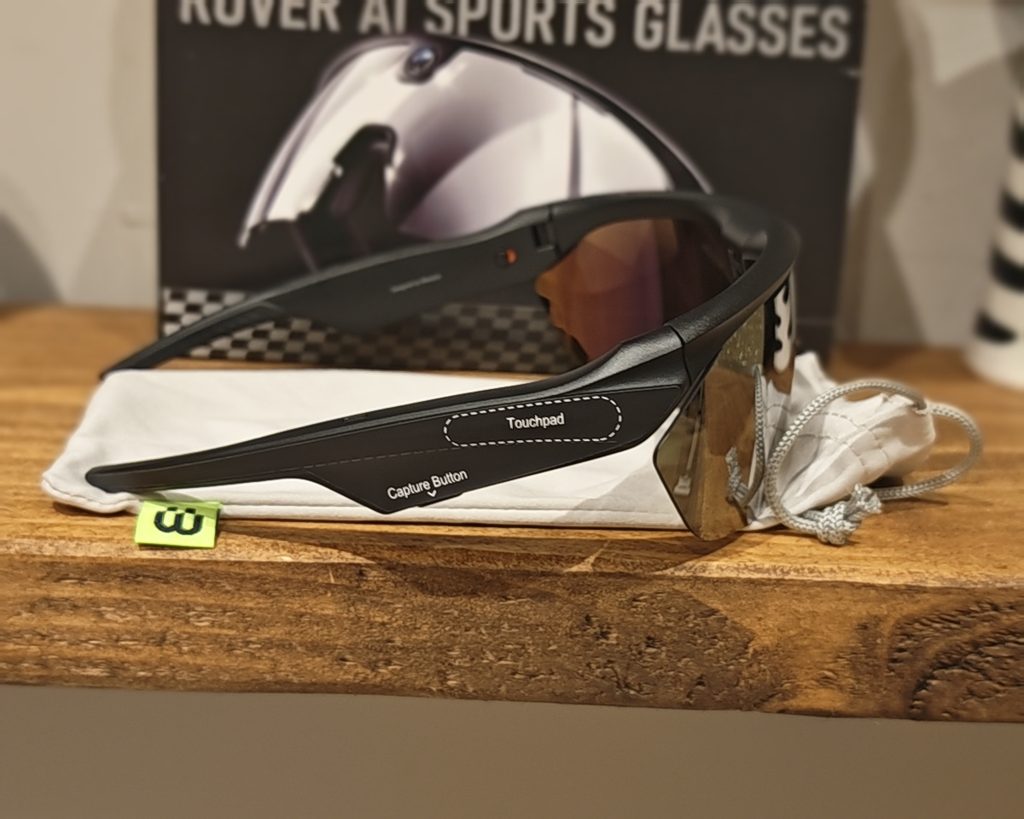
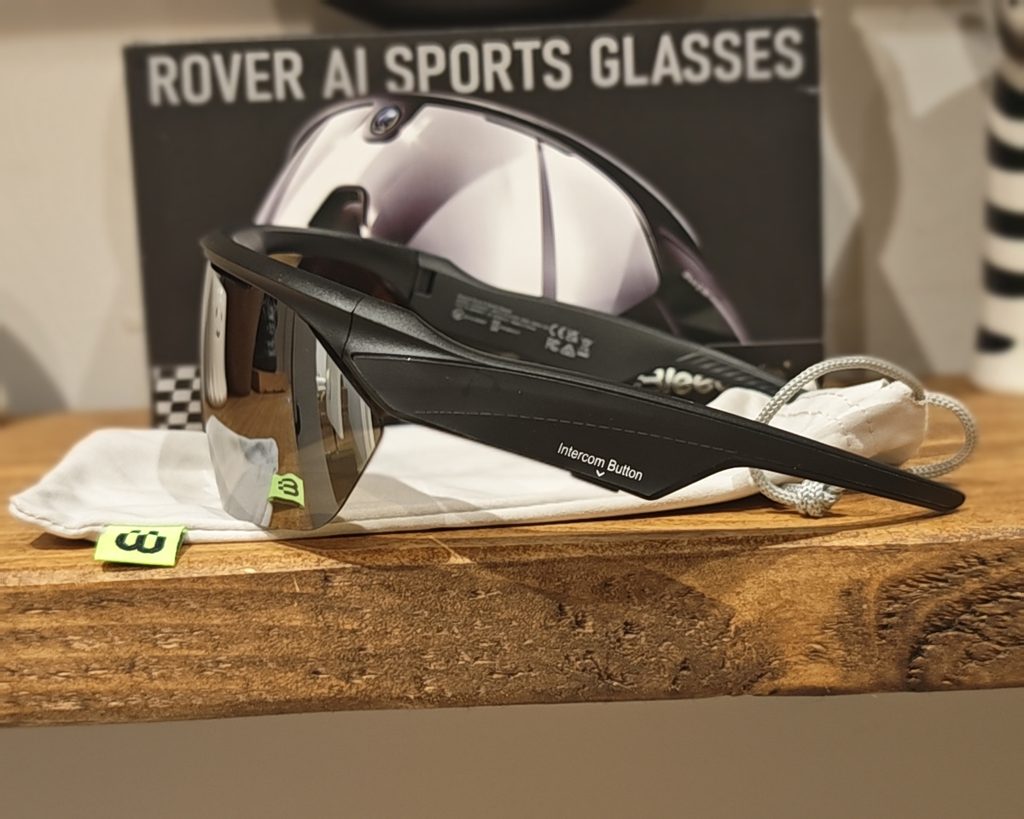
The frame is made from TR90, a flexible nylon-based material that many sports eyewear brands use, with a matt black finish. At 53 g, the Rover is noticeably heavier than a standard pair of cycling glasses, which typically weigh around 25 to 35 g. It’s also 4 g heavier than the BleeqUp Ranger. However, it’s lighter than the Oakley Meta Vanguard, which weighs around 66 g. Most of the bulk sits in the thick temple arms, which house the battery, speakers and electronics, and the frame comes in a single size. People with smaller faces may find it a little large.
The camera sits in the centre of the brow bar, directly above the bridge of the nose, so it records from eye level. It’s quite conspicuous, so people around you will know the glasses can record. One of the main hardware upgrades over the Ranger is that the camera can tilt to -10°, 0° or 15°. That lets you adjust the framing for an upright riding position, a low aero position on a road bike, or running. It’s a manual adjustment with three fixed positions, so there’s nothing to change in the app. For running, 0° is likely to suit most people, while the -10° setting is useful if you wear a cap or visor that would otherwise creep into the top of the shot.
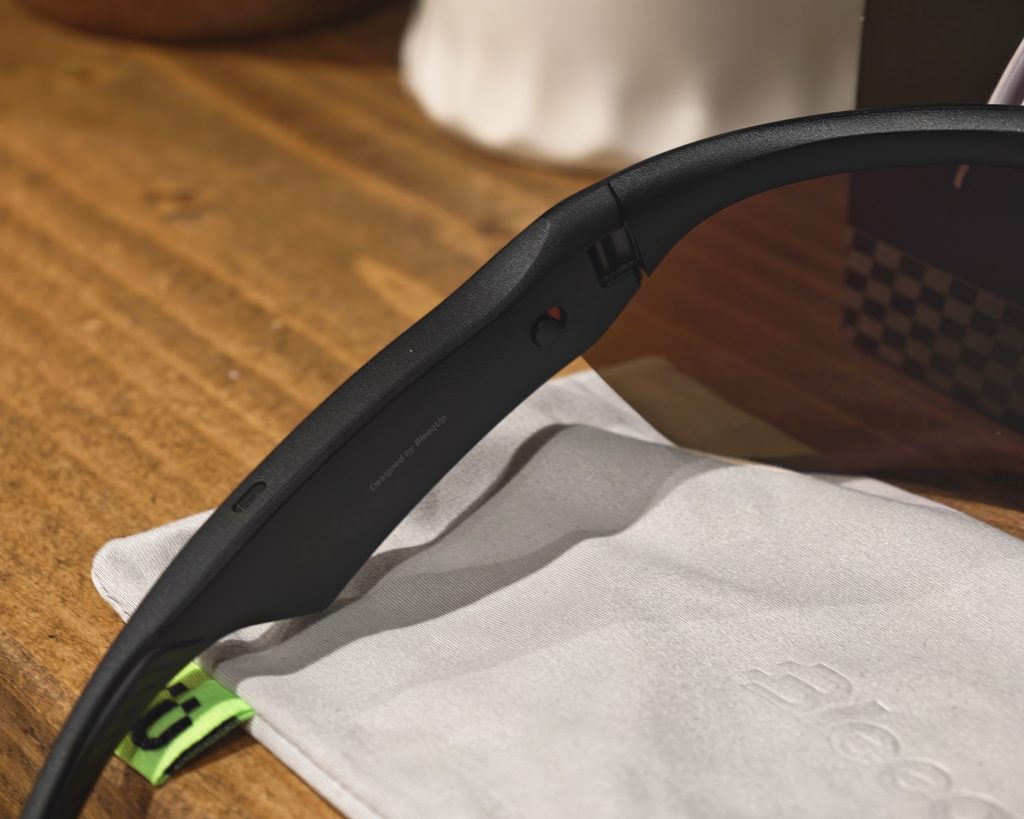
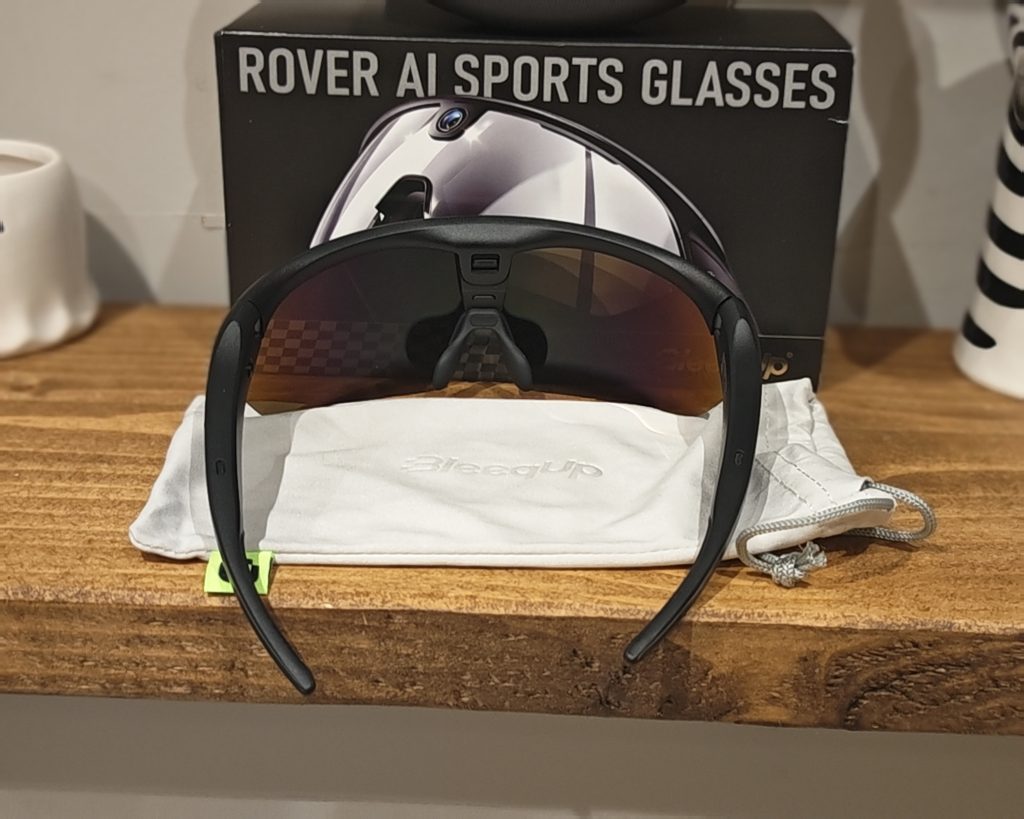
The nose pad adjusts on three axes, which helps make up for the one-size frame. The included prescription insert clips in behind the main lens. You’ll need an optician to fit your own lenses to it, but it’s useful to have in the box rather than as an optional extra.
The controls are split between the two temples. One side has a touchpad on the outer surface with a capture button underneath for photos and video. The other side has an intercom button underneath for the walkie-talkie feature. On the inside of the left temple, near the hinge, is a physical slide switch for power. It shows green when on and red when off. I like having a hard power switch, because it means the glasses won’t slowly drain while they sit in the case between rides. An indicator light on the inside of the nose bridge shows pairing and recording status.
Audio comes from two full-range open-ear speakers, with slotted grilles on the inside of the temples near your ears. There’s also a five-microphone array for voice commands, calls and the intercom. Charging uses a magnetic cable rather than USB-C. That helps with water resistance, but you’ll need to remember the proprietary cable if you go away for a weekend. It’s also a different cable from the one used by the Ranger, so existing owners can’t reuse their old one.
The Rover is rated IP65, up from IP54 on the Ranger. That means it’s dust-tight and protected against water jets, so riding in heavy rain shouldn’t be a problem. It’s not designed to be submerged, though.
BleeqUp App and Design
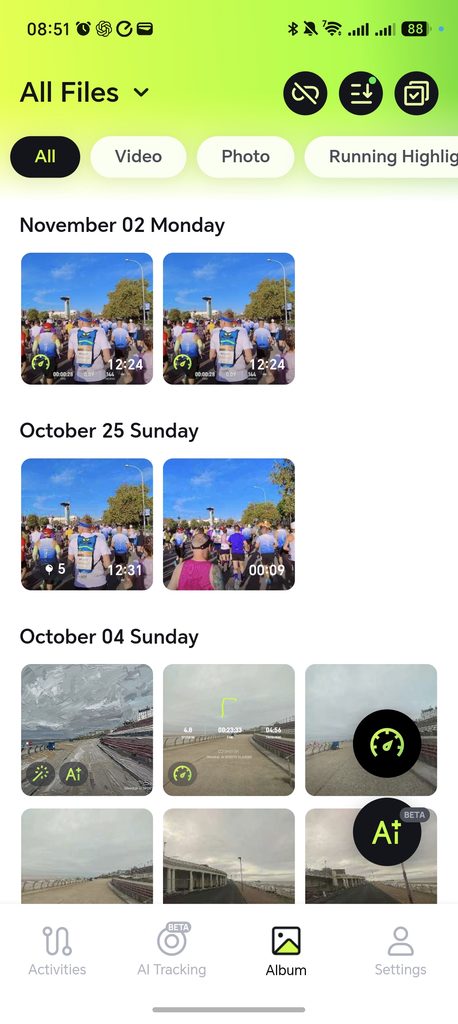
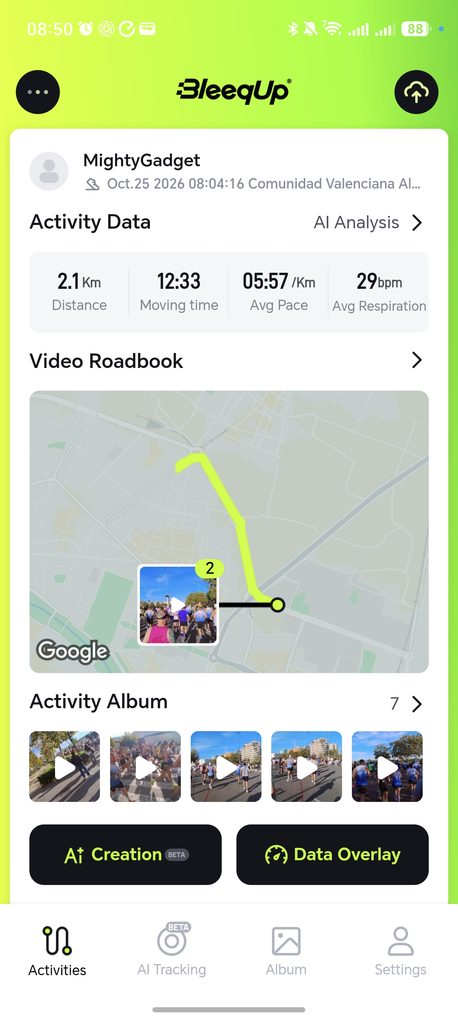
Everything runs through the BleeqUp app, which is available for Android and iOS. Pairing is straightforward, and once the glasses have been set up, they connect to the phone automatically when you flick the power switch on. The app handles camera settings, activity tracking, media transfer and all of the AI features, so you will spend a fair amount of time in it.
Activity tracking relies on your phone’s GPS rather than a GPS chip in the glasses. That makes sense given the limited space and battery in the frame, but it does mean you need to carry your phone on every run or ride where you want data. Cyclists will have it in a jersey pocket anyway, but some runners prefer to leave the phone at home and rely on a watch. Heart rate, cadence sensors and power meters can be paired over Bluetooth, and Apple Watch owners can sync live heart rate into cycling activities.
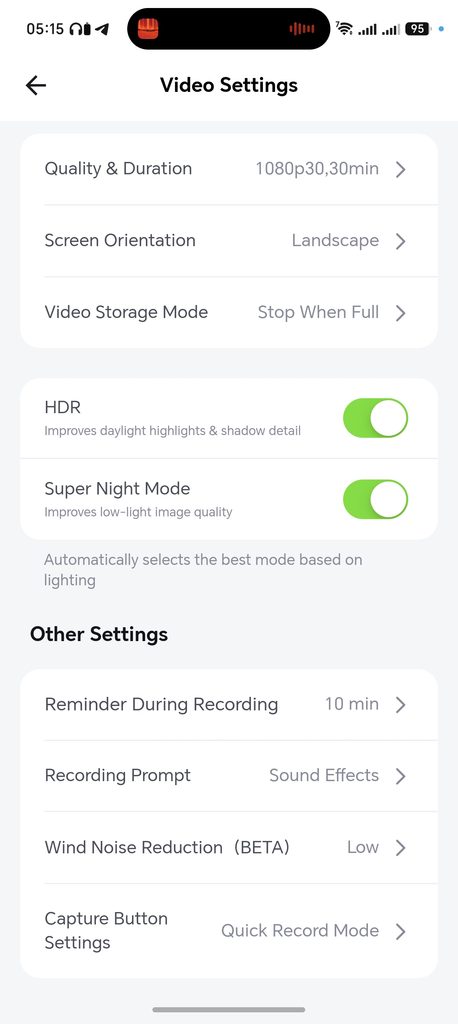
The video settings are more comprehensive than I expected. The main options are:
- Quality and duration, where you choose between 3K 60fps, 3K 30fps, 1080p 60fps and 1080p 30fps, plus the length of each recording segment
- Screen orientation, with landscape or portrait recording
- Video storage mode, which can stop when full or loop over older footage
- HDR, which improves highlight and shadow detail in daylight
- Super Night Mode for low light, with the option for the glasses to choose the best mode automatically based on the lighting
- A reminder during recording, which I had set to every 10 minutes
- A recording prompt, which plays a sound effect when recording starts and stops
- Wind noise reduction, which is still in beta and can be set to low or high
- Capture button settings, where Quick Record Mode changes how presses are handled
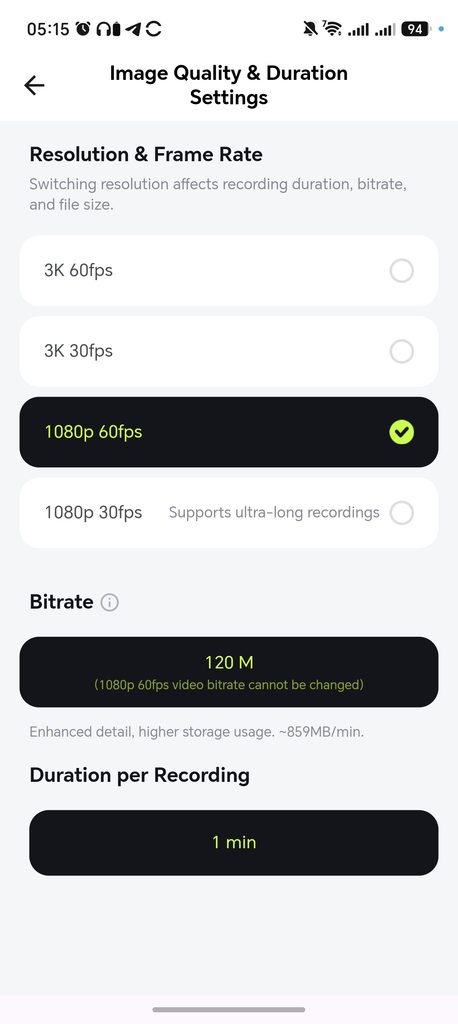
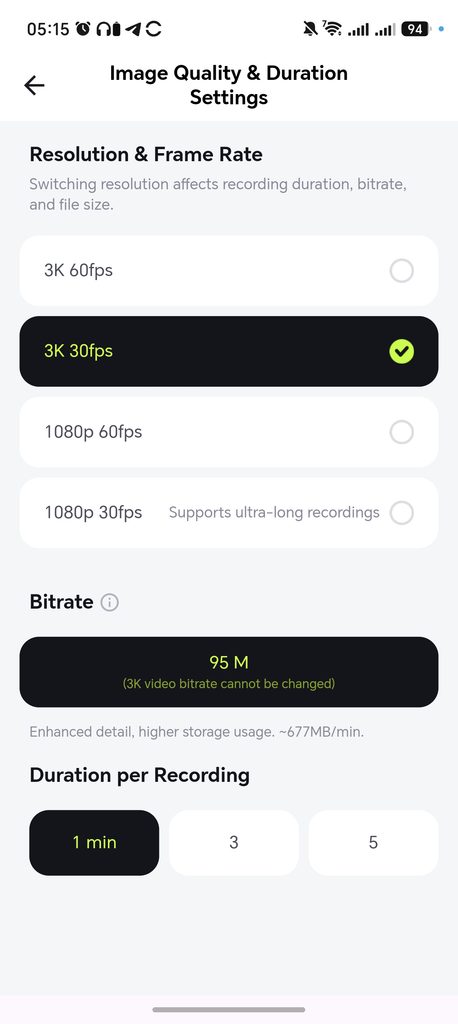
Bitrate is fixed for most modes. Selecting 1080p 60fps locks the bitrate at 120 Mbps, which the app states uses around 859 MB per minute. With 64 GB of storage, that works out at a little over an hour of 1080p 60fps footage, which is roughly in line with what the battery can manage anyway. Only 1080p 30fps allows the bitrate to be changed and supports long continuous recordings.
By default, a single press of the capture button takes a photo and a long press starts video. The touchpad handles media, with a swipe to change the volume, a single tap to play or pause and a double tap to skip a track or answer a call. There are also voice commands using the “Hey Bleeker” wake phrase, which are useful when your hands are busy, although the physical button is quicker if you can reach it.
The walkie-talkie feature uses your phone’s data connection rather than radio, so range isn’t limited in the same way as a traditional intercom. The Rover adds support for groups, which is aimed at club rides where several people are wearing BleeqUp glasses. As I was running on my own, I didn’t get much use out of this.
My main criticism of the app is that it sits in its own ecosystem. There’s no FIT file import and no automatic import of activities from a watch, which is something BleeqUp says it is working on. As a Garmin user, I ended up recording my runs on my watch and in the BleeqUp app at the same time, and the data from the two doesn’t always match. There are also a few rough edges, such as the word “video” being misspelt as “vedio” on the AI Sports Creative screen, which is minor but does make some parts of the app feel unfinished.
Performance / In use
For my testing, I only used the glasses for running, as my bike is currently out of action, and I have been dealing with a lot of injuries while trying to be fit for the Valencia Half Marathon.
Unfortunately, I ended up pulling out of Valencia after just over one mile, so I have not had much luck capturing footage for this review. I think my calf is better now, so I will add more footage when I can.
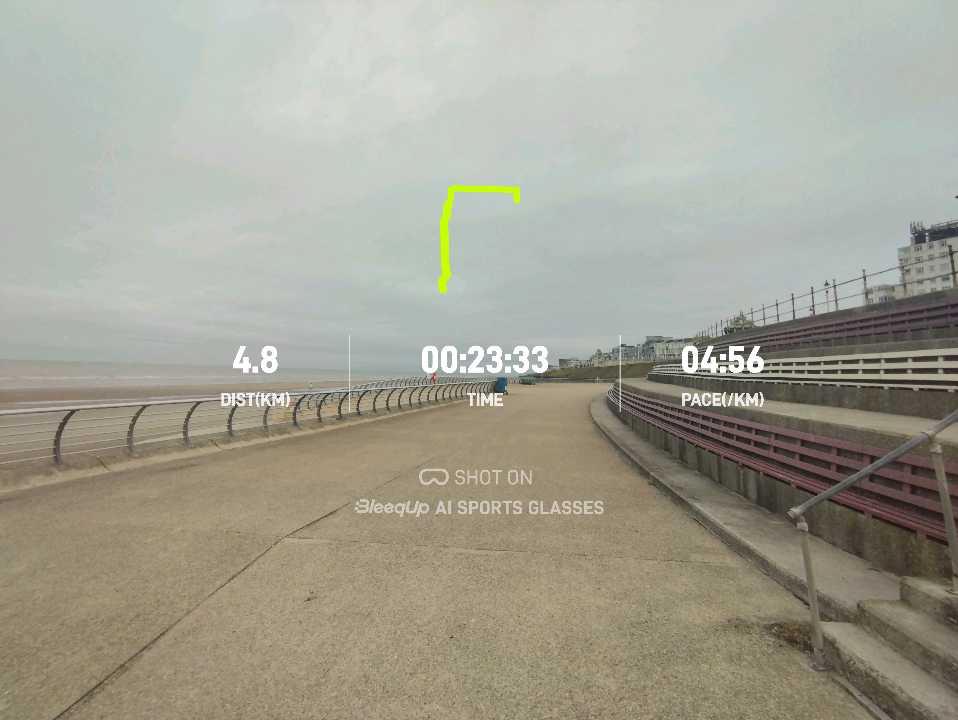
Alongside Valencia, I used the Rover for a 4.8 km seafront run at home in early October and a longer run around Odderøya in Kristiansand, Norway. That gave me a mix of grey, overcast conditions and bright Spanish sunshine, which was useful for judging the camera.
Video Quality
Footage shot at the default 1920 x 1080 at 30fps without HDR is OK. On a cloudy day, the colours are a bit muted and dull, but adequate enough. The grey skies along the seafront and in Kristiansand didn’t give the small sensor much to work with, and the footage lacks the punch you would get from a modern action camera.
The main issue was that, while running, I naturally look around a lot as I cross roads and move out of the way of people. This creates quite choppy footage. Even with a higher frame rate, I pan my head around faster than you’d want a camera to pan while recording video. Electronic image stabilisation can help with the bounce from each stride, but it can’t do anything about sudden head movements. This is the fundamental trade-off with any head-mounted camera, and it’s something a chest or handlebar mount avoids.
That being said, the small amount of footage I shot in Valencia did appear to be smoother. I was running in a straight line within a large crowd, so I wasn’t constantly turning my head to check for traffic, and the bright sunshine helped. Colours were much more natural, the blue sky and runners’ kit came through well, and the 120° field of view captured the scale of the field. In good light, the footage is perfectly usable for sharing on social media or Strava.
The 120° field of view is wide, and you can see some stretching towards the edges of the frame. That suits sport, as it captures more of your surroundings, but it’s not as natural as a narrower lens.
With 1080p at 30fps, you can record for unlimited lengths, split into segments of your chosen duration. 60fps footage is limited to 1 minute for both 1080p and 3K, and 3K at 30fps is limited to 5 minutes. In practice, this means the higher-quality modes are better suited to capturing short moments throughout an event rather than recording the whole thing.
Photo Quality
Stills are captured at 16 MP with a 4:3 aspect ratio. In daylight, there’s a decent amount of detail, and the photos are fine for sharing. As with video, the wide lens means there’s noticeable distortion near the edges, so buildings and people at the sides of the frame can look stretched.
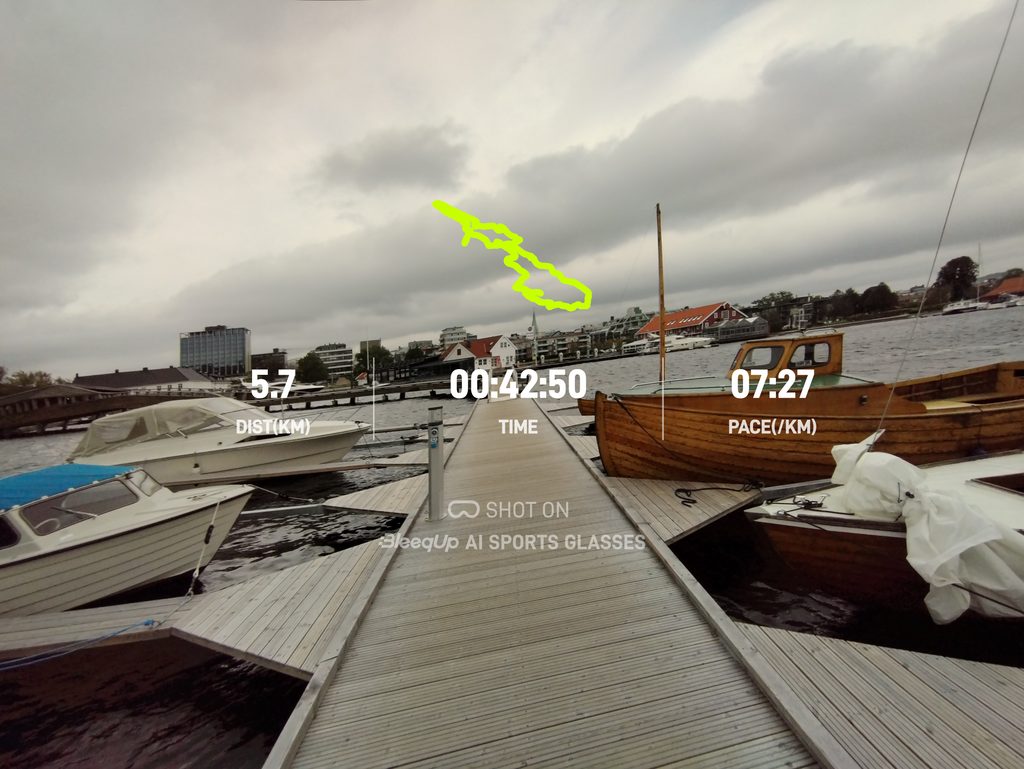
One feature I like is the option to add a data overlay to photos. The app adds your distance, time and pace, along with a trace of your route, so a photo from the end of a run doubles as a summary of the activity. A photo of a pier in Kristiansand came out with 5.7 km, 42:50 and 7:27/km overlaid, which is a nice way to share a run. A “Shot on BleeqUp AI Sports Glasses” watermark is added at the same time, which some people won’t want.
AI Video Roadbook
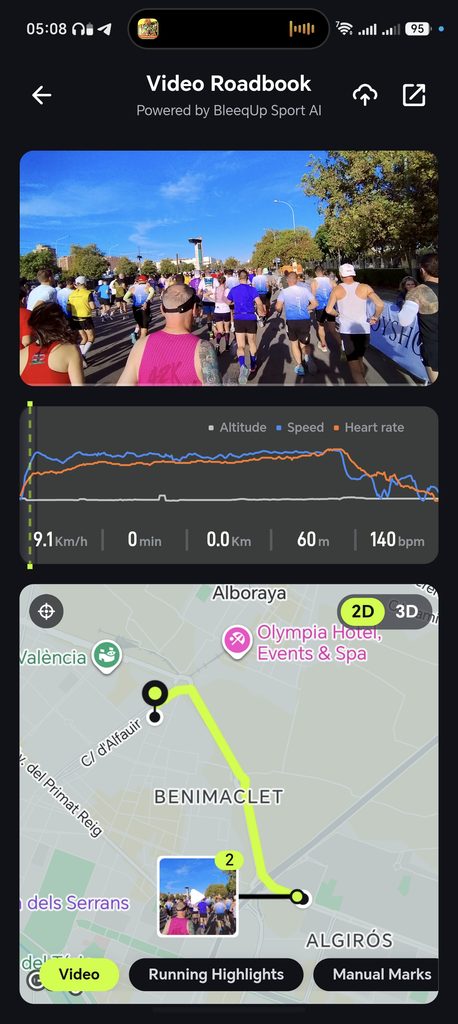
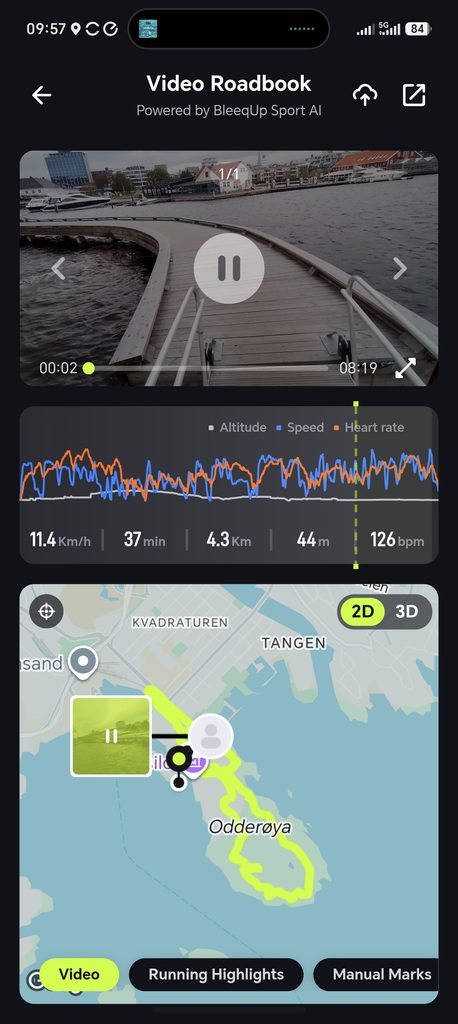
The Video Roadbook collates all the data captured during a ride or run and presents it on one screen. So, you get the video footage you shot, combined with fitness data and the GPS maps.
The video sits at the top, with a graph of altitude, speed and heart rate underneath and a map at the bottom. As you scrub through the graph, the figures update to show your speed, elapsed time, distance, altitude and heart rate at that point. On my Kristiansand run, I could jump to the 37-minute mark and see that I was at 4.3 km, running at 11.4 km/h with a heart rate of 126 bpm. Video clips are pinned to the map where they were recorded, and you can switch between 2D and 3D map views. There are also tabs for videos, running highlights and manual marks, and you can upload or share the result.
I like this feature because it lets you look back at different parts of a run or ride, and I think it will be great for races or big events. I had planned to use this after the Valencia Half Marathon so my partner and I could talk through the good and awful parts of the run. That didn’t quite go to plan, but even for the short section I ran, it was nice to see the footage of the start alongside my pace and heart rate.
Running Highlights
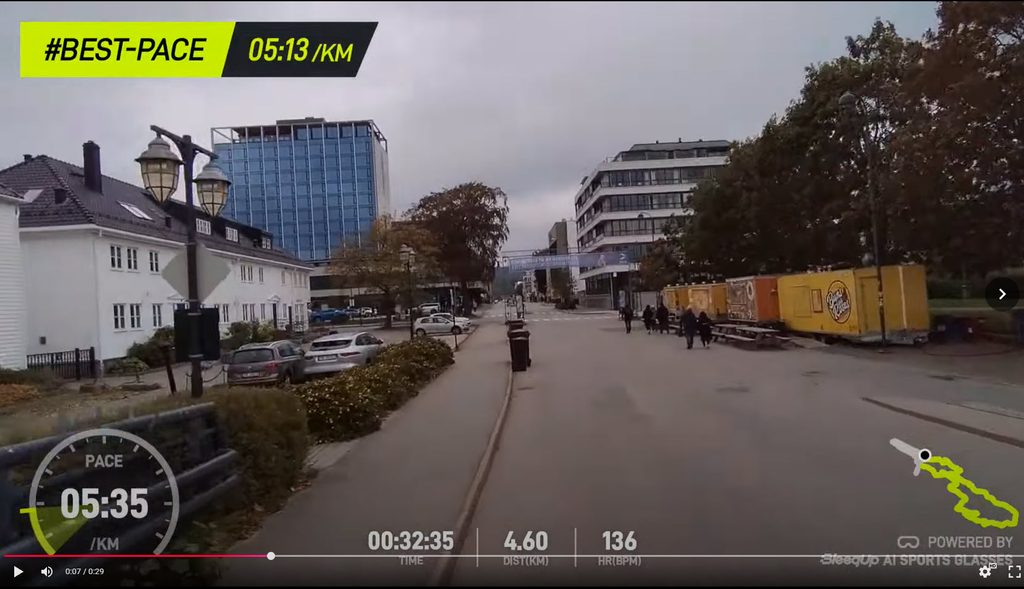
The Running Highlights tab automatically picks out notable moments from your run and adds a data overlay. My Kristiansand run produced clips tagged with my best pace of 5:13/km and my maximum heart rate of 148 bpm, each with a pace dial, elapsed time, distance, heart rate and a mini route map. You can also add your own manual marks during an activity.
This works well and saves a lot of time compared to scrubbing through footage yourself. The automatic selection is based on your data rather than what is actually happening in the video, though, so the “best pace” clip can be a dull stretch of pavement rather than anything worth watching.
Some of the other AI editing tools are more limited for runners. AI Clip, which automatically edits footage into a short video with music and overlays, only works with video shot during AI Tracking for cycling. AI Clip Search, which lets you find a specific moment in a long recording by describing it, is currently only available on iPhone, with Android support still in development.
AI Master Motion
AI Master Motion is designed to turn first-person footage into third-person shots, so it looks as if you were filmed by someone following you or from above with a drone. It only works with footage shot during AI Tracking, and the app clearly labels it as limited, stating that running activities are not yet supported and that development is in progress.
As I was only running during my testing, I haven’t been able to try it. The idea is clever, but it’s worth being clear that this is generated footage rather than a real recording of you. I’ll update this section once I’m back on the bike.
AI Master Remix

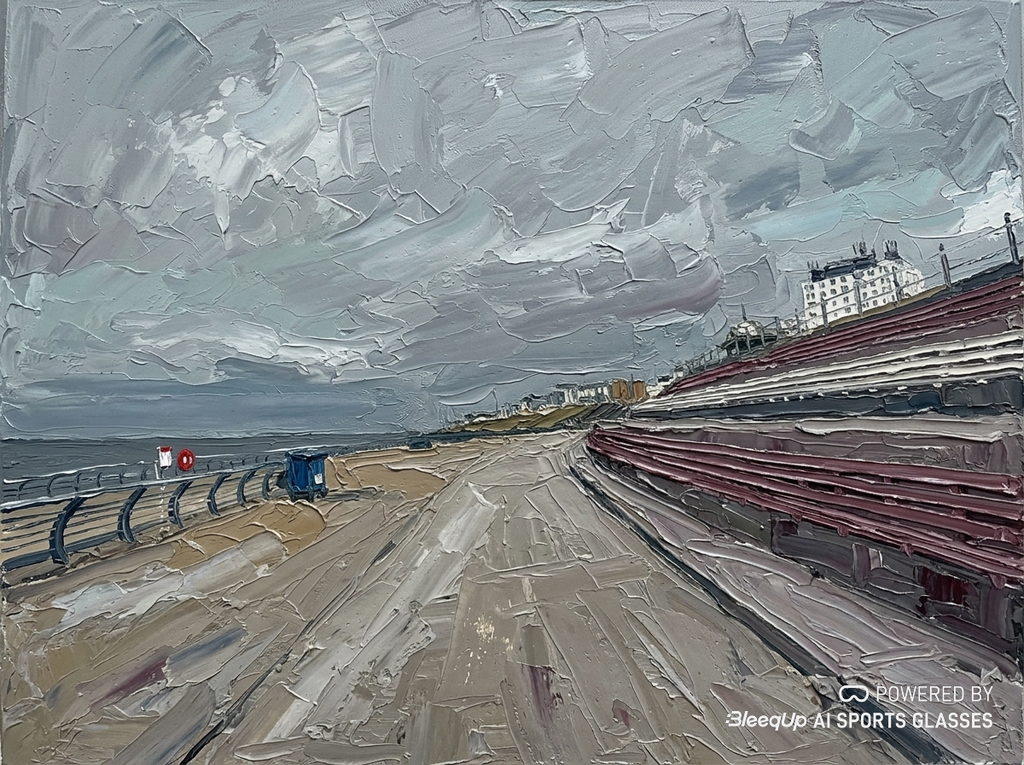
The AI Master Remix feels like a feature that has been included just for the sake of throwing AI features in. It basically takes one of the images you captured and reworks it into a different style, such as an oil painting. Some people call this AI slop. This feature made more sense on the SwitchBot AI Art Frame, but I don’t personally see the point here.
There are four preset styles: Ghibli World, TDF Legend, Day-to-Night and Dreamy Oil. There’s also a custom style option where you can type your own description. Dreamy Oil turned a grey seafront promenade into a thick palette-knife painting, and Ghibli World produced a hand-painted animation-style version of a viewpoint over the sea in Norway. TDF Legend is the most extreme, adding cheering crowds, flags, sponsor banners and a race leaderboard with made-up rider names to a quiet pier in Kristiansand.
The results are reasonably well done, and I can see some people having fun with them. However, they are entirely unrelated to sport or training, and the TDF Legend images in particular look a bit like real event photos at first glance, which I’m not sure is a good thing.
Audio Quality
Audio quality is fine if you have realistic expectations for what audio glasses can achieve.
For running, I was able to play music and hear instructions clearly, even at a brisk pace. Because the speakers sit just outside your ears, you can still hear traffic and people around you, which I consider essential when running on roads. The trade-off is that bass is limited, and sound will leak out at higher volumes, so anyone near you on a quiet path may hear what you’re listening to.
For cycling, I am sceptical about how well these will perform. I personally struggle with hearing audio properly with bone conduction headphones due to the wind noise. BleeqUp has a sport wind noise reduction feature that increases the speaker output at speed, which should help, but I haven’t been able to test it on the bike yet.
The five-microphone array handles calls and voice commands. The wind noise reduction setting for recorded audio is still in beta, and recorded audio from any camera exposed to the wind will never be particularly clean.
AI Sports Assistant
The AI Sports Assistant is BleeqUp’s umbrella term for the training features. During an activity, you can wake it by voice and ask questions about your session, such as your current distance or heart rate. After the activity, it generates a summary of how it went.
The idea of asking for your stats by voice makes more sense on a bike, where taking a hand off the bars to look at a watch isn’t ideal. For running, most people will already have a watch on their wrist, so I see less need for it.
Breathing Monitoring
Breathing monitoring works exactly as expected, and the post-workout analysis shows average respiration rate and max respiration rate, which can help gauge exertion. The app labels each figure, so on my seafront run, the average of 34 bpm was marked as moderate and the maximum of 55 bpm as rapid.
That being said, the data doesn’t seem to match my Garmin. On an easy 5K run, it stated the average respiration rate was 34 bpm with a max of 55 bpm, while my Garmin reported 35 bpm average and 41 bpm max.
I haven’t done enough activities to gauge if the two are consistently reporting different data, and I am not too bothered by it, as it is not a metric I normally pay much attention to. The averages were very close, so the difference seems to come from short spikes in the readings. On my Valencia run, the Rover reported an average of 29 bpm and a maximum of 38 bpm, which seems more plausible.
The bigger concern is that the breathing data feeds into the AI analysis and the body monitoring alerts. If the maximum reading is inflated, it can make a run look much harder than it was, which I noticed in the activity recaps.
AI Sport Recap
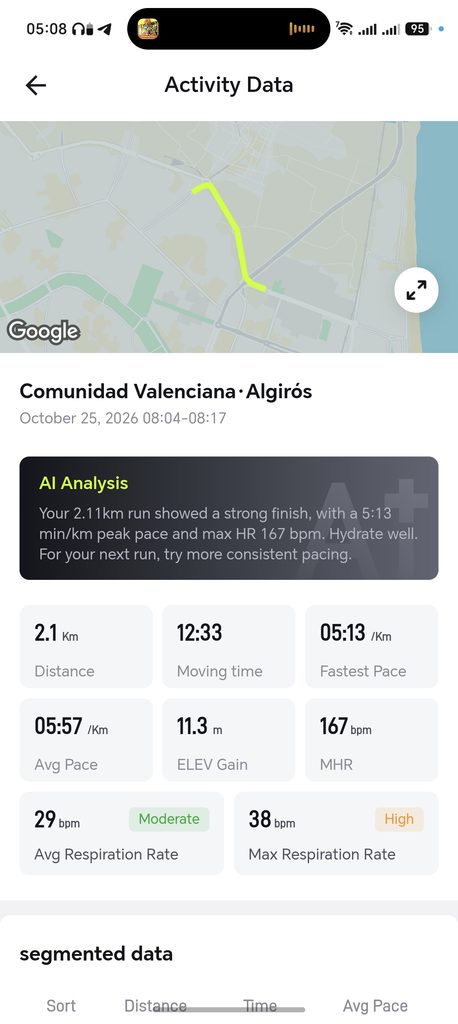
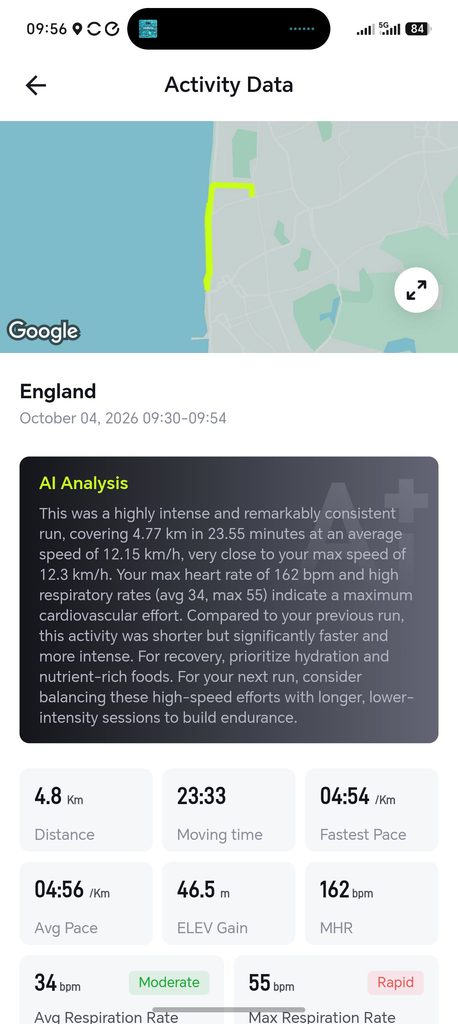
After each activity, the app generates a short AI analysis at the top of the activity data screen, alongside distance, moving time, fastest pace, average pace, elevation gain, maximum heart rate and respiration rate.
For my seafront run, it described a “highly intense and remarkably consistent run” covering 4.77 km in 23.55 minutes at an average of 12.15 km/h. It said my maximum heart rate of 162 bpm and high respiration rates indicated a maximum cardiovascular effort, noted that the run was shorter but faster than my previous one, and recommended hydration, nutrient-rich food and more long, low-intensity sessions to build endurance. The figures were accurate, although expressing 23 minutes 33 seconds as 23.55 minutes is an odd way of presenting it. However, I wouldn’t describe that run as a maximum effort, and I suspect the respiration spike played a part in that conclusion.
The Valencia recap highlights the main limitation. It told me my 2.11 km run “showed a strong finish” with a 5:13/km peak pace and maximum heart rate of 167 bpm, then told me to hydrate well and try more consistent pacing next time. In reality, I had pulled out with a calf injury. The AI only has your numbers to go on, so it has no way of knowing why a run was short or slow.
The recap is similar in tone to the AI summaries that Garmin and Strava now offer. It’s a nice summary to glance at, but the advice is generic, and I wouldn’t use it to plan training.
AI Sports Safety
The safety features are mostly aimed at cycling, and they are one of the biggest differences between the Rover and the Ranger.
During a tracked activity, AI hazard detection looks for events such as close passes, collisions and hard braking. When it detects one, it automatically starts recording, and if pre-recording is enabled, it keeps the 10 seconds of footage before the event. This is similar in principle to a dashcam, and if you ever need evidence after an incident on the road, it could be useful. Keeping the camera ready to capture an event is likely to use more battery, so you may need the Power Plus on longer rides. Hazard detection is unlikely to be perfect, either, and I would expect some false triggers.
The environment and exercise alerts require you to set a destination in the app. The glasses can then warn you about upcoming climbs, descents and sharp turns, along with changes in the weather. With a heart rate monitor connected, the body monitoring feature combines heart rate, breathing data and activity intensity to look for signs of fatigue or excessive strain and suggests you ease off. Navigation prompts are also given through the speakers.
As I haven’t been able to ride with the Rover yet, I can’t comment on how accurate these alerts are. I would treat them as an extra layer of assistance rather than a safety system. The camera faces forwards, so it can’t see vehicles approaching from behind in the way a rear radar such as the Garmin Varia can. The focus is also on capturing footage of an incident, so I wouldn’t see it as a replacement for the incident detection on a Garmin watch or bike computer.
Battery Life
Battery life is a weak spot of these glasses. They are officially rated for 1 hour of continuous video recording, and I would say that any cyclist these appeal to is going to be on a ride much longer than one hour.
Even for runners, this won’t get you through a half marathon, or even a 10K for many people.
However, a BleeqUp Power Plus battery add-on is available for £45 and can give you an additional four hours of recording.
That said, it is worth noting that the Oakley Meta Vanguard doesn’t appear to offer superior battery life. There are numerous reports on Reddit about the poor battery life.
One user stated that after 90 minutes of riding, with around 30 minutes of 1080p 30fps video recording and the other 60 minutes of music, they had 14% battery left.
When I used it at Valencia, I would estimate that 30 minutes at 1080p 30fps was about right, as I got a low battery notification after I had finished using it.
The underlying problem is the 260 mAh battery, which is the same capacity as the Ranger. There’s only so much space in the temple arms, and the Rover’s extra AI features, phone connection and real-time processing all draw on that small cell. Audio playback is much less demanding, with up to 8 hours of music, so the glasses will last a long ride if you only use them as headphones and record occasional clips.
The Power Plus is a 1,600 mAh pack that mounts on the back of your helmet and connects to the glasses by cable. BleeqUp claims it extends recording to around five hours in total and music playback to 40 hours or more, and it doubles as a rear light. For cyclists, I think it is close to essential if you want to record more than short clips. For runners, it’s a less practical solution, as wearing a battery on the back of your head isn’t ideal without a helmet.
Charging the glasses takes around an hour. BleeqUp also notes that battery performance drops in very cold or very hot weather, which is worth bearing in mind for winter rides in the UK.
Available Accessories
- BleeqUp Rover Prescription Lens adaptor: £65
- BleeqUp Rover Power Plus: £45
- BleeqUp Rover Photochromic Lens: £65
- BleeqUp Bluetooth Controller: £45
The Bluetooth Controller is a small handlebar-mounted remote that runs on a standard CR2032 coin cell battery. Once it has been paired through the app, it reconnects automatically when you switch it on. It lets you start recording without reaching for the small capture button on the temple, which should be easier when wearing gloves.
Price and Alternative Options
The BleeqUp Rover AI Sports Glasses are available for £427, and you can get a bundle that includes the Power Plus, Bluetooth Controller and Clear to Grey extra lenses for £539.
The BleeqUp Ranger glasses are available for £359 with standard lenses or £389 with ZEISS lenses.
If you are choosing between the two, I think the Rover is the better buy for most people. The camera and battery are the same, but the tilting lens, double the storage, IP65 rating, HDR and safety features are worth the extra £68 over the standard Ranger. The Ranger only makes sense if you are on a tighter budget and don’t need the AI features.
There are various competing options at different price points, depending on what features you need:
Oakley Meta Vanguard from £499: These appear to be the best alternative. For the sports features, instead of pairing with a heart rate monitor, you can pair with a Garmin watch. So, there’s a much higher total cost if you want all the features.
Tulbeys AI Smart Glasses for £176 on Amazon: These are just a cheap version, which only do video and don’t have the best reviews.
Cybersight Zenith Sports Glasses / Zenith Pro for £237 / £420: Not really the same product. These are AR sports glasses that can display navigation and sports and fitness data on the lens itself, allowing you to focus on the road and not your bike computer.
Engo3 sports glasses, with three different models from £300: The same concept as the Cybersight. These can provide live data from your Garmin device. They look a bit sleeker than the Cybersight, but don’t appear to offer navigational information or any audio or comms.
The other option is to keep using separate devices. A small action camera, a pair of open-ear headphones and a decent pair of sports glasses will give you better video and longer battery life, but you lose the convenience of having everything in one place, along with the data overlays and Video Roadbook.
Overall
Overall, I like these glasses. A lot of runners and cyclists like to capture photos and videos of events, and this seems to be one of the most convenient ways to do it.
Being able to overlay stats and pair your heart rate monitor elevates this above a generic action camera.
The glasses themselves are quite bulky, but not significantly worse than similarly shaped sports glasses.
The main downside is poor battery life, which is to be expected to some extent due to the limited space for the battery in the arms of the glasses. Without the battery add-on, attempting to record a full event, other than, let’s say, a 5K, is pointless, or at least, it’s going to cut short quickly. I’d probably stick to the 1-minute durations so you can capture key events throughout a race.
The strengths are clear. The Video Roadbook and Running Highlights are the best features for me, as they turn a run into something you can look back on without hours of editing. The tilting camera is a practical upgrade over the Ranger, the 64 GB of storage is generous, the IP65 rating means rain isn’t a concern, and the open-ear audio works well for running. The hard case and prescription insert in the box are also welcome at this price.
There are also some areas that need work. Video quality in overcast conditions is only average, head-mounted footage will always be a bit choppy, and several of the AI features are either cycling only, iPhone only or, in the case of AI Master Remix, of questionable value. The breathing data and AI recaps are interesting, but I wouldn’t rely on them for training. The lack of integration with Garmin or other platforms also means you are likely to be recording every activity twice.
At £427, the Rover isn’t cheap, and adding the Power Plus pushes the cost close to the Oakley Meta Vanguard. However, it offers more sports-specific features without needing a Garmin watch, and the option to record in landscape suits cycling footage. If you want a single device to capture your rides and races, particularly if you ride in an aero position, the Rover is a solid choice. Runners should just be aware of the battery limitations and that some of the AI features are still catching up on the running side.
BleeqUp Rover AI Sports Glasses Review
78%
Summary
I like the BleeqUp Rover as a convenient way to capture runs and races, with Video Roadbook and activity overlays making the footage more useful to look back on. Daylight video and open-ear audio are adequate for casual use, but short recording battery life, limited Garmin integration and unfinished AI features undermine the £427 price. They suit capturing occasional highlights, although runners get fewer features than cyclist
Pros
- Capturing activity highlights is convenient.
- Video Roadbook adds useful context.
- Camera tilt offers practical adjustment.
- Open-ear audio works for running.
Cons
- Recording battery life is short.
- Overcast footage lacks visual detail.
- Garmin activity integration is missing.
- Several features remain unavailable for runners.
- The asking price is high.

I am James, a UK-based tech enthusiast and the Editor and Owner of Mighty Gadget, which I’ve proudly run since 2007. Passionate about all things technology, my expertise spans from computers and networking to mobile, wearables, and smart home devices.
As a fitness fanatic who loves running and cycling, I also have a keen interest in fitness-related technology, and I take every opportunity to cover this niche on my blog. My diverse interests allow me to bring a unique perspective to tech blogging, merging lifestyle, fitness, and the latest tech trends.
In my academic pursuits, I earned a BSc in Information Systems Design from UCLAN, before advancing my learning with a Master’s Degree in Computing.
I’m proud to share that Vuelio has consistently ranked Mighty Gadget as one of the top technology blogs in the UK. With my dedication to technology and drive to share my insights, I aim to continue providing my readers with engaging and informative content.
I work directly with the companies I review products for or their chosen PR agency.
For Social Media, you can find me on: