
Summary created by Smart Answers AI
In summary:
- Tech Advisor highlights Android’s new AI-powered theft protection features, including Theft Detection Lock and Offline Device Lock, designed to combat rising phone theft and financial fraud.
- These security tools automatically lock phones when theft patterns are detected or when devices go offline, preventing thieves from accessing banking apps and personal data.
- Most anti-theft features remain disabled by default, requiring users to manually activate Identity Check, Factory Reset Protection, and Samsung’s Security Delay for comprehensive protection.
My colleague’s Pixel 9 Pro was snatched on Tottenham Court Road last November. She was using Maps when a thief on a bike grabbed it. She called her bank within minutes but the snatcher was way ahead of her and had already tried accessing her banking apps.
The Metropolitan Police recorded 71,391 phones stolen in London in 2025. Losing the device is rarely the worst part – it’s the banking app attempts that can be more costly.
Since 2024, Android has had a proper set of theft protection tools, which were updated again in 2026 with a bunch of added features, including Identity Check for banking apps.
But many Android users don’t even know that theft protection features exist on their devices. The features are buried in Settings and often off by default. Google doesn’t shout about them either.
Here’s everything you need to know to protect your phone, your data and your money.
Theft Detection Lock
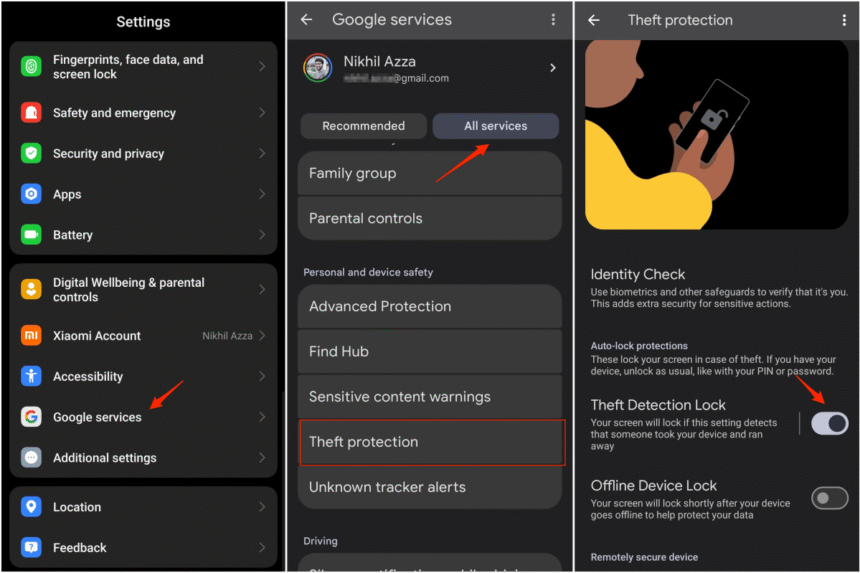
To turn it on: Settings > Google > All services > Theft protection > Theft Detection Lock
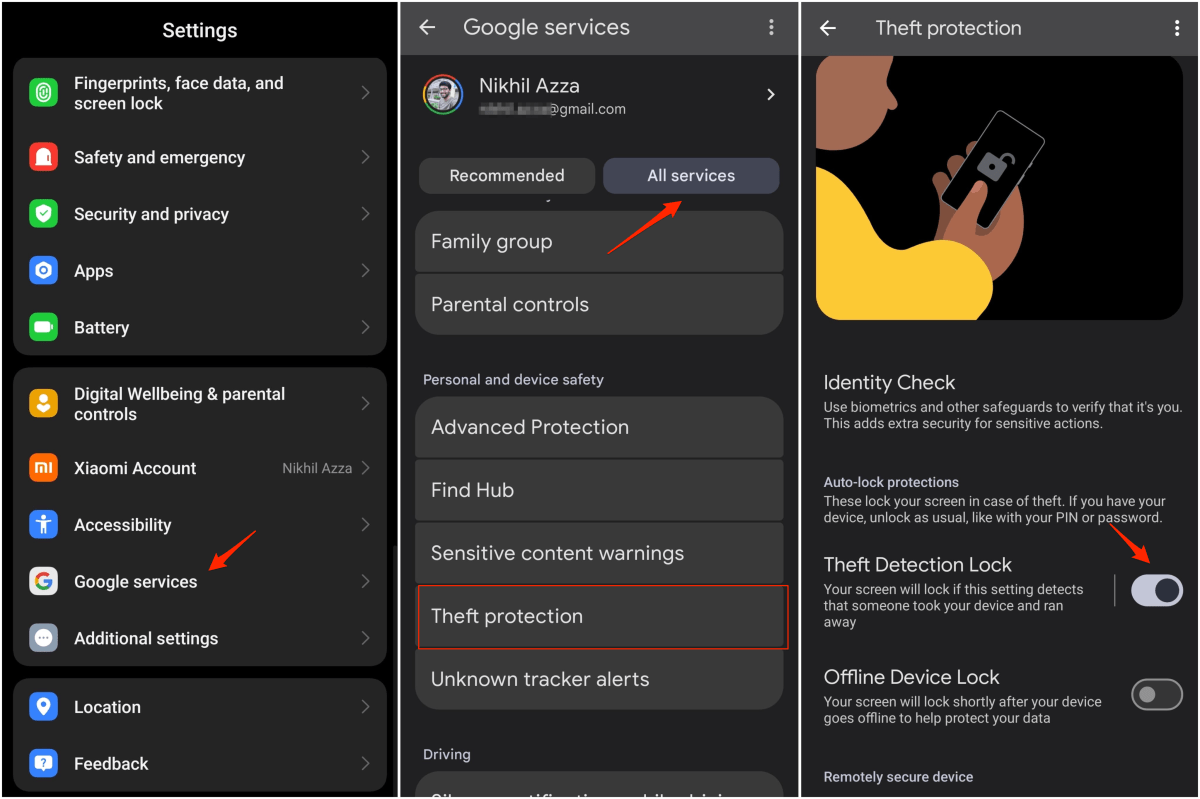
This feature is built for the scenario above. It’s AI that protects your Android phone the moment it senses a theft attempt. The on-device AI uses an accelerometer, gyroscope, Wi-Fi, and Bluetooth together to recognise sudden jerks, rapid movement, running, cycling, and driving. If the pattern matches a snatch and run, the screen locks automatically before the thief has time to start disabling things.
But there’s one limit worth knowing: it only works on an unlocked, in-use screen and, if someone grabs it calmly without running, the algorithm has nothing to trigger it. It also won’t trigger if you’re connected to a stable Wi-Fi or Bluetooth network, which Google says reduces false positives.
Speaking of which, the sensitivity can cause issues. Google made theft detection more robust in early 2025 meaning that if you suddenly jog fast, there’s a chance that theft detection may kick in and lock the screen. It may be annoying, but it also proves that it’s working.
Offline Device Lock
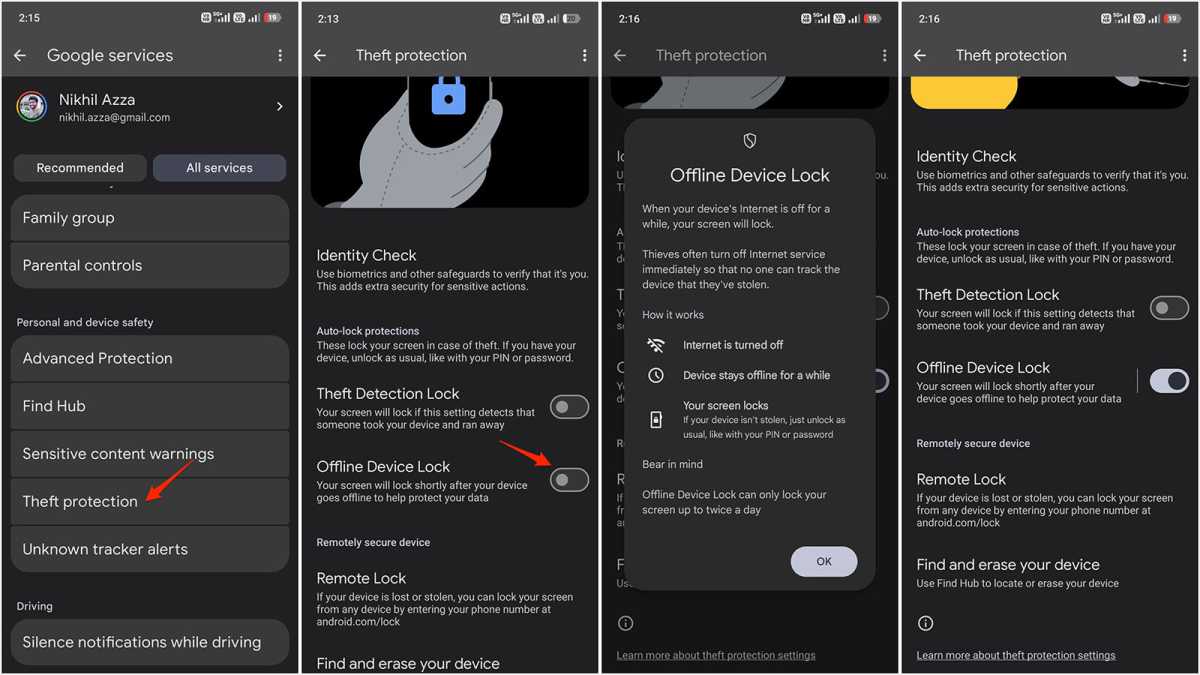
To turn it on: Settings > Google > All services > Theft protection > Offline Device Lock
Nikhil Azza / Foundry
The first thing most thieves do is cut the internet. A connected device can be tracked, locked, and wiped remotely. Pulling it offline stops all of that, and the offline device lock is built specifically to prevent that.
If your phone goes offline for an extended period of time after being unlocked, the screen locks automatically. It also triggers after too many failed attempts in a short window. Google hasn’t publicised the threshold but it doesn’t happen instantly. A brief signal drop won’t trigger it, for example going into a basement or tunnel, but a phone that stays offline will.
The same caveat applies as with the Theft Detection Lock. Your phone has to be unlocked when it loses connectivity for this to kick in.
Identity Check
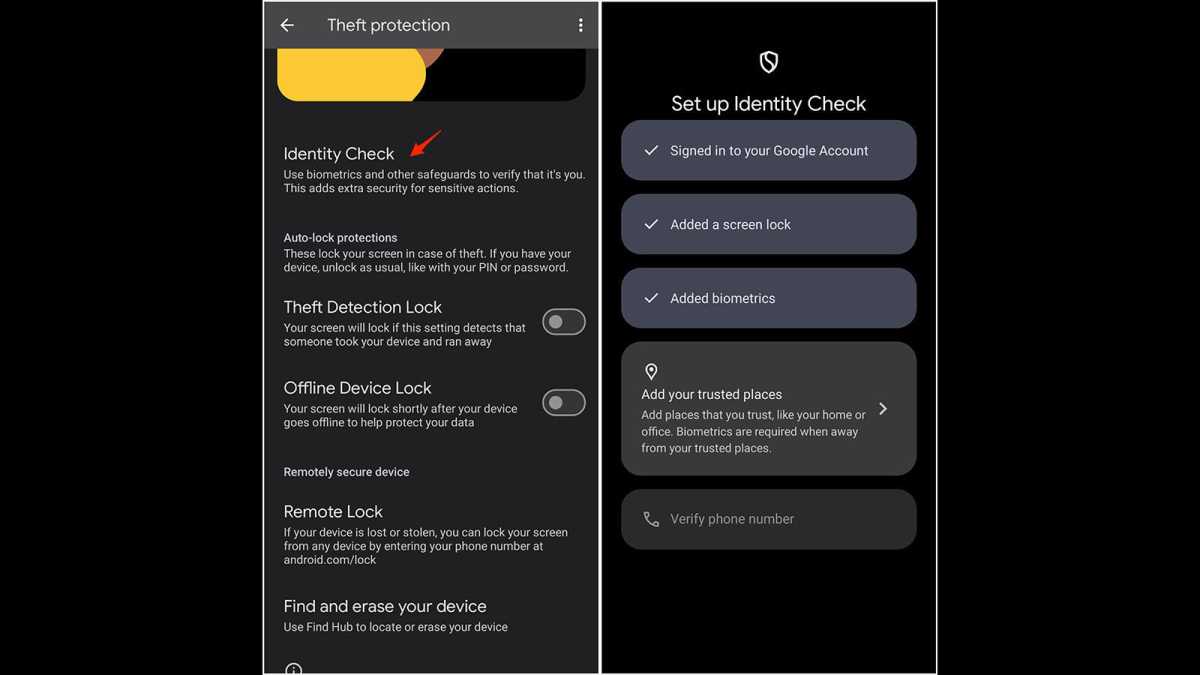
On a Pixel: Settings > Google > All services > Theft protection > Identity Check
Nikhil Azza / Foundry
This is the most important and least understood security measure. It can stop a thief breaking into your phone in the first place.
Take this scenario: someone watches you type in your PIN in a coffee shop, then takes your phone. They can now break in and change the PIN, disable Find Hub, run a factory reset, and lock you out completely within a few minutes, all before you can report or track.
With Identity Check, none of these actions can be performed outside of a trusted location, without your fingerprint or face. PIN alone won’t be enough for anything sensitive, such as changing your lock screen, factory resetting, accessing passkeys or opening banking apps. Biometrics will be needed.
Samsung’s One UI adds its own layer on top with Security Delay. Try to reset the biometric data outside the trusted location on your Galaxy phone and a one-hour waiting period kicks in before any changes take effect.
That hour is the window to log into Samsung Find from a laptop and put the phone into Lost Mode before the takeover is completed. It’s a smart addition.
Factory Reset Protection
This has been around since Android 5.1, and it does an important job. If a thief manually resets your phone from settings, Factory Reset Protection kicks in and the next time they’re at the set-up screen, it demands previous Google account credentials. Without credentials, the phone can’t be set up and it’s useless. It’s what makes stolen Android devices hard to sell on.
There’s no toggle for it – add a Google account and it’s active automatically. You almost certainly already have it.
But there’s a gap worth knowing: if the thief knows your PIN and goes into the Settings and removes your Google account, then they perform a factory reset, the FRP won’t trigger. The account was gone before the reset.
This is where security measures work together and it’s why Identity Check matters beyond just banking apps. Outside a trusted location, removing a Google account requires biometric authentication, not just a PIN. A thief can’t remove the account and can’t defeat FRP.
Also, remotely wiping via Find Hub removes FRP entirely. Anyone can set the phone fresh after that. Therefore, lock it first at android.com/lock. Only wipe it if you’ve given up on getting it back.
What you need to turn on right now
Everything except Factory Reset Protection is off by default on most phones. You’ll need to switch on Theft Detection Lock and Offline Device Lock. Remote Lock needs your number to be verified and Identity Check needs a full setup.
Spending five minutes in Settings is the difference between simply losing your phone and losing your phone and having your bank account and personal data compromised.
My colleague got her Pixel back three weeks later. Someone handed it in at a police station in Hackney, still locked. Two banking app attempts were made, but not a third.
Next up, find out everything you need to know about Android 17.




