Summary created by Smart Answers AI
In summary:
- Tech Advisor tested AI features on Samsung and Pixel phones for a week, evaluating tools like Circle to Search, Magic Eraser, Call Screening, and voice assistants.
- Pixel’s Best Take and battery optimization proved most valuable, while Samsung’s Generative Edit left visible artifacts and Circle to Search provided unreliable results.
- Most AI features feel like demos rather than essential tools, with complex multi-step requests failing on both Gemini and Bixby assistants.
I’ve had AI features on my phone for the better part of the year, including Gemini from day one. Every few weeks, I’d try something new, thinking it would be useful, before going back to basics once the novelty wore off.
AI features are now built into most modern smartphones, but many still feel like demos that you’ll try once and promptly forget. I forced myself to use AI features for a week, using photo edits, voice typing, assistant requests, and writing suggestions. All of it.
I tested AI features on both Samsung and Pixel devices, because the experience varies. I wanted to see where the gap actually was and figure out which of these features are actually useful day to day, and which ones you can safely ignore.
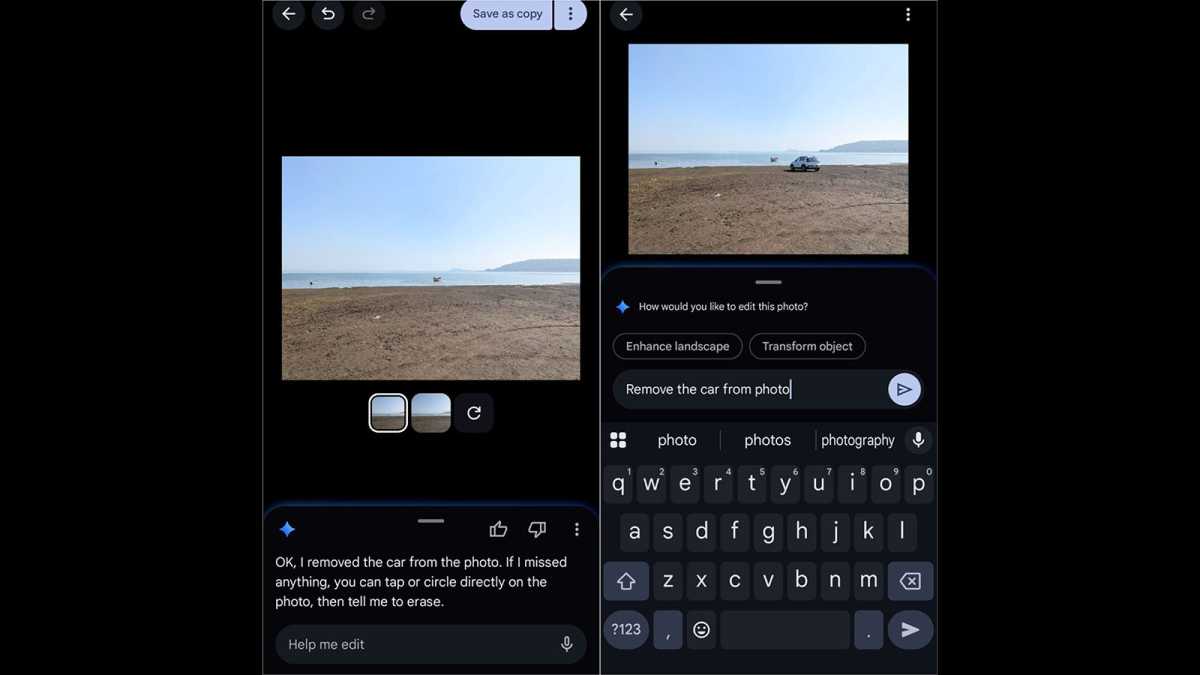
I assumed that the reputation of Pixel’s AI erasers was largely social media hype, but I was corrected pretty quickly.
Within a day, I started using it and cleared an unwanted object from my mother’s vacation photo. The result was fine, not perfect but noticeably cleaner and more than good enough. When I shared the photo with my mother, she was impressed enough that she didn’t notice the subtle changes the AI had made. That’s the bar, and AI eraser cleared it.
Nikhil Azza / Foundry
Pixel’s Best Take was also surprisingly useful – better than I expected. I took a burst shot of a group of five people, and the end result was a perfect group photo. It isn’t always clear how it selects faces, but it picked well. And the composite didn’t look as though it was stitched.
On the other hand, Samsung’s Generative Edit is aggressive, and it shows in the results. I tried removing a car standing in front of my home to capture a street scene, and the resulting pavement looked soft in the final image. If someone observes closely or knows the original, it would be obvious.

Nikhil Azza / Foundry
Conclusion: Samsung’s Generative Edit is good for quick social posts, but less good if you look closely. Pixel’s AI photo features are more subtle and more reliable.
Writing and voice typing that actually held up
Assistant suggestions on the keyboard were mixed, but voice typing stood out. I dictated around 40 messages over the week on both devices. Gboard’s voice input handled background noise from a moving car better than I expected. Accuracy was surprisingly high, enough so that I needed fewer edits than I would if I were simply typing fast on my small onscreen keyboard.

Nikhil Azza / Foundry
Writing suggestions were more useful for work replies than anticipated. If I drafted something quickly, the suggestion would tighten up the sentence without the need to rewrite. Twice, I used the rewrite option to draft an urgent email and the result was better than my draft.
Samsung Writing Assist went a step further, rewriting a complete paragraph. I wrote a blunt work message on a tired afternoon and Samsung rephrased it into more professional output, which was actually better. I use it often now.
Conclusion: None of this feels like the future but it can make an annoying Tuesday slightly less annoying.
Assistant tasks that were inconsistent
This is where the week got patchy. Reminders, alarms, and quick voice notes worked fine across all phones. As long as requests were short and clear, there was no problem.
But complex requests fell apart. I asked Gemini on Pixel to find a Chinese restaurant that’s open after 9pm on Friday, add it to my Calendar, and text my colleague its name. This is very much the kind of multi-stage task that Google highlights in demos. It only got to step one and stopped there. I had to do the rest manually, which took longer than doing it manually from the start.
Samsung’s Bixby had a similar ceiling: it was good for simple, single tasks. Give it more than two commands, and it slows down. By the weekend, I’d stopped trying anything complex.
Conclusion: Keep it simple, or don’t bother at all.
The background features you don’t notice until they’re gone
Call screening is the best Pixel AI feature I used all week, and I nearly didn’t bother testing it. I had seven calls flagged as likely spam, with six of them correctly identified. The one I missed was actually my banker calling me from his office. Fair enough, that’s a reasonable error rate.
Pixel’s battery optimisation also did something remarkable for battery life. I didn’t track the exact metrics but by Saturday, I was noticing I was finishing the day with noticeably more charge than I’d been getting earlier that week with the same usage pattern. The feature seemed to understand which apps I was actually using and stopped the rest from doing too much in the background.

Nikhil Azza / Foundry
Conclusion: These were arguably the best AI features of all. They don’t ask you to do anything. They just run, and maybe that’s why they’re so useful.
I’d expected to use Circle to Search to replace half of my usual Google searches, but it didn’t. It returned incorrect results twice within a few days. And by Wednesday, I stopped trusting it. It’s fine for identifying products – and that’s really what Google wants you to use it for – but for more important searches, I switched back to typing.

Nikhil Azza / Foundry
Otter didn’t perform as well as I’d hoped on the only recording that actually mattered during the week. I recorded a 20-minute conversation in a coffee shop, where it picked up so much background noise, and the transcript had so many errors, that a more traditional form of note-taking would have been better.
The Pixel Recorder transcription of a quiet 15-minute voice memo I made on a walk was good. I learned that location and noise conditions matter a lot when transcribing – and Otter didn’t handle tougher conditions well.
Conclusion: The proactive suggestions, like the ones that surface apps or show you shortcuts before you ask, mostly got in my way. I turned most of them off.
What I’m actually keeping
Magic Eraser and Best Take will stay on my phone – as will voice typing, for select situations. Of all the features, Call screening is one that I’d miss most if it disappeared. I also rate the quiet background action of battery optimisation.
Samsung Writing Assist is useful if I’m in a rush, and I often am. Circle to Search is only useful for identifying products, nothing more.
By the end of the week, all other AI features had been switched off or forgotten. That’s not necessarily because they’re bad but because they didn’t deliver any real improvements for me. The tools that stuck were the ones I stopped thinking about and that’s probably the best measure of what actually works.
Companies want us to start seeing these AI features as essential. But after a week of relying on them, my take is that most are not quite useful or accurate enough. Not yet, at least.
Read next: Better than AI? The four improvements we want instead.