
Summary created by Smart Answers AI
In summary:
- Tech Advisor highlights five new WhatsApp features including Meta AI photo editing, seamless chat transfer between Android and iOS, and parent-managed accounts for children.
- These updates address long-standing user pain points, particularly the problematic cross-platform chat migration that previously required complex workarounds.
- Key improvements include direct photo editing within chats, simplified transfer process through WhatsApp settings, and enhanced parental controls for family users.
WhatsApp has recently unveiled a major update for its popular messaging app. It includes five new features that early adopters can already try out.
The aim of the changes is, on the one hand, to make WhatsApp more user-friendly and, on the other, to enable users to organise their chats more effectively – even across multiple devices.
1. Targeted storage management
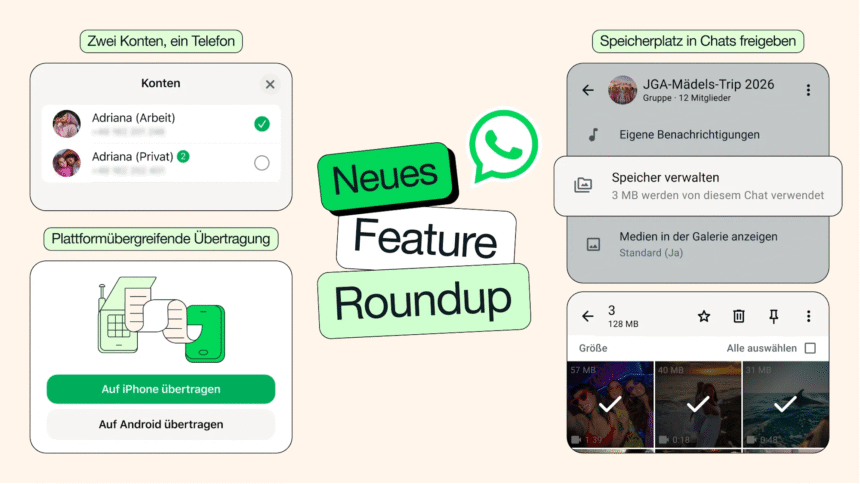
Users can now ensure even more effectively that WhatsApp takes up less storage space on their device by locating and deleting large files directly within a chat. It is therefore no longer necessary to delete the entire chat history.
To do this, simply tap the name of the chat and select ‘Manage storage’. Here, you can choose which media files you want to delete, or opt to remove all files.
2. Cross-platform chat transfer
Transferring WhatsApp chats is usually quite straightforward. However, it has always been problematic when one device runs on Android and another on iOS. WhatsApp has now found a solution to this and allows chats to be transferred seamlessly between the two platforms.
To do this, simply go to Chats > Transfer chat history > Transfer to Android device if you’re starting from an iPhone.
If you’re starting from an Android device, you’ll also need the “Transfer to iOS” app (available in the Google Play Store).
3. Using two accounts on iPhones
Another new feature for iPhone users is that they can now use two WhatsApp accounts simultaneously.
Until now, this was only possible on an Android device. This allows you, in particular, to separate work and personal use, or simply set up a second account for a family member.
To switch accounts, simply tap on your profile picture. The option to switch accounts should then be visible in the bottom tab.
4. Sticker suggestions
When you select an emoji in a chat, WhatsApp now also suggests matching stickers. So, if you prefer, you can express the same theme or emotion with a sticker instead. Or stick with the original emoji.
Meta AI, WhatsApp’s in-house AI, can now edit photos directly in the chat before you send them. This allows you to make quick adjustments, such as removing or optimising certain elements.
All the features mentioned here are available now and are being rolled out to all users.
However, it may take a few days for some users to see all the changes. So keep an eye out for updates and install them straight away if you want to try out any of the new features.
In additional WhatsApp news, parents can now take control of their kids’ WhatsApp accounts.
This article originally appeared on our sister publication PC-WELT and was translated and adapted from German.