Any links to online stores should be assumed to be affiliates. The company or PR agency provides all or most review samples. They have no control over my content, and I provide my honest opinion.
Aqara Wall Outlet H2 UK Review
Aqara Wall Outlet H2 UK Review
Summary
The Aqara Wall Outlet H2 UK is a well-engineered smart wall socket that delivers excellent build quality, reliable Zigbee performance, and genuinely useful per-socket power monitoring when used within the Aqara ecosystem. However, its high price, limited USB-C charging performance, and reduced functionality in Thread mode make it difficult to recommend for widespread deployment, reserving it primarily for enthusiasts with specific automation or energy-monitoring requirements.
- Price – 60%
- Features – 80%
- Performance – 70%
Pros
-
Excellent build quality with thoughtful electrical design and safety features
-
Reliable Zigbee performance with accurate per-socket power monitoring
-
Dual Zigbee and Thread support offers ecosystem flexibility
Cons
-
Very expensive compared to competing Zigbee wall sockets
-
USB-C charging is limited to 15 W shared, which feels outdated
-
Reduced functionality and monitoring granularity when using Thread/Matter
In the UK, one of my main issues with Zigbee and Thread is the lack of wall sockets. There are a growing number of light switches, with options for neutral and no neutral, and various plug sockets. But when it comes to actual wall outlets that integrate smart home capabilities, the market is frustratingly bare.
Until the launch of this Aqara Wall Outlet H2, there appeared to be just two brands currently making Zigbee wall sockets, and both have mediocre reviews. The question is whether the Aqara Wall Outlet H2 UK provides the perfect solution many of us have been waiting for, or if it falls short of expectations given its premium price point.
I’ve been testing both the single USB and dual USB-C variants to see how they perform in real-world scenarios, and whether they’re worth the investment for your smart home setup.
Related Review
Specification
The Aqara Wall Outlet H2 UK comes with comprehensive specifications that position it as a premium smart socket solution:
Physical Attributes:
- Weight: 385 g
- Dimensions (L x W x H): 154 x 96 x 58 mm
- Product Dimensions: 146 x 86 x 38.4 mm (5.75 x 3.39 x 1.51 in.)
Technical Specifications:
- Model: WP-P09D
- Wireless Protocols: Thread, Bluetooth, Zigbee
- Electrical Rating: 230-250 VAC, 50/60 Hz, Max 13 A
- USB-C Output (Dual Port): 5.0V @ 3.0A (shared), 15.0W (total)
- Operating Temperature: -5C to 40C (23F to 104F)
- Operating Humidity: 0-95% RH, non-condensing
Package Contents:
- Wall Outlet H2 UK (Dual USB-C) x 1
- User Manual x 1
- Screw Kit x 1
- Compliance Statement x 1
- 10 mm Spacer x 1
The inclusion of both Thread and Zigbee support is a smart move from Aqara, giving you flexibility depending on your existing smart home infrastructure. The 10 mm spacer is particularly useful – I found it necessary when working with back boxes that sit flush to the wall, though my garage installation with a deeper surface-mounted box didn’t require it.
Features
Thread/Zigbee Smart Socket
This smart socket supports both Thread and Zigbee wireless protocols, offering flexibility depending on your existing smart home setup. In Thread mode, no Aqara hub is required, and the socket connects directly to Matter-compatible controllers including Apple Home, Google Home, and Amazon Alexa.
For Zigbee mode, you will need an Aqara Zigbee 3.0 hub running firmware version 4.5.20 or later. I tested it with my Aqara Hub M3, which worked perfectly with excellent signal strength throughout my testing period.
Thread connectivity enables direct Matter integration, which allows the socket to work across multiple ecosystems without being locked into a single platform. However, there’s a trade-off here – while Thread offers broader compatibility, you get more granular control and features when using Zigbee mode with an Aqara hub. This is a pattern I’ve noticed across several Aqara products.
Real-Time Power Monitoring
The socket includes real-time energy monitoring on a per-outlet basis when operating in Zigbee mode. This is where things get interesting from a practical standpoint. You can track power consumption of connected devices and create automations based on power draw thresholds.
In my testing, I found this particularly useful for monitoring my electric blanket’s power consumption in the bedroom. The granular per-socket monitoring means you can see exactly which device is drawing what power, rather than just getting a combined figure for the entire outlet.
Practical applications include automatically switching off devices once they reach full charge, or receiving notifications when appliances such as washing machines or tumble dryers complete their cycles. I would have loved to test the washing machine scenario, but my garage installation was primarily used for camera equipment and tools.
When using Thread mode, the power monitoring still works, but you only get a combined power figure for the entire outlet rather than per-socket data. This is disappointing and represents a real limitation if you’re planning to use Thread exclusively.
Smart Wall Outlet Automation
The socket can detect the real-time power status of connected devices and use this information to trigger automated actions. I set up a test automation where my lamp would turn on when my camera equipment powered up, and it worked reliably throughout testing.
Beyond simple on/off scheduling, you can configure the physical buttons on the socket itself for automation functions. Each socket has its own tactile button, and you can configure these for single press, double press, or long press actions. In the Aqara app, you can set the socket to multi-function mode, which means the outlet stays permanently powered, and the button becomes purely an automation trigger.
This multi-function mode is cleverly designed – your connected device gets constant power, but you gain three different automation triggers per socket. For power users who want to squeeze every bit of functionality out of their smart home setup, this is genuinely useful.
Dual Child Lock and Overload Protection
Integrated safety shutters help prevent small objects from being inserted into the outlets, providing an additional layer of child safety. The socket also features overheat and overload cut-off protection, automatically disconnecting power if unsafe conditions are detected.
You can set a maximum power threshold in the Aqara app, ranging from 100W to 3,250W. If the connected device exceeds this threshold, the socket will cut power. This is useful for preventing overloads or catching malfunctioning equipment before it becomes a fire hazard.
Remote control functionality remains available via the app or voice commands, allowing you to physically cut power to the outlet when needed. The LED indicators are customisable to suit your preferences and environment – you can have them on, off, sync with the switch state, or set them opposite to the on/off state. I kept mine synced with the switch state for easy visual confirmation of power status.
Built-in USB-C Charging
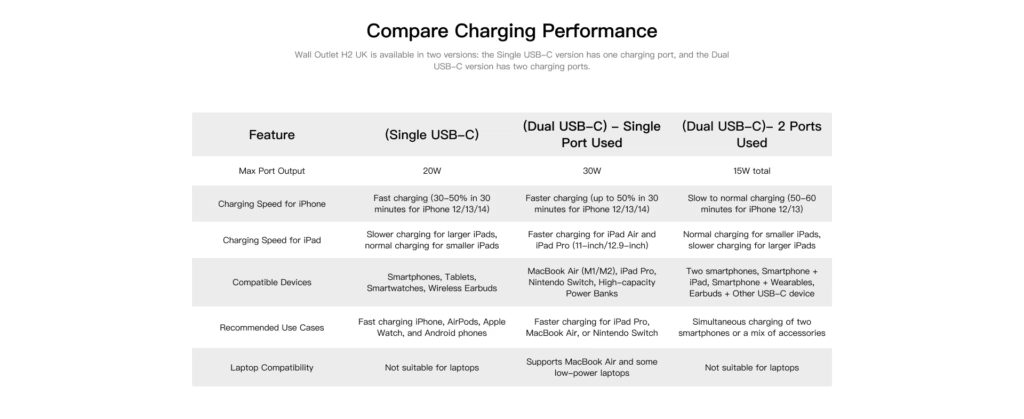
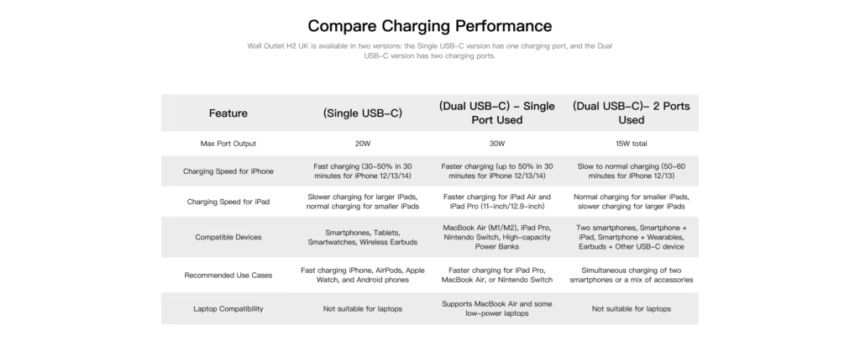
The socket includes dual USB-C ports with a combined output of 15 W when both ports are in use (5 V at 3 A shared between both ports), suitable for charging phones, tablets, and smaller accessories. Charging can be controlled independently via the app, allowing you to switch the USB ports on or off for added convenience and energy savings.
Bizarrely, when one port is in use, you get 30W. No idea why it wouldn’t be 30W split.
For both ports, 15W shared is disappointing in 2025. Most modern smartphones support at least 20W fast charging, with many flagship devices supporting 30W, 45W, or even higher Power Delivery inputs. The iPhone 15 Pro, for example, can charge at up to 27W with a suitable charger.
That said, it’s better than nothing and handy for charging or powering low-powered devices. It’s also perfectly adequate for slow charging a phone overnight, which is arguably healthier for battery longevity anyway. But if you’re hoping to quickly top up your device during the day, these USB-C ports won’t cut it.
Engineered for Everyday Durability
The socket uses zero crossing technology, which switches power at the precise moment the AC voltage passes through zero. This reduces electrical stress on the internal relay during switching operations, improving long-term reliability regardless of how frequently the outlet is turned on and off.
This is a nice technical detail that speaks to Aqara’s attention to engineering quality. In practical terms, it means the relay should last longer and handle more switching cycles than cheaper alternatives. Given the £70 price point, this level of engineering quality is expected, but it’s good to see it present nonetheless.
Design

The Aqara Wall Outlet H2 has a clean, minimalist design with a matte white finish. The build quality feels solid – at 385g, it has substantial heft that suggests quality components inside. The faceplate attaches very securely, requiring you to insert something thin between specific points and lift at four corners to remove it.
At first, this removal process feels like you might break the faceplate, but it’s actually quite robust once you understand the mechanism. The secure attachment means there’s no risk of the faceplate coming loose during normal use.
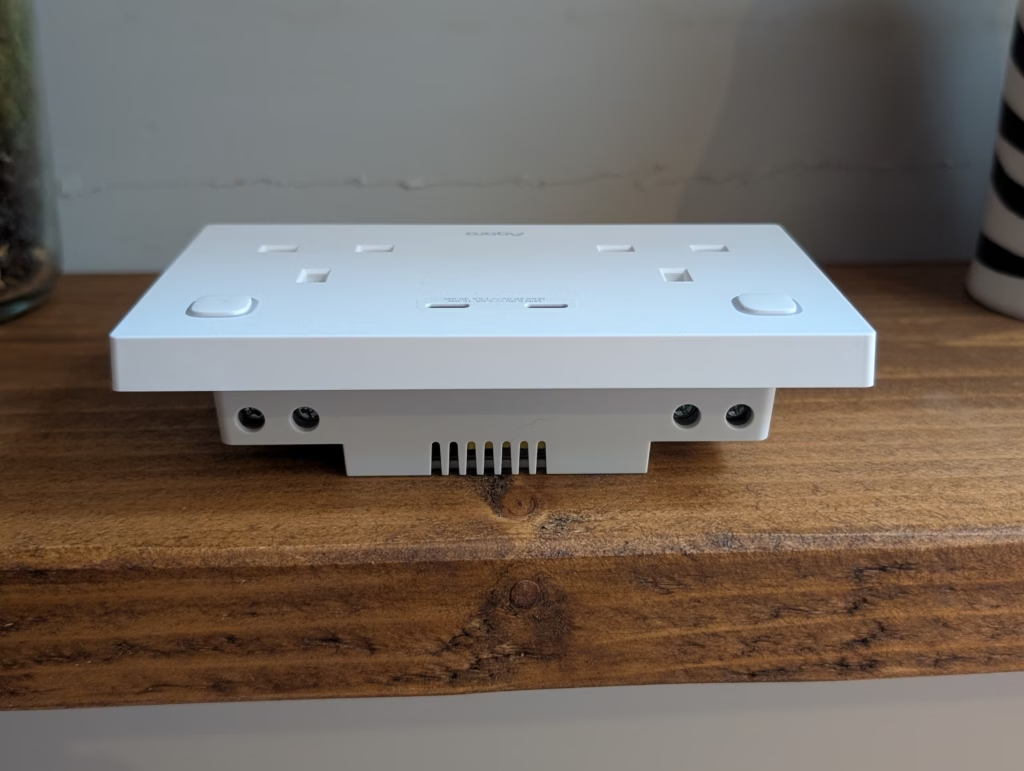
The socket is noticeably thicker than a standard UK wall socket, measuring 58mm in depth compared to around 35-40mm for standard sockets. This is where the included 10mm spacer becomes useful – it helps bridge the gap between the socket and your back box, reducing the effective thickness and making installation easier in standard mounting scenarios.
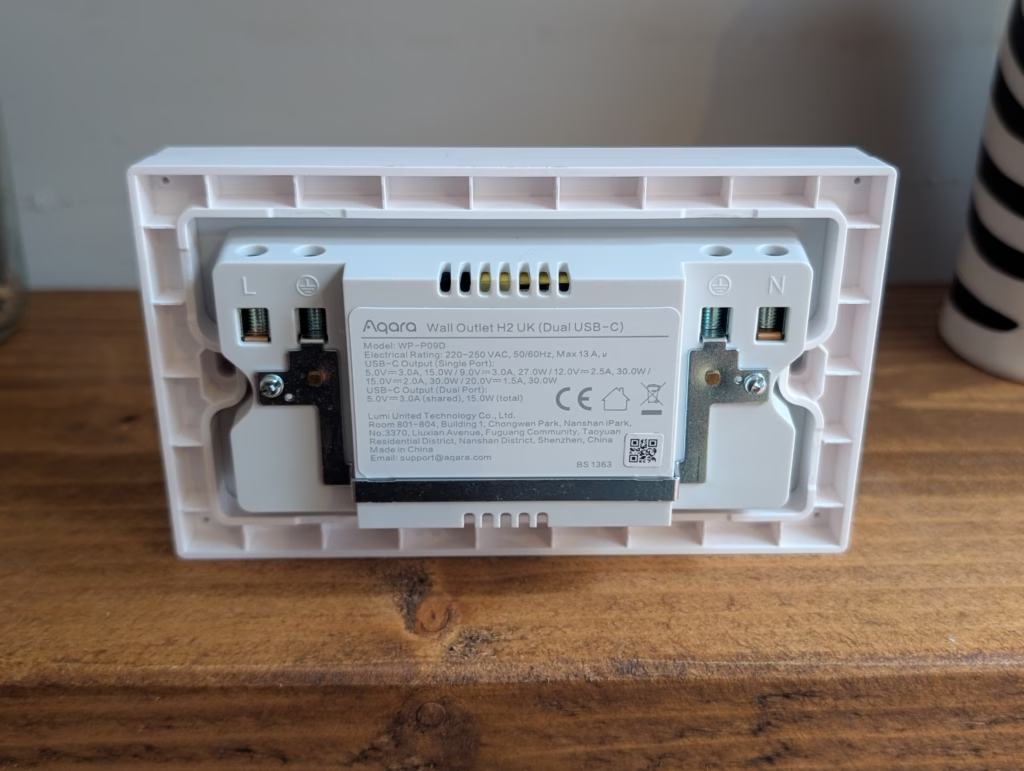
One design element I appreciate is the inclusion of two earth terminal positions. You can use either one, which provides flexibility during installation depending on how your existing wiring is positioned. The terminals themselves accept both cross-head and flat-head screwdrivers, though the included screws are cross-head.
The tactile buttons for each socket sit flush with the faceplate and provide good feedback when pressed. They’re positioned sensibly and easy to locate by feel. The LED indicators are small and unobtrusive, which I prefer to the bright, always-on LEDs found on cheaper smart plugs.
Installation
While I have fitted lots of light switches over the years, I have never installed a wall socket before tackling this project. So, for this installation, I opted to fit it in my garage where I wasn’t concerned about damaging plaster around the back box or if anything else went wrong, it wouldn’t be too disruptive to my household.
The physical installation is no more complicated than a light switch, but I want to stress that if you’re not comfortable working with mains electricity, you should hire a qualified electrician. I switched off the breaker for my entire house before starting work, ensuring no power was flowing to the socket.
The process itself is straightforward: turn off the power at the mains, remove the existing socket, and transfer the wiring to the new unit. I prefer to unscrew one wire at a time and attach it to the new socket to avoid the risk of mixing everything up.
In my garage, the back box was mounted onto the wall and quite deep, so I didn’t need to use the included spacer. However, I suspect back boxes mounted flush to the wall in the house would lack the depth, making the spacer necessary. The spacer has small tabs around its perimeter that correspond to matching tabs on the socket body, providing a firm seating that prevents rocking or movement.
One thing I noticed during installation is that the terminal wells are somewhat shallow compared to the sockets I’m used to working with. Ideally, you want the wire seated so there’s minimal exposed copper visible outside the terminal. I ended up trimming a small amount from each wire to achieve a clean, secure connection with only sheathed wire visible.
The wiring layout is sensible: earth terminals on both sides (use whichever is more convenient), live on the left when viewing from the front, and neutral on the right. When you flip the socket around for installation, the neutral ends up on the left side, which caught me out briefly before I realised the orientation.
After connecting all the wires, I gave each a firm tug to ensure they were properly secured. It’s far better to discover a loose connection now than after you’ve sealed everything up and restored power. The cross-head screws included with the unit are approximately 1.5-2mm longer than the flat-head screws that came with my original socket, which provided slightly better purchase in the back box.
The entire installation took about 20 minutes, including taking photos and double-checking everything. If you’re comfortable with basic electrical work, this should be well within your capabilities. Just remember to install the spacer (if needed) before wiring everything up – fitting it afterwards requires removing all the wires again.
Set Up
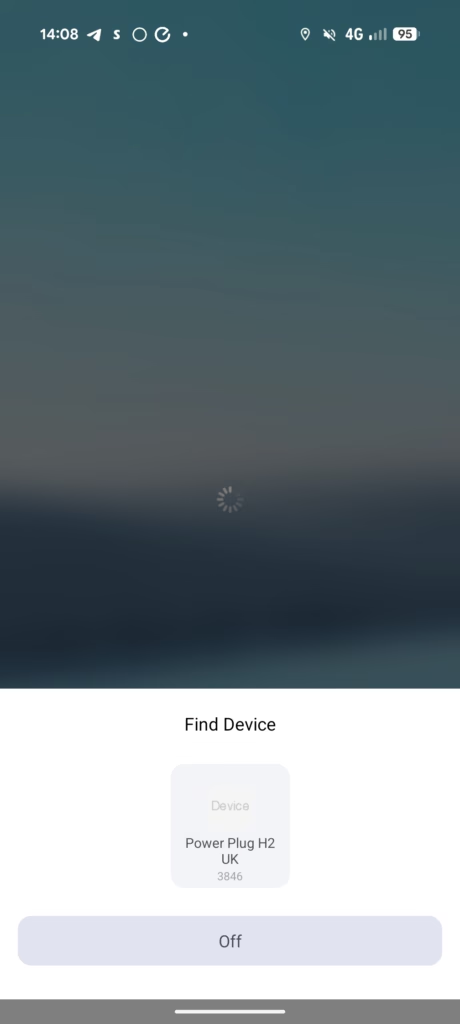
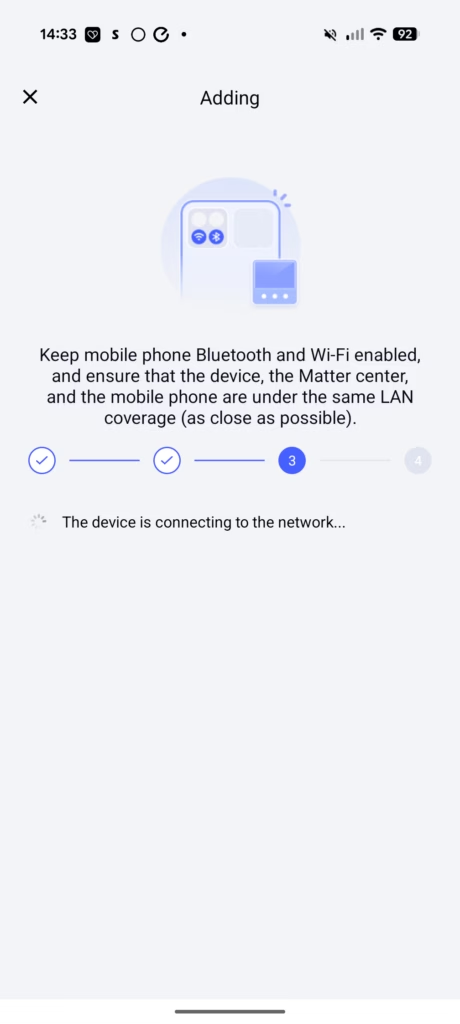

With the socket installed and power restored, the setup process is essentially the same as all other Aqara products. The Aqara Home app automatically identified the socket and gave me the option to use Thread or Zigbee.
I tested both protocols extensively to see how they compared in terms of functionality and reliability. The initial pairing process with Thread was marginally faster – scanning the QR code on the socket, selecting my M3 hub, and completing the Matter setup took about 30 seconds. Zigbee pairing was similarly quick, taking perhaps 40-45 seconds total.
Like all other Aqara products, if you opt for Thread, you don’t get quite as much control. The main thing I noticed was that the power data was separate per socket with Zigbee, but Thread displayed the power output as a whole. This is a significant limitation if you want granular energy monitoring for different devices.
The Aqara app provides extensive configuration options when using Zigbee mode. You can access device settings, set up automations, configure the child lock, adjust maximum power thresholds, set power-off memory behaviour, customise LED indicators, and configure switch settings for each socket.
The switch settings are particularly interesting. In single press mode, the button acts as a standard on/off toggle for that socket. In multi-function mode, the socket stays permanently powered, and the button becomes an automation trigger supporting single press, double press, and long press actions. This gives you three automation triggers per socket, which is genuinely useful for advanced smart home setups.
I also tested the socket with Apple Home, both in Thread mode and when bridged through Zigbee via the M3 hub. Response times were excellent in both cases – toggling the sockets on or off happened almost instantaneously, with no perceptible lag. This is one area where Aqara consistently excels.
One frustrating limitation: the USB-C ports don’t appear as controllable entities in Apple Home, regardless of whether you’re using Thread or Zigbee. They’re always powered on, which means you can’t automate them through HomeKit. You can control them through the Aqara app when using Zigbee mode, but this feels like a missed opportunity for Thread/Matter integration.
In Use
USB-C Ports
With 15W split between two ports, you’re looking at a maximum of 7.5W per port if you’re charging two devices simultaneously. This is fine for overnight charging or powering low-draw USB-C devices, but it’s not suitable for fast charging during the day.
In my testing, I used the USB-C ports primarily for charging a secondary phone overnight and occasionally powering a small USB-C desk fan in summer. For these use cases, the 15W limitation wasn’t an issue. But if you’re hoping to replace a dedicated fast charger, you’ll be disappointed.
The ability to control the USB ports independently through the Aqara app is useful, though it only works in Zigbee mode. You can schedule them to turn off at certain times for energy savings, or switch them off entirely when not needed. This is a nice touch that adds some practical value.
The ports themselves accept USB-C cables without any issues – no loose connections or wonky insertion angles. The physical implementation is solid, even if the power delivery capability is underwhelming.
Power Monitoring
Power monitoring is where this socket starts to justify its premium price point, at least when using Zigbee mode. The per-socket monitoring provides genuinely useful data that you can leverage for automations and energy tracking.
I set up monitoring on my camera equipment in the garage, which typically draws around 40-60W when actively charging batteries or transferring files. The Aqara app displays current power draw in watts, and you can view historical consumption data over time.
The ability to set power thresholds and create automations based on power draw is genuinely useful. For example, you could set up an automation to notify you when your washing machine cycle completes (by detecting when power draw drops below a certain threshold), or automatically cut power to a device once it’s fully charged (again based on reduced power draw).
However, the power monitoring accuracy seems decent but not lab-grade. Comparing readings with my separate power meter showed the Aqara socket was typically within 5-10% of the reference measurement, which is acceptable for consumer-grade monitoring but not suitable if you need precise data for professional purposes.
Signal strength with Zigbee was excellent throughout my testing. The Aqara app displays signal quality graphically over time, and mine consistently showed “excellent” ratings. This is likely helped by my relatively robust Zigbee mesh, but it’s good to see the socket’s radio performance is up to par.
One limitation worth noting: while you get per-socket power monitoring with Zigbee, you can’t monitor the USB-C ports independently. They’re always powered on and don’t report their consumption separately. Given the low 15W output, this is unlikely to be a dealbreaker, but it would have been nice to have complete visibility.
Home Assistant

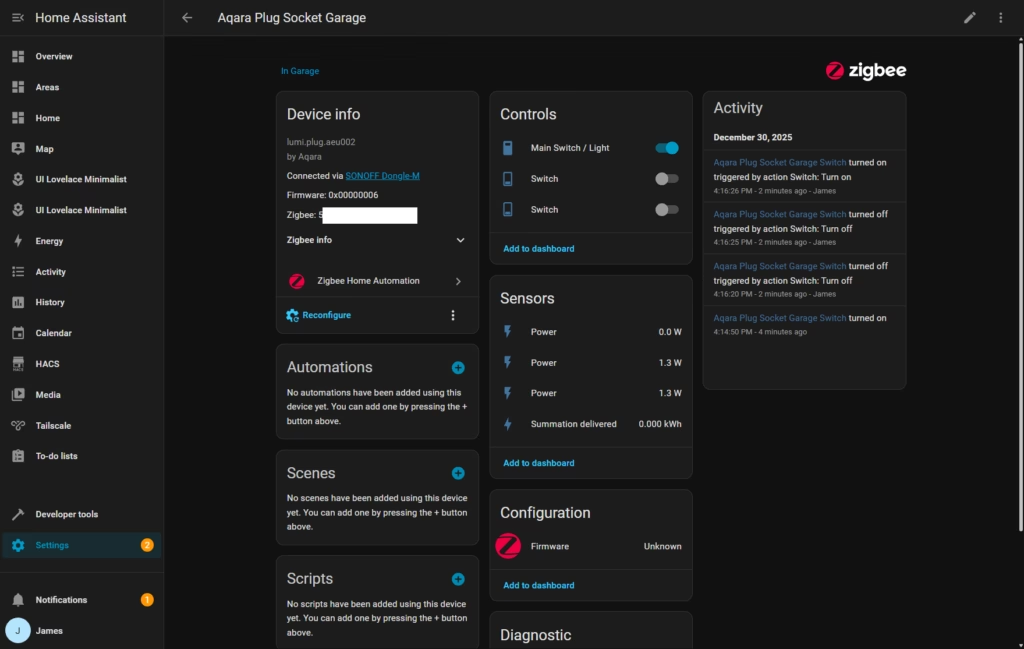
In all my previous Aqara reviews, I have integrated the Aqara devices via Matter through the Aqara bridge as I had previously had a poor experience with the older Home Assistant ZBT-1. Since getting the SONOFF PoE Dongle Max, I have been adding devices directly to Home Assistant, so when I finished testing this socket in Aqara, I reset it and added it to Home Assistant directly.
So far, it has been working well. At first, I thought it worked perfectly, but it appears that two of the power sensors report the same output rather than different values per socket. I haven’t tested this extensively yet, so this may be a minor glitch.
Price and Alternative Options
The Aqara Wall Outlet H2 has launched for £79.99, though at the time of writing, it’s available on Amazon for £68. Let me be blunt – this is expensive for a smart socket, and it’s going to be a tough sell for most people.
To put this in perspective, let’s look at the competition:
The Click Smart 13A 2 Gang Zigbee Smart Socket (CMA30036) is available for £26. The product page indicates it needs a Click Smart + Smart Gateway Hub CSP010, but it should work with third-party Zigbee controllers and Home Assistant. Reviews on Amazon are not great, and it lacks power monitoring and USB ports. The aesthetics are also quite basic, with a more industrial look than the Aqara.
BSEED has a 2 gang Zigbee socket with one USB-A port and one USB-C port delivering up to 20W and power monitoring. This is available in both black and white and appears to have a glass finish rather than matte plastic. This costs £43 for the dual-gang version.
They also offer a single-gang variant with dual USB-C ports for just £28. For both models, you need a back box that is at least 35mm deep, which could be an issue depending on your installation.
On paper, the BSEED options look competitive, offering similar features at significantly lower prices. However, reviews online suggest build quality issues, difficult installation in standard back boxes, and partial Home Assistant integration. Several users report that power monitoring doesn’t work reliably, which undermines one of the key selling points.
At £68-£80, the Aqara Wall Outlet H2 would cost over £1,000 to replace just 15 sockets in an average home. That’s a substantial investment that’s hard to justify unless you have specific use cases that require the features this socket provides.
The saving grace is that there is almost no reliable competition. If you want a Zigbee wall socket with dependable power monitoring, Thread/Matter support, and Aqara’s typically solid build quality, this is arguably your best option.
Overall
The Aqara Wall Outlet H2 is another Aqara product I have mixed feelings about. I wanted to love it – smart sockets are a far superior solution to smart plug adapters, and I would love to replace all my sockets with these. The build quality is excellent, the feature set is comprehensive, and the dual protocol support (Thread and Zigbee) provides genuine flexibility.
But at £68-£80, it is hard to recommend as a solution for most homes. It would cost a fortune to replace all the sockets in my house with these, and the benefits don’t clearly justify the investment unless you have specific automation needs that standard smart plugs can’t address.
The USB-C ports are useful but underpowered at just 15W shared. In 2024, when most devices support significantly faster charging, this feels like a missed opportunity. Power monitoring is excellent when using Zigbee mode, but you lose granular per-socket data if you opt for Thread instead.
The installation process is straightforward if you’re comfortable with basic electrical work, though the socket’s thickness and shallow terminal wells require some attention during fitting. The included spacer helps, but you may need to trim wires more than expected to achieve clean connections.
The BSEED 2 gang Zigbee socket is your best bet if you want to save money, and on paper, it is a superior option with 20W USB charging instead of 15W. However, reviews online are poor, and the Home Assistant integration is only partially functional. Users have also reported that it is almost impossible to install in standard back boxes due to its size and rigidity.
The Click Smart option looks acceptable but is even less aesthetic than the Aqara, and lacks USB-C and power monitoring entirely. At £26, it’s certainly cheaper, but you’re giving up most of the smart functionality that makes these sockets worthwhile.
So, while I find this hard to casually recommend to everyone, if you are adamant about fitting Zigbee 2-gang sockets, this is arguably the best option on the market. The build quality is solid, the feature set is comprehensive when using Zigbee mode, and Aqara’s ecosystem integration is reliable.
I would love to see Aqara offer a version without USB ports at a lower price point, perhaps around £45-£50. For many users, the USB-C charging is nice to have but not essential, and removing it could make these sockets more accessible for broader deployment throughout a home.
The Thread/Matter support is a forward-looking feature, but the reduced functionality compared to Zigbee mode means you’re probably better off sticking with Zigbee if you’re already invested in that ecosystem. Thread makes sense if you’re building a new smart home from scratch and want maximum platform compatibility, but be aware you’re giving up per-socket power monitoring.
In an ideal world, competing brands would launch alternative Zigbee wall sockets with similar features at more competitive prices. This would force Aqara to reconsider their pricing strategy and make these sockets more accessible. Until that happens, you’re paying a premium for what is admittedly one of the few reliable options in this category.
For specific use cases – monitoring power-hungry appliances, automating existing “dumb” devices, or replacing problem sockets in high-use locations – the Aqara Wall Outlet H2 makes sense despite the high price. For general smart home upgrades throughout your property, the cost quickly becomes prohibitive.
I will keep testing these sockets over the coming months to see how they perform long-term. The zero crossing technology should provide good reliability, but only time will tell if they justify the premium price through consistent performance and longevity. Check back for updates as I accumulate more real-world usage data.
Aqara Wall Outlet H2 UK Review
Aqara Wall Outlet H2 UK Review
Summary
The Aqara Wall Outlet H2 UK is a well-engineered smart wall socket that delivers excellent build quality, reliable Zigbee performance, and genuinely useful per-socket power monitoring when used within the Aqara ecosystem. However, its high price, limited USB-C charging performance, and reduced functionality in Thread mode make it difficult to recommend for widespread deployment, reserving it primarily for enthusiasts with specific automation or energy-monitoring requirements.
- Price – 60%
- Features – 80%
- Performance – 70%
Pros
-
Excellent build quality with thoughtful electrical design and safety features
-
Reliable Zigbee performance with accurate per-socket power monitoring
-
Dual Zigbee and Thread support offers ecosystem flexibility
Cons
-
Very expensive compared to competing Zigbee wall sockets
-
USB-C charging is limited to 15 W shared, which feels outdated
-
Reduced functionality and monitoring granularity when using Thread/Matter
Last update on 2025-12-31 / Affiliate links / Images from Amazon Product Advertising API

I am James, a UK-based tech enthusiast and the Editor and Owner of Mighty Gadget, which I’ve proudly run since 2007. Passionate about all things technology, my expertise spans from computers and networking to mobile, wearables, and smart home devices.
As a fitness fanatic who loves running and cycling, I also have a keen interest in fitness-related technology, and I take every opportunity to cover this niche on my blog. My diverse interests allow me to bring a unique perspective to tech blogging, merging lifestyle, fitness, and the latest tech trends.
I’m proud to share that Vuelio has consistently ranked Mighty Gadget as one of the top technology blogs in the UK. With my dedication to technology and drive to share my insights, I aim to continue providing my readers with engaging and informative content.