I recently reviewed the relatively affordable and excellent Startech.com Thunderbolt 5 Universal Docking Station, and last year, the Anker Prime TB5 Docking Station.
Ugreen have recently launched three new Thunderbolt 5 docking stations of their own, and the Ugreen Maxidok 17-in-1 is the top-of-the-range model, supporting dual 6K/8K displays, a multi-gig Ethernet port and most impressively of all, an M.2 NVMe SSD slot which can accommodate an NVMe drive up to 8TB.
With an RRP of £420, it is up there as one of the most expensive TB5 docking stations on the market, but you can get an early bird pre-order discount, taking it down to £357. At that discounted price, it starts to look more reasonable, though it is still a significant outlay for what is essentially a peripheral. Whether or not the premium is justified depends largely on whether you need the specific features this dock offers over cheaper alternatives like the Startech or Anker options.
Related Posts
Specification

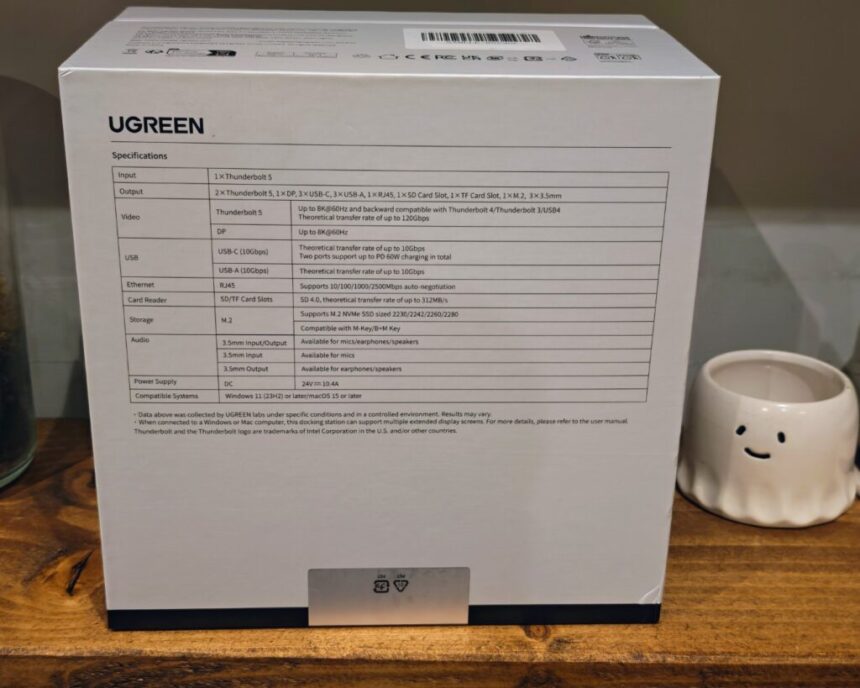
| Specification | UGREEN Revodok Maxidok 17-in-1 Thunderbolt 5 Dock | UGREEN Maxidok 10-in-1 Thunderbolt 5 Dock | UGREEN Maxidok 10-in-1 Thunderbolt 5 Mac mini Dock |
| Total Ports | 17 | 10 | 10 |
| Display Outputs | 2 × Thunderbolt 5 | 2 × Thunderbolt 5 | 2 × Thunderbolt 5 |
| 1 × DisplayPort | 1 × DisplayPort | 1 × DisplayPort | |
| Maximum Display Support | Dual 6K / Single 8K | Dual 6K / Single 8K | Dual 6K |
| Thunderbolt 5 Ports (Downstream) | 2 × TB5 (120Gbps) | 2 × TB5 (120Gbps) | 2 × TB5 (120Gbps) |
| USB-A Ports | 3 × USB-A (10Gbps) | 3 × USB-A (10Gbps) | 3 × USB-A (10Gbps) |
| USB-C Ports | 3 × USB-C (10Gbps) | — | — |
| Upstream Charging to Host | Up to 140W | Up to 100W | None |
| Device Charging (Downstream) | 2 × TB5: 15W each | 2 × TB5: 15W each | 2 × TB5: 15W each |
| 2 × USB-C: 60W total | |||
| Power Adapter | 240W | 140W | 65W |
| Ethernet | 2.5GbE | 1GbE | — |
| SD Card Reader Speed | Up to 312 MB/s | Up to 170 MB/s | Up to 312 MB/s |
| Audio Ports | 3 × 3.5mm (In/Out) | 1 × 3.5mm (In/Out) | — |
| M.2 NVMe SSD Slot | 1 × slot (up to 8TB) | — | 1 × slot (up to 8TB) |
Ugreen have launched three TB5 docking stations as part of the new Maxidok range. The 17-in-1 is the flagship, but there are also two 10-in-1 models – one designed as a general-purpose dock and the other specifically for the Mac mini. It is worth understanding the differences between them, as the cheaper models may suit some users just as well.
The 17-in-1 model has 17 total ports, which includes 2 Thunderbolt 5, 1 DisplayPort, 3 USB-C (10Gbps), 3 USB-A (10Gbps), 2.5GbE Ethernet, SD and microSD card readers, 3 audio jacks and the M.2 NVMe slot. Display support maxes out at dual 6K or a single 8K. The dock uses a 240W power adaptor and can deliver up to 140W to the host laptop.
The 10-in-1 Thunderbolt 5 Dock strips things back considerably. It has the same 2 TB5 downstream ports and 1 DisplayPort, plus 3 USB-A (10Gbps), but drops the 3 USB-C ports entirely. Ethernet drops to 1GbE, the SD card reader is slower at 170 MB/s, and you only get a single combo audio jack. It has no M.2 slot, and the power adaptor is a smaller 140W unit providing up to 100W to the host. It is priced at £250 RRP with an early bird price of £200.
The 10-in-1 Mac mini Dock is designed to sit underneath or integrate with the Mac mini form factor. It matches the 17-in-1 on display support (dual 6K), has the same 3 USB-A (10Gbps) and 2 TB5 ports, and includes an M.2 NVMe SSD slot. However, it lacks any Ethernet port, has no audio outputs, and offers no upstream charging to the host at all. Its power adaptor is 65W. It is priced at £300 RRP with an early bird of £255.
For most users buying a standalone TB5 dock, the choice will come down to the 17-in-1 and the 10-in-1. The jump from £200 to £357 (at early bird prices) gets you three extra USB-C ports, faster Ethernet, better card reader speeds, three audio jacks, the M.2 slot, and a much beefier power supply. If you need the expandability, the 17-in-1 is the one to go for. If you just need a basic hub with TB5 connectivity and can live without multi-gig Ethernet and the NVMe enclosure, the 10-in-1 is a more affordable entry point.
Design and Ports

The Ugreen Maxidok is a physically large docking station with a metal chassis that has a surprising amount of weight to it. It feels well-built and sturdy on a desk, which is exactly what you want from something that will have multiple cables pulling at it from all directions.
As far as a docking station goes, the overall appearance is attractive with a two-tone design. Half the chassis is finished in a grey colour and the rear section has a copper colourway with a finned design likely to help with passive cooling. The finned section adds visual interest and should help dissipate some of the heat generated by the 240W power delivery and the various controllers inside. During testing, the dock did get warm under sustained load, but it never became uncomfortably hot to the touch.

The front of the dock houses the 3 USB-C (10Gbps) ports and the SD/microSD card reader slots. The rear is where you will find the 3 USB-A (10Gbps) ports, the 2 Thunderbolt 5 downstream ports, the single DisplayPort output, the 2.5GbE Ethernet port, the 3 audio jacks (input and output), the upstream TB5 host connection and the DC power input.

The M.2 NVMe slot is accessible from the underside of the dock. The NVMe enclosure section is quite deep, and the cover plate has a built-in passive radiator to help with cooling – a thoughtful addition, as NVMe drives can run hot under sustained workloads.
I would have preferred a mixture of USB-A and USB-C on the front, as it makes it easier to plug peripherals in. Having all three USB-A ports on the rear means you will likely be reaching around the back of the dock any time you want to plug in a USB-A flash drive, mouse receiver or similar. It is a minor inconvenience, but one that could have been easily avoided with a different port arrangement.


For the display ports, you only have a single DP port capable of 8K, and the other two ports are TB5. It is slightly inconvenient having to use TB5 for a display, as you will likely need USB-C to HDMI or DisplayPort adaptors for most monitors. However, this setup does open the possibility of daisy chaining devices with Thunderbolt, which could be useful for users with TB5-compatible displays or other Thunderbolt peripherals.
M.2 NVMe Enclosure and Performance

The M.2 NVMe enclosure is perhaps the standout feature of the Maxidok 17-in-1. While it is not entirely unique for a hub to include NVMe storage, it is not something that is very common, and the implementation here is well thought out.
The slot supports M.2 NVMe PCIe Gen4 x4 drives up to 8TB in capacity. This is a genuinely useful addition for laptop users, many of whom are limited to a single internal M.2 slot. Being able to slot an NVMe drive directly into the dock means you can add high-speed external storage without needing a separate enclosure cluttering up your desk.
The cover plate includes a built-in passive radiator, which should help keep drive temperatures in check. NVMe drives, particularly when performing sustained sequential writes, can throttle significantly without adequate cooling. Having the heatsink integrated into the dock itself is a much tidier solution than stacking a standalone USB enclosure next to the dock.
Theoretically, when connected to a TB5 port, you can achieve up to 120Gbps throughput, which would work bwhich should be enough to max out the throughput of many NVMe drives. I didn’t have a spare PCIe 4.0 NVMe to test this with, but I used a PCIe 3.0 drive from one of my mini PCs. With this, I was able to achieve around 3000MB/s read and write speeds.
In terms of real-world performance, speeds will be limited by the Thunderbolt 5 bandwidth allocation to the NVMe controller. You should not expect the full sequential read/write speeds that a Gen4 NVMe drive would achieve when connected directly to a motherboard’s M.2 slot, but the throughput is still substantially faster than any USB 3.2 Gen 2 external drive. For large file transfers, video editing scratch disks or Time Machine backups, this is an excellent feature to have built in.
It is worth noting that the CalDigit TS5 Plus and the Anker Prime TB5, which are the closest competitors at the premium end of the market, does not include an M.2 slot. If built-in NVMe storage is a priority, the Ugreen Maxidok is one of the very few TB5 docks that offers this.
Displays
Display support is provided through the single DisplayPort connector and two Thunderbolt 5 ports. The dock supports a maximum of dual 6K at 60Hz or a single 8K at 60Hz. If your monitor does not support USB-C display input, then you will need an adaptor for the TB5 ports, which adds a small extra cost.
One area where the Maxidok falls short compared to some alternatives is triple monitor support. The Startech Thunderbolt 5 dock I recently reviewed supports up to triple 4K at 144Hz, as it has dedicated HDMI, DisplayPort and USB-C display outputs. The CalDigit TS5 Plus also supports triple 4K 144Hz on compatible Windows Thunderbolt 5 PCs and can even do 4 monitors with M5 MacBooks. The Maxidok is limited to dual displays, which for many users will be perfectly adequate, but if you need three screens, this is not the dock for you.
It is worth putting this in context, though. Dual monitor support covers the vast majority of use cases, and the CPU on many Intel laptops does not even support more than two external monitors. If you are using a MacBook, macOS limits you to two external displays through a single Thunderbolt connection, regardless of which dock you use, so the triple display advantage of other docks is only relevant on Windows. Still, if you are a Windows user who needs three monitors, this is something to be aware of before committing to the Maxidok.
USB Performance
On the front of the dock, you have 3 USB-C (10Gbps) and then 3 USB-A (10Gbps) on the back. Then there are the two TB5 ports, which can be used for displays or other devices, such as storage.
All six USB ports run at 10Gbps, which is USB 3.2 Gen 2 speed. This is a solid baseline and should be more than adequate for the vast majority of peripherals. In testing, transfer speeds aligned with the rated specification – you can expect around 900-1000 MB/s from an external SSD connected to one of these ports, which is in line with what you would see from any other 10Gbps USB port.
One thing to note is that all six USB ports share bandwidth through a USB controller, which means if you are saturating multiple ports simultaneously with high-speed storage devices, you may see reduced throughput on each individual port. This is a standard limitation of virtually all docking stations and is not specific to the Ugreen. The CalDigit TS5 Plus addresses this with its dual USB controller design, but that dock also costs significantly more.
The two downstream Thunderbolt 5 ports each provide 15W of charging, which is enough to power portable monitors or bus-powered drives but will not fast charge a phone.
2.5 Gbps Ethernet Performance
With a dock at this price point, 2.5GbE is the minimum I would expect. This matches most other premium options, including the Anker Prime TB5 Docking Station.
Performance is on par with other 2.5GbE implementations. In testing, throughput sits fractionally under the claimed speeds due to USB overhead, which is entirely normal. You should see around 2.3-2.4 Gbps in real-world transfers. If you have a 2.5GbE switch and NAS on your network, this port will allow you to take full advantage of that infrastructure.
It is worth noting that the 20-port CalDigit TS5 Plus has a 10GbE port, though it does cost more at £470. For users who regularly transfer large files over a local network – video editors, photographers or anyone working with NAS storage – 10GbE is a meaningful upgrade. The CalDigit is four times faster on wired networking, and if that is a priority for your workflow, it may justify the additional cost. For most home and office users, though, 2.5GbE is more than sufficient and a considerable step up from the gigabit Ethernet found on cheaper docks.
Power Delivery and Charging
The Maxidok has a 240W power adaptor, which is capable of providing 140W to a laptop. This is enough to drive a MacBook Pro at full charge rate. Very few Windows laptops currently support 140W charging – the best example I can think of is the HP Omen Transcend 14.
The 240W total power budget is generous. After providing 140W to the host, there is still 100W remaining for downstream devices. The dock can provide up to 60W via two of the USB-C ports and 15W each via the TB5 ports. The 60W USB-C charging is useful for tablets, phones or other accessories, and the 15W on the TB5 ports should be enough to drive portable monitors without needing separate power supplies.
The power adaptor itself is large, as you would expect from a 240W unit. This is the trade-off you make for having a dock that can charge a high-performance laptop and power multiple peripherals simultaneously. It is worth factoring in the space the power brick will take up under or behind your desk when planning your setup. The Startech TB5 dock uses a smaller 180W adaptor and still manages 140W host charging, but it has fewer downstream charging options as a result. The CalDigit TS5 Plus goes even bigger with a 330W power supply, though a substantial portion of that headroom is dedicated to its 36W downstream Thunderbolt ports, which comfortably beat the 15W the Ugreen offers on its TB5 ports.
Price and Alternative Options
The Ugreen Maxidok 17-in-1 Thunderbolt 5 Docking Station has an RRP of £420 and an early bird price of £357, which also includes a free TB5 cable.
The 10-in-1 TB5 docking station is £250 RRP with an early bird price of £200. The 10-in-1 TB5 Mac Mini Dock is £300 RRP with an early bird price of £255.
The Ugreen Revodok Max Thunderbolt 5 Dock was one of the first TB5 docks to launch and had an initial price of £380, but it has since dropped to around £280. It is worth noting that user reviews for this particular model are quite poor, which is unusual for Ugreen. I have always been happy with the Ugreen docks I have reviewed in the past, so this is a bit of an outlier.
The Startech Thunderbolt 5 docking station I recently reviewed is £285 RRP and available for £238. It offers triple monitor support via dedicated HDMI, DisplayPort and USB-C display outputs, which is a notable advantage over the Maxidok. The Startech also uses a smaller 180W power adaptor while still delivering 140W to the host, and it is driverless with compatibility across Windows 11 and macOS. At roughly £120 less than the Maxidok’s RRP, the Startech represents excellent value, though it lacks the M.2 slot, the extra USB-C ports and the multi-gig Ethernet.
I have previously reviewed the Anker Prime TB5 Docking Station, which has a high RRP of £400 but is currently available for around £300. It is a solid dock, but it is harder to justify the extra cost over the Startech when the feature set is broadly similar.
The Wavelink Thunderbolt 5 Dock is well reviewed and priced at around £300. The Kensington SD5000T5 EQ Thunderbolt 5 Docking Station is also around £300.
CalDigit has three options in its TB5 range: the smaller, more basic Element 5 Hub at £250, the 15-port TS5 at £400, and the 20-port TS5 Plus, which includes 10GbE, priced at £470. The CalDigit TS5 Plus is the one to look at if you need more ports and faster wired networking, but it comes at a significant price premium. It also features dual USB controllers for improved bandwidth when multiple high-speed USB devices are connected simultaneously, and its downstream Thunderbolt 5 ports provide 36W each compared to the Maxidok’s 15W. However, the CalDigit lacks the M.2 NVMe slot, which is a genuine differentiator in the Ugreen’s favour. The Element 5 Hub is cheaper than the Startech, but it is more of a hub than a full docking station and has fewer ports.
The TB5 dock market is maturing rapidly, and prices are coming down as more manufacturers enter the space. At the £357 early bird price, the Maxidok 17-in-1 sits in a reasonable position for the feature set it offers. At the full £420 RRP, it starts to feel expensive, particularly when the Startech offers triple display support for nearly half the price.
Overall
I have found the Ugreen Maxidok 17-in-1 Thunderbolt 5 Docking Station to be excellent, and it has performed well for all the functionality it offers.
It is a well-specced TB5 dock that should accommodate the vast majority of people’s needs. The M.2 slot is a great addition, giving you the option to add ultra-fast external storage, which can be very useful for laptops that are often limited to just one M.2 slot. The build quality is impressive, the port selection is generous, and the 140W host charging with a 240W power supply means you are unlikely to run into power delivery issues.
That being said, you should make sure the specs suit your needs. For me, the one stumbling block is the dual monitor support versus three, which you can get from some competing options, including the Startech, at a significantly lower price. It is a bit of a niche requirement, and the CPU on many Intel laptops does not even support more than two external monitors. But if triple display support matters to you, this dock is not the right choice.
The 2.5GbE Ethernet is adequate for most users but falls behind the 10GbE offered by the CalDigit TS5 Plus. The downstream TB5 port charging at 15W each is also modest compared to the CalDigit’s 36W, which could matter if you are powering demanding bus-powered peripherals. And the absence of any HDMI output means you will almost certainly need at least one adaptor for your monitors.
While I have not used it, the CalDigit 20-port TS5 Plus is a more rounded premium TB5 dock with 10GbE and triple 4K 144Hz monitor support, but it lacks the M.2 slot, and it also costs 12% more than the RRP of the Ugreen and 32% more than the discounted price.
Overall, if you have paid a premium for a laptop with Thunderbolt 5 and need as much expandability as possible, then the Ugreen Maxidok 17-in-1 is an excellent choice and gets a strong recommendation from me. The M.2 NVMe slot, 17-port configuration and 140W host charging make it one of the most feature-rich TB5 docks available. Just be aware of the dual display limitation and make sure that aligns with your workflow before committing.
Ugreen Maxidok 17-in-1 Thunderbolt 5 Docking Station Review
85%
Summary
The Ugreen Maxidok 17-in-1 Thunderbolt 5 Docking Station is one of the most feature-rich TB5 docks currently available, combining extensive connectivity with a useful integrated M.2 NVMe enclosure. The 17-port layout, 140 W host charging and 2.5 GbE networking make it well suited to demanding desktop setups, particularly for users who want both high-speed storage and a large number of peripherals connected through a single cable. Build quality is excellent and performance across USB, networking and storage is consistent with expectations for a premium Thunderbolt dock.
However, its high RRP makes it difficult to justify for some users, particularly when cheaper Thunderbolt 5 docks offer similar core functionality. The lack of HDMI and the limitation to two external displays may also be restrictive depending on your workflow. For users who specifically want the integrated NVMe slot and extensive port selection, the Maxidok stands out as one of the most capable options on the market.
Pros
- Integrated M.2 NVMe storage slot
- Extensive 17-port connectivity
- Up to 140 W laptop charging
- Solid metal build quality
Cons
- Expensive at full retail price
- Limited to dual displays
- No native HDMI output
- Modest downstream TB5 charging