Any links to online stores should be assumed to be affiliates. The company or PR agency provides all or most review samples. They have no control over my content, and I provide my honest opinion.
I have reviewed a lot of docking stations over the past few years, and I have always been a big fan of them, but late last year, I started working in IT support, and most clients use laptops combined with multi-monitor setups. This, therefore, makes a dock essential.
We tend to match docks for the laptop, which are predominantly either Dell or Lenovo.
After a year of supporting clients with docks, I have realised how unreliable they can be, and the cost of branded docks seems disproportionate for what you are getting.
I have reviewed products from Startech in the past, and while I have found them to be good, I have often criticised the prices when compared to options on Amazon from popular brands like Anker and Ugreen.
However, Startech has one advantage over those brands: our MSP and I believe many others wouldn’t typically supply products from the likes of Anker or Ugreen, but they would with Startech.
So, I was quite eager to test the new Startech 140W Universal Triple Monitor Docking Station. At £242 RRP, it is unlikely to win over many home users, especially when you can pick up similarly specced options from Ugreen, Anker and OWC at lower price points.
One big selling point for this dock, in comparison to many consumer options, is the support for three 4K displays. It has two inputs that you can use either DP or HDMI on, then a USB-C output which supports DP Alt-Mode Video. It achieves this using DisplayLink, which allows it to support multi-monitor setups over older and slower USB-C ports, and it even includes a USB-A adaptor allowing you to use this on legacy systems.
Related Reviews
Specification
| Ports | |
| External Ports | |
| Port Type | Details |
| USB 3.2 Type-A | Gen 1, 5Gbps |
| USB 3.2 Type-A with BC 1.2 | Gen 1, 5Gbps, 7.5W |
| USB 3.2 Type-C with BC 1.2 | Gen 1, 5Gbps, 18W |
| 3.5mm Audio | Stereo Female, 4-position |
| RJ-45 | 2.5G/1G/100Mbps/10Mbps |
| DisplayPort | 2 ports |
| HDMI | 2 ports |
| USB 2.0 Type-A | 2 ports, 480Mbps |
| USB 3.2 Type-C | Gen 2, 10Gbps |
| USB 3.2 Type-C (DP Alt Mode) | Gen 2, 10Gbps, 7.5W, DP Alt-Mode Video |
| Host Connectivity | |
| Connector | Specification |
| USB Type-C | Host connection port |
| Hardware | |
| Feature | Specification |
| 4K Support | Yes |
| Fast-Charge Ports | Yes |
| Displays Supported | 3 |
| Audio | Yes |
| Interface | USB 3.2 Gen 2 10Gbps |
| Bus Type | USB-A, USB-C |
| Lock Slot Compatibility | Kensington Standard, Kensington Nano, Noble Wedge |
| Chipsets | DisplayLink DL6950; GL5911; GL5910; GL3590; RTL8156B |
| MTBF | 42,209 Hours |
| Performance | |
| Feature | Specification |
| Wake on LAN | Yes |
| Max Data Transfer Rate | 10Gbps |
| Max Digital Resolution | 4K 60Hz |
| Type and Rate | USB 3.2 Gen 2, 10 Gbit/s |
| UASP Support | Yes |
| Supported Charging | BC 1.2 (1.5A), USB-C (18W) |
| Compatible Networks | 2.5G / 1G / 100Mbps / 10Mbps |
| PXE | Yes |
| Full Duplex | Yes |
| Power | |
| Item | Specification |
| Power Source | AC Adapter Included |
| Input Voltage | 100 to 240 AC |
| Input Current | 2.5A |
| Output Voltage | 20V DC |
| Output Current | 10.5A |
| Centre Tip Polarity | Positive |
| Plug Type | M |
| Power Consumption | 210W |
Design / Build Quality
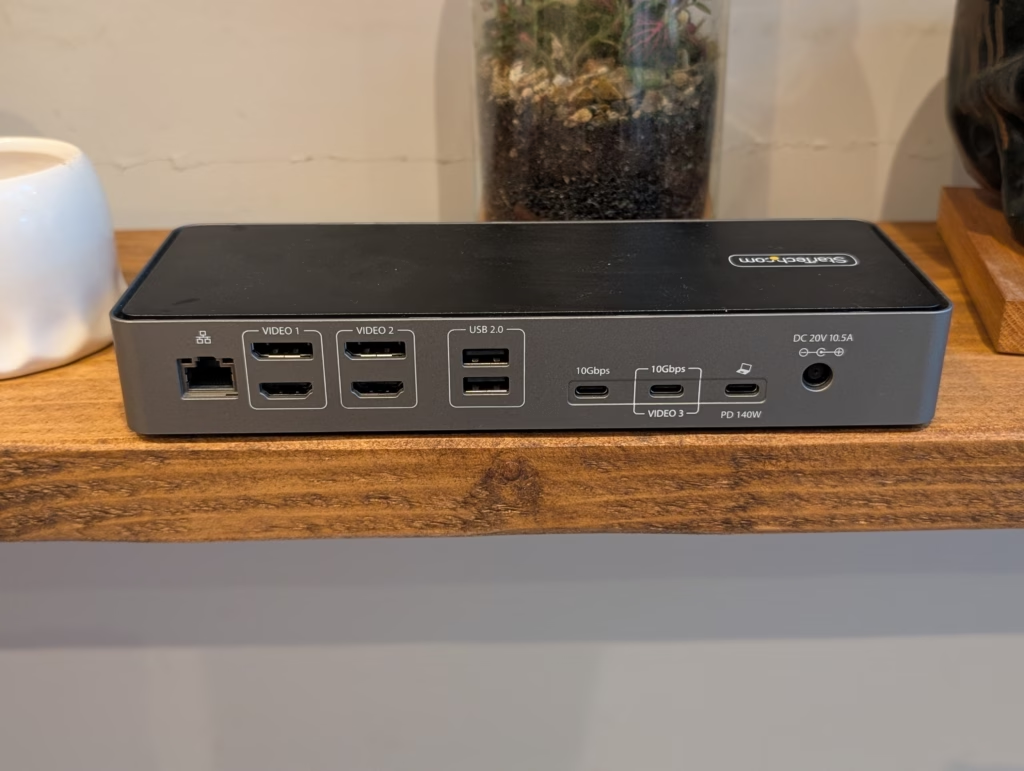
Docking stations are not exactly attractive in the first place, and Startech does not make the most visually appealing products. This is very much function over form. The chassis is constructed with a utilitarian grey and black aesthetic that blends easily into a corporate office environment but will not win any design awards. The casing feels dense and substantial, which is usually a positive indicator for thermal management. Docks pushing 140W of power and driving three monitors generate significant heat, so the materials used here likely serve as a passive heatsink.
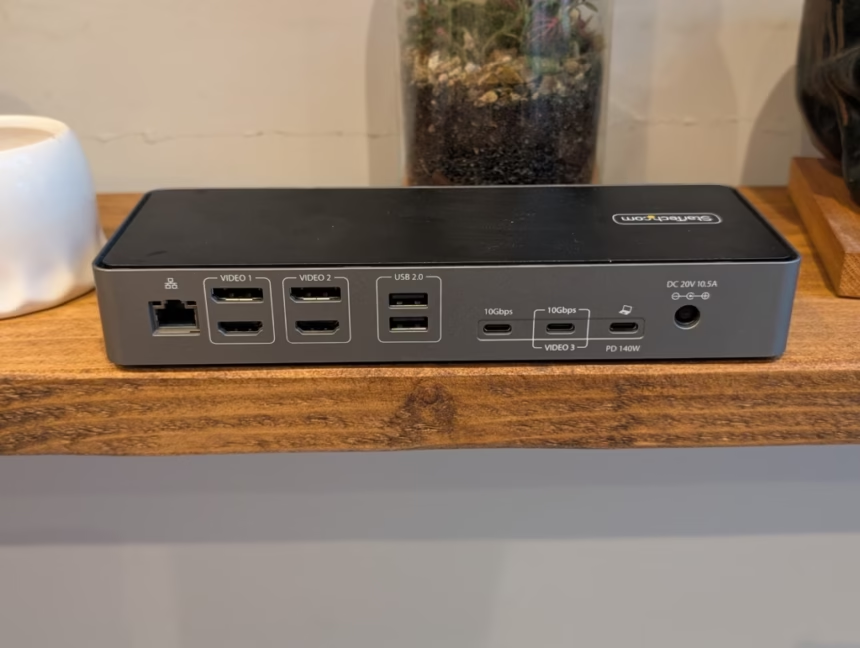
The layout of the ports is logical for a permanent desk setup. The rear houses the connections that you typically plug in once and forget, such as the monitor cables (HDMI/DP), the Ethernet connection for wired internet, and the USB 2.0 ports which are ideal for a keyboard and mouse. Keeping these at the back aids in cable management, preventing the “spider web” effect across your desk.
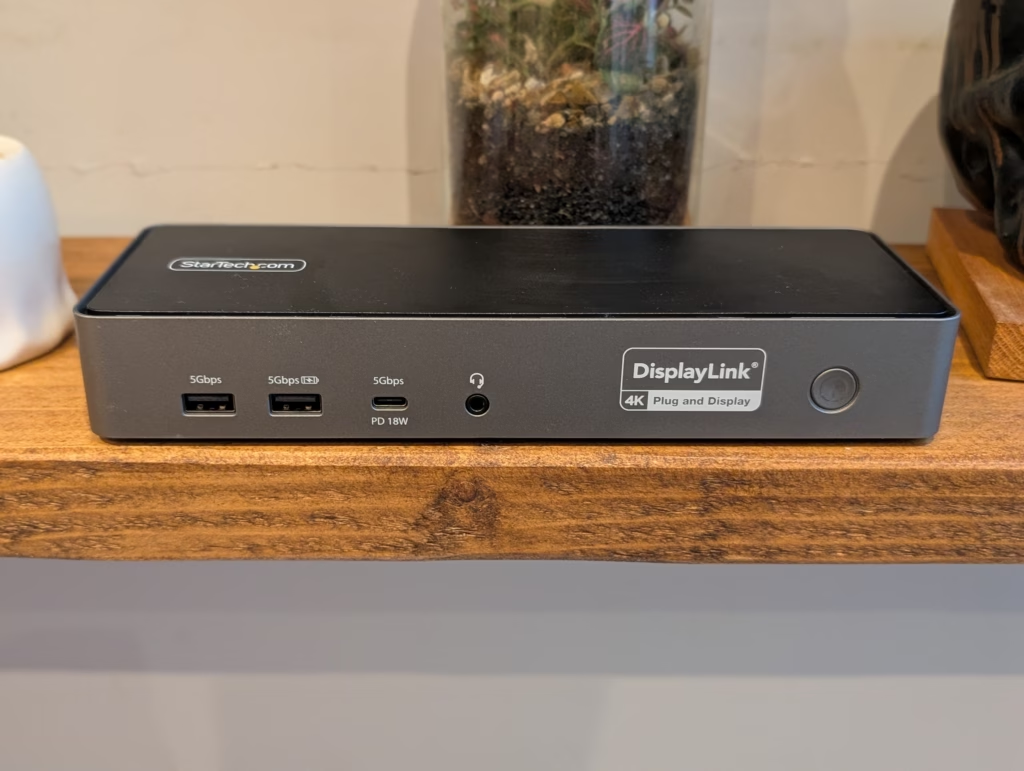
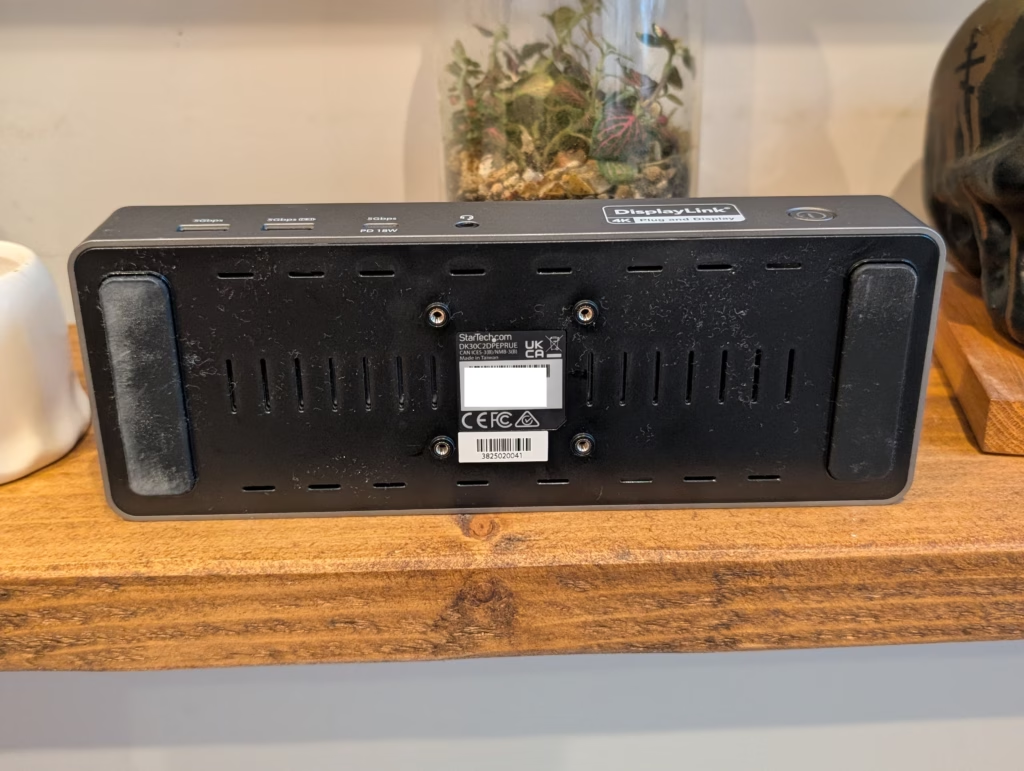
Conversely, the front panel features the ports you need frequent access to. There is a USB-C port capable of 18W charging, which is excellent for quickly topping up a phone or connecting a temporary drive. The inclusion of two USB-A ports on the front is also practical, as many wireless headset receivers and flash drives still utilise this connector. The power button is tactile and located on the front right, next to the audio jack.
One specific feature that leans heavily into the enterprise focus is the inclusion of three different lock slots. On the side of the unit, you will find a Kensington Standard slot, a Nano slot, and a Noble Wedge slot. In an office environment where hardware theft is a genuine concern, this flexibility ensures the dock can be secured regardless of which locking system the company has already invested in.

Performance
The true test of any docking station lies in its daily reliability and how it handles the bandwidth constraints of a single cable connection.
Multi-Monitors
As previously mentioned, one of the main selling points for this dock is the triple display support. It does this over USB 3.2 Gen 2 10Gbps, which is the host port. It achieves this thanks to DisplayLink, so this is an appealing option for anyone using an older laptop that lacks USB4 or Thunderbolt.
DisplayLink technology works by compressing video data using the CPU of the host computer and sending it as data packets over USB. The dock then decompresses this data to display the image. This differs from “native” video signals like Thunderbolt, which carry a direct DisplayPort signal. The advantage of DisplayLink is its universality; it works on almost anything with a USB port, including Apple M1/M2/M3 base model chips that natively support only one external screen.
However, the implementation here is a hybrid. Video 1 and Video 2 are driven by the DisplayLink DL6950 chipset, offering flexible HDMI or DisplayPort connections. Video 3 is a USB-C output that supports DP Alt-Mode Video. This means the third monitor relies on the laptop’s native GPU capabilities passed through the USB-C port. To use this third output, you would need to use a USB-C to HDMI/DP cable or a monitor that accepts a direct USB-C input.
Some desktop monitors support this, and most portable monitors support it. At home, I have a Samsung C49RG90 49-inch super ultrawide which runs at 5120×1440 x 120Hz. Out of curiosity, I tried this with my work laptop. Initially, the laptop recognised the monitor, but when I changed the source, the monitor would not pick up a signal. However, once I updated my DisplayLink Drivers, I was able to drive the monitor.
This highlights a critical aspect of DisplayLink docks: software dependency. Unlike a simple plug-and-play Thunderbolt hub, the DisplayLink Manager software must be installed and kept up to date for the video outputs to function correctly. In the past, I managed to get a Ugreen dock running the monitor, but it would cause the laptop to intermittently crash. I have not used the Startech for a full day of work in this setup, but I did run it for a few hours without issue.
In the office, I run two 27-inch 4K monitors, and then a third portable monitor underneath. Until now, I have had to plug one of the monitors into the HDMI port on my laptop. It has not been a significant issue, but it is one more thing to plug in when I set it up. With this dock, I have been able to run all three monitors without issue. The visual fidelity on the DisplayLink screens was indistinguishable from native connections for standard office tasks like spreadsheets, coding, and web browsing. While DisplayLink can sometimes introduce latency in high-motion content like gaming, for professional workflows, it is seamless.
Power Delivery and USB Transfer
The “140W” in the product title refers to the Power Delivery (PD) capability. This is a significant specification. Most standard docks top out at 96W or 100W. 140W PD utilises the newer PD 3.1 protocol, making this dock suitable for high-performance mobile workstations, such as the 16-inch MacBook Pro or powerful Windows machines with discrete graphics cards. Using a dock with insufficient power can result in the laptop battery slowly draining even while plugged in, or the CPU throttling performance to save energy. Startech providing 140W ensures that the laptop can run at full tilt while charging.
I tested the USB transfer speeds using an external NVMe enclosure connected to the rear 10Gbps USB-C port. Transfer rates were consistent with the 10Gbps limitation, hitting read/write speeds that saturate the bus. However, users should be aware that because the video data (for two monitors) and the USB data are sharing the same 10Gbps uplink to the laptop, bandwidth can technically become a bottleneck if you are transferring massive files while simultaneously pushing pixels to dual 4K screens. In practice, during my testing, I did not notice any peripheral lag or video stuttering, suggesting the DL6950 chipset manages the bandwidth prioritisation effectively.
2.5GbE Networking
There used to be very few docks that supported 2.5GbE, and it is something I have criticised brands for in the past, especially when USB-C 2.5GbE docks are very affordable. Network speeds are often the bottleneck in modern workflows, particularly as we move towards larger file sizes and cloud-based assets.
Considering the price of this dock, I am relieved that it includes 2.5GbE and during my testing with it, it performed as expected. LAN transfer does not quite hit 2500Mbps, but USB-C networking is sub-optimal; however, it is a big improvement from gigabit.
In a real-world file transfer test from a local NAS equipped with 10GbE, the transfer speeds were significantly faster than a standard gigabit connection. While a gigabit port caps out at around 110-120 MB/s, the 2.5GbE port on this dock allowed speeds to float closer to 230-250 MB/s. For IT professionals deploying OS images or video editors pulling footage from a local server, this speed increase is tangible. It also adds a layer of future-proofing, as 2.5GbE switches and routers are becoming increasingly common in small business networks and enthusiast home setups.
Price and Alternative Options
The Startech 140W Universal Triple Monitor Docking Station has an RRP of £241.19 including VAT.
Startech has the Universal USB4 & Thunderbolt 4 Docking Station, which supports four 4K displays and has 2.5GbE. This has an RRP of £274.79 GBP including VAT. If you have a laptop with USB4/Thunderbolt, this would be worth the extra money, however, is worth noting that this only supports 100W charging, though very few laptops support higher than 100W charging over USB-C.
Anker has the Anker Prime Docking Station (14-in-1, Triple Display, DisplayLink). This has an RRP of £ 300, higher than Startech’s, but it is available for £200. This supports up to three 8K monitors at 60Hz, with 140W PD and 2.5GbE. It also has a display and companion app giving you greater control over its features.
There are affordable options that have triple monitor support using Displaylink, but these tend to be from random brands, most companies and MSPs would not use these products. One example is the ZMUIPNG Displaylink Docking Station has triple monitor support but only 100W PD and gigabit Ethernet. This is available for around £120.
Overall
The Startech 140W Universal Triple Monitor Docking Station is a bit of a niche product that will most likely appeal to business environments where you may have end users running older mid-range laptops that lack things like USB4 or Thunderbolt, but need triple monitors for lots of screen real estate. That is quite a common occurrence where I work; almost every end user uses two external monitors plus a laptop, and I am sure they would happily run three if they could.
At 250 GBP, it is not cheap, and it seems disproportionately expensive when the host port only supports 10Gbps over USB 3.2 Gen 2. But, there are not many reputable competing products, and it is the triple monitor support over USB 3.2 Gen 2 using DisplayLink that is the main selling point here. It solves a specific hardware limitation through clever software and silicon integration.
In my case, it has achieved exactly what they are advertising, and what I want. A docking station that supports three external 4K monitors over USB 3.2 Gen 2 with adequate power delivery to charge my laptop. Now, when I get to work, I only plug in a single USB-C port, and I get to work immediately.
Overall, I have ended up liking this more than expected, and continue to use it for my work set-up, which is always a strong indicator of how I feel about a product. It may not have fancy USB4 or Thunderbolt 4 ports that other brands are shifting towards; it instead focussed on support for triple monitors over older USB-C standards, which is extremely useful in business environments including work from home setups. For IT managers looking to standardise on a single dock that works with almost any laptop—from an old Dell Latitude with USB-A (via adapter) to a new MacBook Pro—this Startech unit offers a compelling, albeit pricey, solution.

I am James, a UK-based tech enthusiast and the Editor and Owner of Mighty Gadget, which I’ve proudly run since 2007. Passionate about all things technology, my expertise spans from computers and networking to mobile, wearables, and smart home devices.
As a fitness fanatic who loves running and cycling, I also have a keen interest in fitness-related technology, and I take every opportunity to cover this niche on my blog. My diverse interests allow me to bring a unique perspective to tech blogging, merging lifestyle, fitness, and the latest tech trends.
I’m proud to share that Vuelio has consistently ranked Mighty Gadget as one of the top technology blogs in the UK. With my dedication to technology and drive to share my insights, I aim to continue providing my readers with engaging and informative content.