Any links to online stores should be assumed to be affiliates. The company or PR agency provides all or most review samples. They have no control over my content, and I provide my honest opinion.
Plaud NotePin S Review
Plaud NotePin S Review
Summary
The Plaud NotePin S refines an already capable concept with a more practical wearable design and a genuinely useful tactile button, making it an effective tool for professionals who regularly record meetings, lectures, or conversations. While it lacks phone call recording and does not match the extended microphone performance of the Note Pro, its strong AI transcription, flexible summaries, and improved usability make it a well-judged option for personal, close-range recording, particularly for those who found the card-style Note form factor inconvenient.
Pros
-
Practical wearable form factor with multiple carrying options
-
Physical tactile button improves reliability and ease of use
-
Accurate transcription and highly flexible AI summaries
-
Generous free transcription tier with full feature access
-
Strong privacy and security credentials suitable for professional use
Cons
-
No phone call recording support
-
Microphone performance is limited compared to the Note Pro
-
Subscription required for heavier transcription use
-
Only minor upgrades over the original NotePin for existing owners
I have previously reviewed the Plaud Note Pro and the original Plaud Note and was pleasantly surprised at how much I liked them.
I was originally sceptical due to the advancements in call recording on phones, with many phones now offering live transcribing, and I still think a phone is going to be adequate for casual or infrequent use. But I found the transcription features and summaries of the Plaud devices both accurate and useful, and I think they are a great choice for anyone who needs to record meetings regularly.
Recently, Plaud launched the new NotePin S, which appears to be a minor refresh of the original NotePin. I didn’t review the original model, but I do find the form factor very appealing in comparison to the Note, and I was eager to review it.
Related Reviews
Specification
| Specification | Plaud NotePin S | Plaud NotePin |
| Record button | Physical tactile button | Pressure-sensitive button |
| Press to highlight | Available | Not available |
| Battery capacity | 320 mAh | 270 mAh |
| Battery life | Up to 20 hours continuous recording (up to 40 days standby) | Up to 20 hours continuous recording (up to 40 days standby) |
| Apple Find My support | Coming soon | Available |
| File transfer options | Bluetooth (BLE 5.2), Wi-Fi (2.4 GHz) | Bluetooth (BLE 5.2), Wi-Fi (2.4 GHz) |
| Upload to cloud while charging | Supported | Supported |
| Device storage | 64 GB | 64 GB |
| Carrying options | Magnetic pin, clip, lanyard, or wristband | Magnetic pin, clip, lanyard, or wristband |
| Weight (without magnetic pin) | 17.4 g | 16.6 g |
| Dimensions | 51 × 21 × 11 mm | 51 × 21 × 11 mm |
| Accessories included | Magnetic pin, clip, wristband, lanyard, charging dock, cable | Magnetic pin, clip, charging dock, cable |
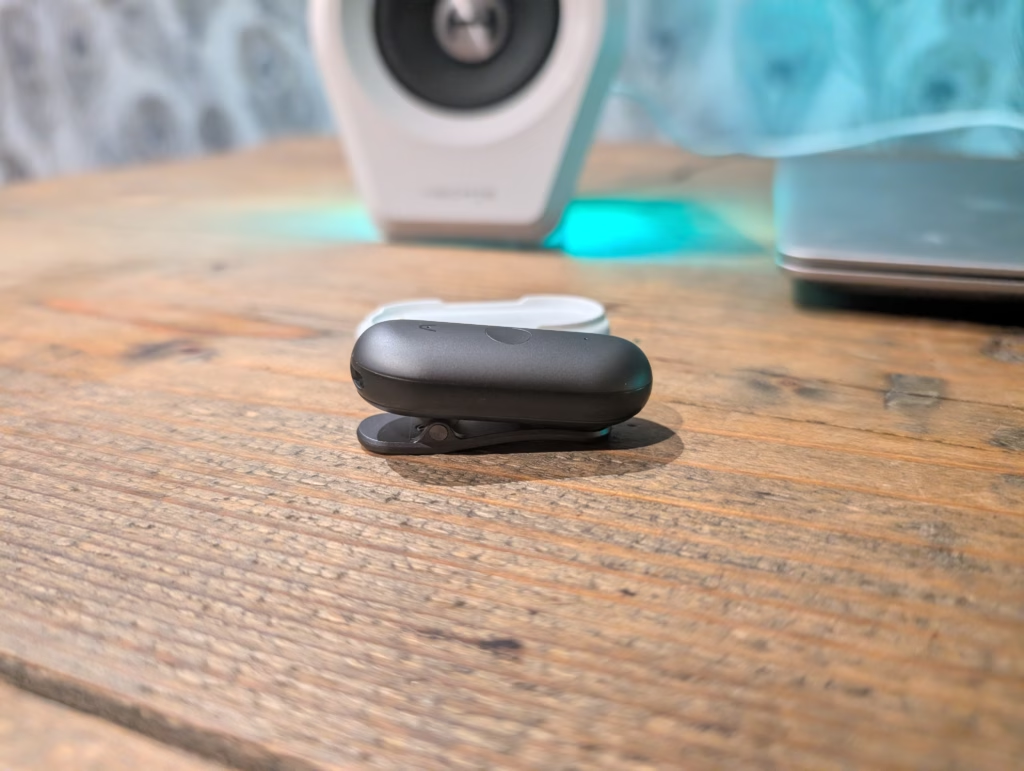
The most significant hardware change is the physical tactile button replacing the pressure-sensitive button found on the original NotePin. This is a small but meaningful improvement that makes the device more intuitive to use, particularly when you cannot see the device and need tactile feedback to confirm your actions.
Plaud Note Plans
The Plaud NotePin S comes with 300 minutes per month of free transcription. If you need more than this, you will need to subscribe to one of the plans.
Thankfully, the free plan shares all the same features as the Pro and Unlimited plans, whereas many companies would wall off certain features behind paid tiers. This means casual users can still access the full suite of AI capabilities, just with limited minutes.
The Pro plan costs £8.40 per month if billed annually, or £17.99 monthly. This increases the minutes to 1200 per month, which should be sufficient for most professionals who attend several meetings per week.
The unlimited plan is £18.80 per month billed annually, or £28.49 monthly. For heavy users who record multiple hours of audio daily, this plan removes any concerns about running out of transcription minutes.
It is worth noting that Plaud includes access to their new Desktop application with the NotePin S, which allows you to record online meetings without intrusive meeting bots. This is a nice addition that extends the usefulness of the Plaud ecosystem beyond in-person recordings.
Design
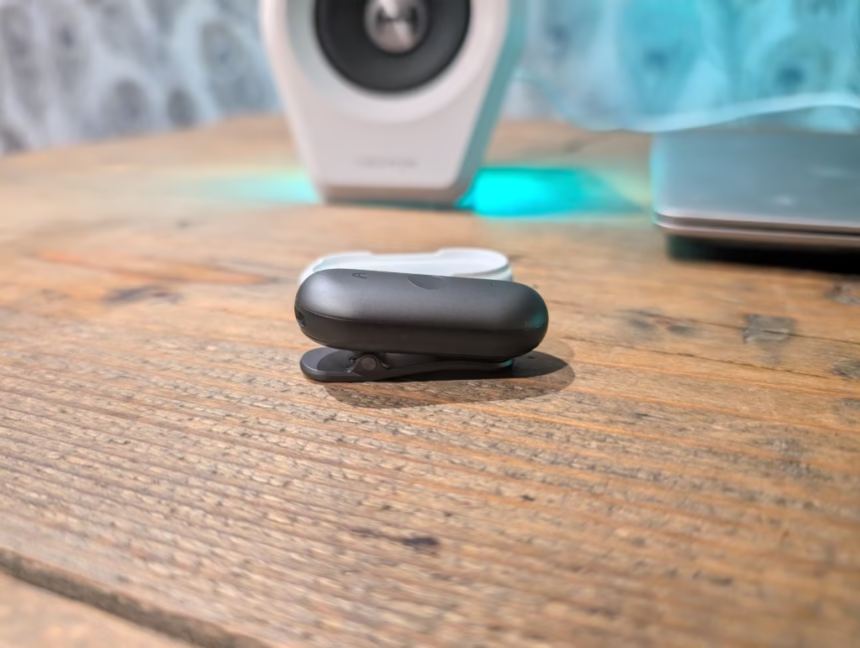
The Plaud NotePin S has a completely different design to the Note, and it is a tweaked design of the original NotePin.
Rather than a flat card-shaped design that attaches to the back of your phone, you have a small pill-shaped design with a magnetic back that can then be attached to a clip, lanyard or bracelet.
Personally, I like this design as it gives you some flexibility on how to wear or carry it. While I love the call recording feature of the Note, I do really like having it attached to the back of my phone, as it adds bulk, and I am constantly having to take it off for contactless payments.
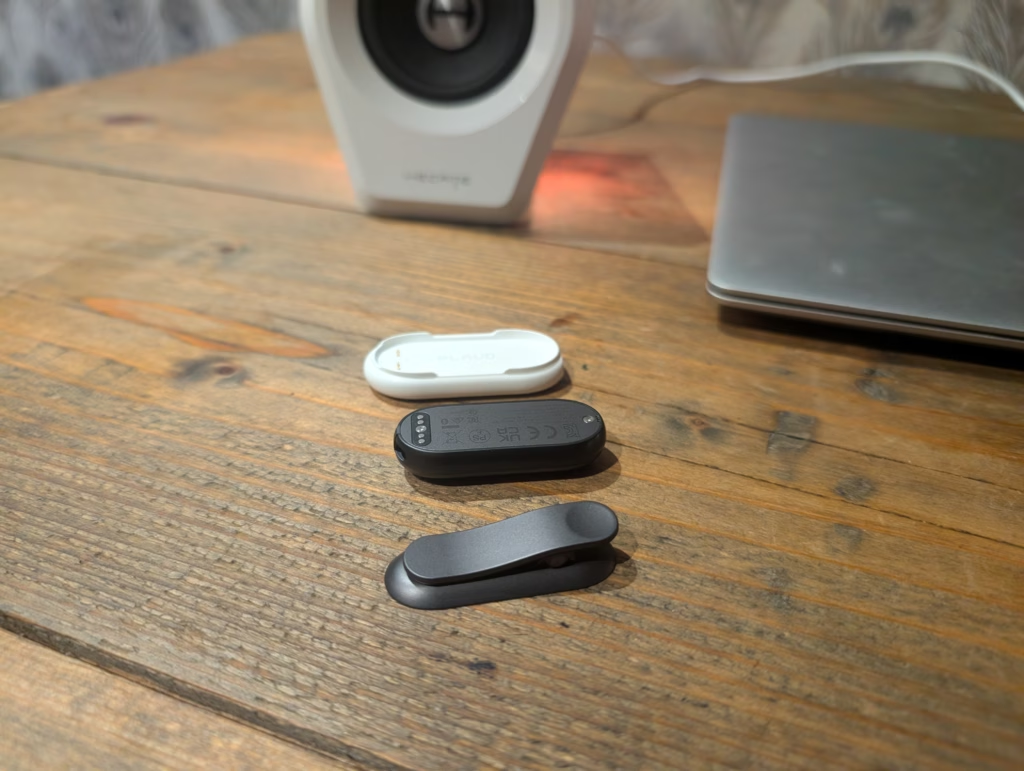
In comparison to the original NotePin, the main difference is a physical button that you hold down to start recording. You then get more accessories, including a wristband and a lanyard.
Set Up
Setting up the Plaud NotePin S is identical to the other Plaud models, it requires downloading the Plaud app. The setup process itself is straightforward – enable Bluetooth, search for the device, and you’re connected within seconds.
Microphone Performance & Voice Recording Quality
At its core are two MEMS microphones capable of capturing audio from distances up to three metres, which Plaud claims deliver clear recording quality across various meeting environments. The previous NotePin also used two MEMS microphones; however, I did not review that, so I cannot compare performance directly.
For comparison, the Plaud Note has 2 MEMS plus 1 VPU (Voice Pickup Unit), and the Pro has 4 MEMS plus 1 VPU. The absence of a VPU in the NotePin S means this device is not designed for phone call recording – it is focused purely on ambient recording for meetings, lectures, and conversations.
In my testing, the dual microphones performed well in typical meeting environments. I found that positioning the device on my chest, either clipped to a jacket or on a lanyard, provided the best results. The audio captured was clear enough for accurate transcription, though naturally the quality degrades as you move further from the speakers.
For smaller meetings of two to four people around a table, the audio quality was very good. Voices came through clearly with minimal background noise. In larger meeting rooms with more participants, or when speakers were at the far end of the room, the quality was acceptable but noticeably reduced compared to having the device positioned closer to speakers.
The lack of the advanced microphone array found in the Note Pro means this device will not match the range or clarity of its more expensive sibling. However, for the intended use case of personal recording where you wear the device yourself, the performance is more than adequate.
AI Transcription Performance & Speaker Labels
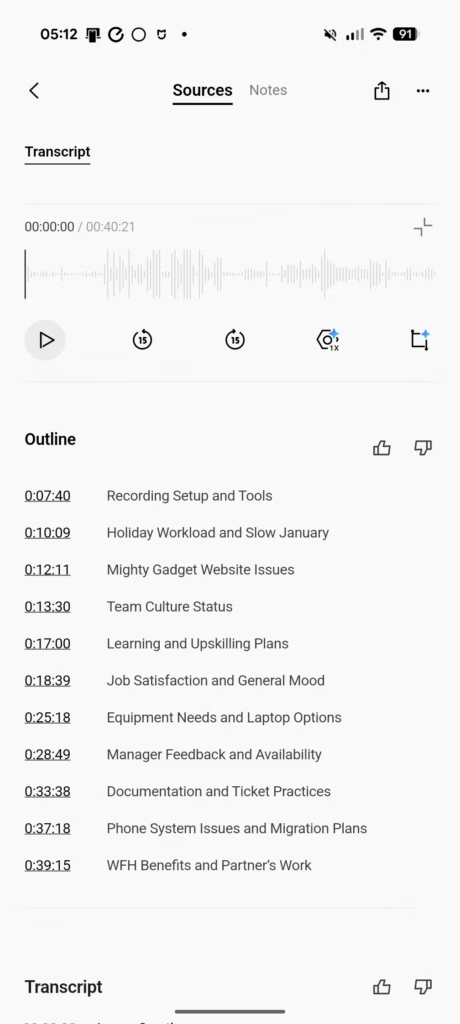
All the transcription and AI features are identical to the other Plaud models, and I have found the system to be excellent overall.
Compared to my previous reviews, it seems the app has been updated to let you program Plaud with your own voice, so it can automatically label your contributions in transcripts. This is a helpful addition that improves the usefulness of speaker labels in multi-person recordings.
The transcription uses OpenAI’s Whisper Large V3 model alongside Azure’s speech services, supporting 112 languages. In my testing with English conversations in good conditions, the transcription was highly accurate, typically achieving what I would estimate as 95 percent accuracy or better for clear speech.
Speaker labelling works reasonably well, though it is not perfect. The system can distinguish between different voices and assign them labels such as Speaker 1 and Speaker 2. You can manually rename these labels in the app afterwards. In meetings with four or five regular participants, I found the AI correctly identified who was speaking about 80 percent of the time after I had labelled them once.
The transcription can struggle with complicated words and technical terms. Working in IT, there are lots of acronyms and technical terminology, and this can sometimes be a stumbling block for the transcription. The custom vocabulary feature helps here, allowing you to add industry-specific terms that the AI should recognise.
For non-native English speakers or those with strong regional accents, the transcription accuracy may be somewhat lower. I noticed that my northern accent occasionally caused the odd word to be misheard, though the context usually made the intended meaning clear.
AI Summary
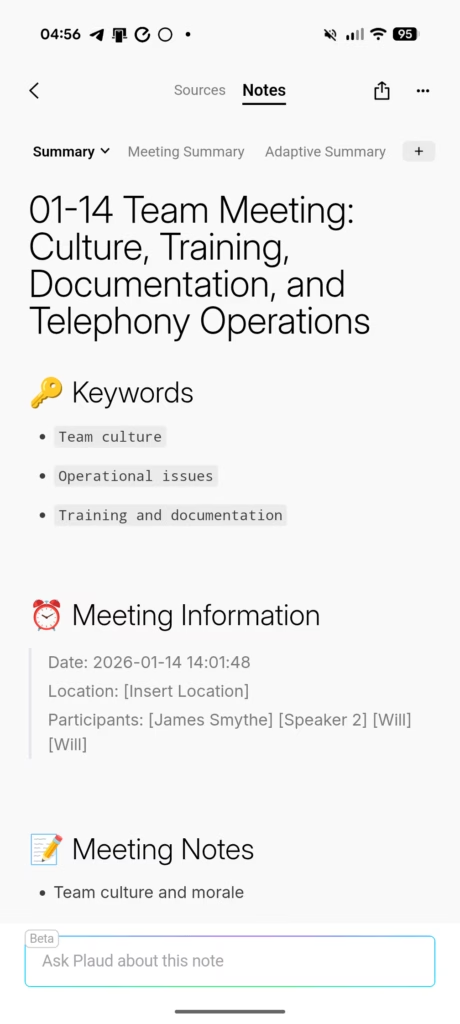
The AI summary feature has improved considerably since my first Plaud review. Rather than just providing a basic overview, Plaud now offers what they call Multidimensional Summaries.
You can generate different summary types from the same recording – meeting notes, action items, key decisions, or even speaker-specific summaries showing what each person contributed. This flexibility is genuinely useful, as different stakeholders often need different types of information from the same meeting.
The summary quality largely depends on the recording quality and content structure. Well-organised meetings with clear agendas produce excellent summaries. Rambling, unstructured conversations predictably yield less useful results. The AI does a decent job of identifying and highlighting important points, though it occasionally fixates on trivial details while missing crucial context.
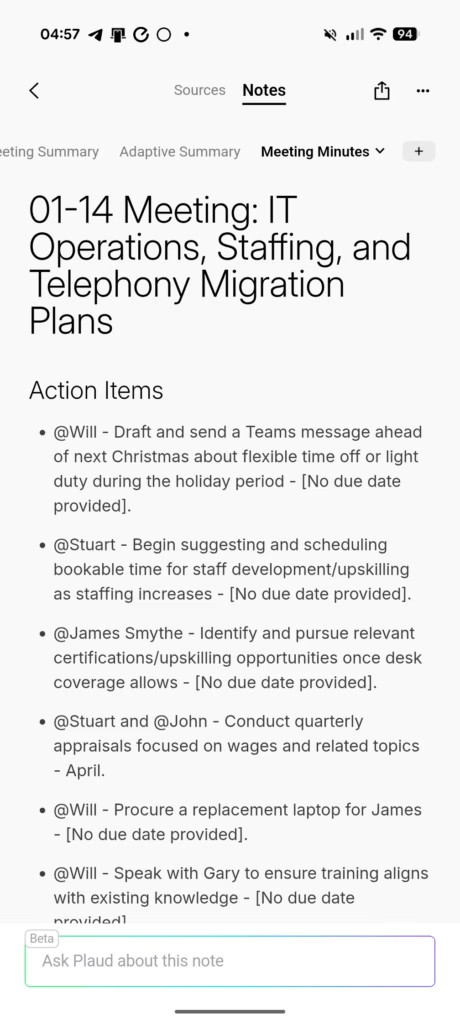
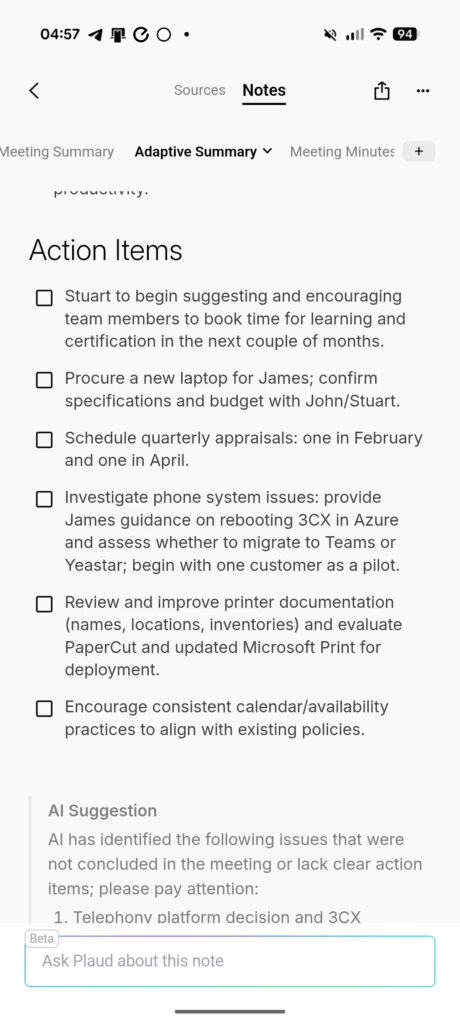
The template system is extensive, with over 2000 pre-built templates for different use cases. Whether you need a sales call summary, a medical consultation note, a legal meeting brief, or a project planning document, there is likely a template that fits your needs.
I found this to be a handy feature. I sometimes attend virtual briefs and admittedly do not always concentrate, often doing work while the brief is running. Using a Plaud device to record, transcribe, and summarise the briefing helps me process the information in a more efficient manner. I can skip all the fluff and get the important information I need.
The summaries are powered by leading large language models including GPT-4, Claude, and Gemini. You can choose which model to use, and each may produce slightly different results depending on the content and structure of your recording.
AI Mind Map
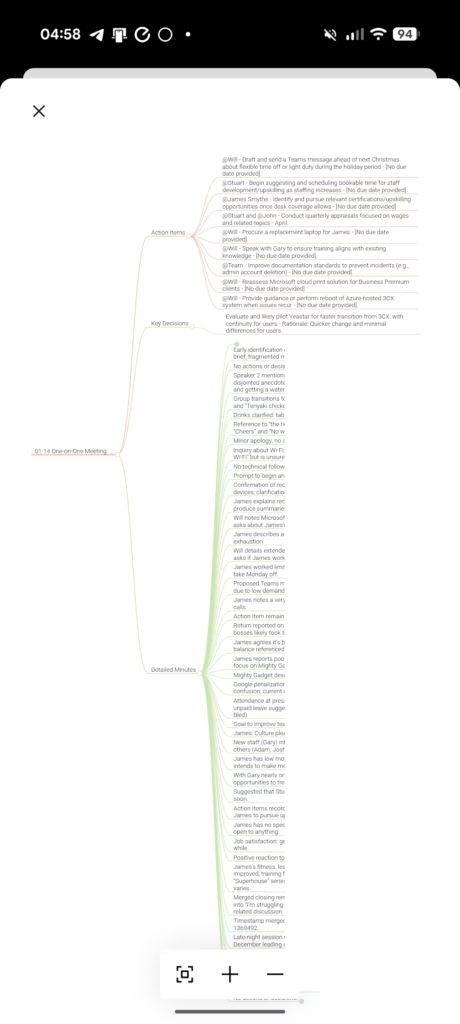
The AI mind map attempts to create a visual representation of the discussion, showing relationships between topics and ideas. For straightforward meetings with clear topics, it works reasonably well. For complex discussions with multiple threads, the resulting mind maps often look chaotic and aren’t particularly useful.
The mind maps are generated automatically based on the AI’s interpretation of the conversation structure. You can’t manually adjust them, which limits their usefulness. I’d love to see the ability to edit and refine these maps, perhaps adding my own connections or removing irrelevant branches.
That said, for simpler recordings like lectures or presentations with a clear structure, the mind maps can provide a quick visual overview of the main topics covered. I would consider this a nice-to-have feature rather than a core selling point.
Battery Life and Charging
Battery life is good enough that I have not had the NotePin S die on me yet during normal use.
While it has a physically larger battery at 320 mAh compared to 270 mAh on the original NotePin, it has the same stated endurance of up to 20 hours continuous recording and up to 40 days standby. This suggests the additional battery capacity is being used to power other improvements rather than extending runtime.
One useful feature is that the device can upload recordings to the cloud while charging. This means you can simply place it on the charger overnight and wake up to find your recordings already transferred and ready for transcription.
The 64 GB of local storage is generous and should accommodate days of continuous recording without needing to transfer files. Plaud states this is enough for approximately 480 hours of audio, which is more than sufficient for most users.
Privacy and Security
Plaud makes much of their privacy and security credentials, and for good reason. The device and platform hold ISO 27001, ISO 27701, GDPR, SOC 2, HIPAA, and EN 18031 compliance certifications. This makes the device suitable for use in professional environments where data security is a concern, including healthcare and legal settings.
Data is encrypted both on the device and during transfer. Your recordings are stored locally until you choose to upload them, giving you control over what gets processed through cloud services.
That said, you are still ultimately sending your recordings to AI providers like OpenAI or Anthropic for transcription and summarisation. While Plaud acts as an intermediary and does not use your data to train models, if absolute privacy is critical, you might want to stick to local-only recording and not use the AI transcription features.
For most professional use cases, the security measures in place should be more than adequate. The HIPAA compliance in particular makes this suitable for medical professionals who need to record patient consultations.
Price and Alternative Options
The Plaud NotePin S has an RRP of £159
The older Plaud NotePin is available for £149, and the Note and Note Pro are available for £149 and £169 respectively.
When I first reviewed Plaud, it did not have much competition. You had applications like Otter that offer similar functionality, but this app and other similar apps are problematic in a corporate environment and have been blocked for many of the clients I deal with.
There have always been a lot of good voice recorders, including some with transcription, such as the iFLYTEK Smart Recorder, but I found the performance poor in comparison to Plaud.
However, Plaud now faces competition from many other brands offering similar products including:
- Mobvoi TicNote AI Voice Recorder for £128, which is basically a clone of the Plaud Note/Note Pro
- Soundcore Portable AI Voice Recorder is similar to the NotePin and is available for as low as £120. However, it does not appear to have the accessories or flexibility on where to wear it.
There are then dozens of Plaud clones on Amazon. Typically, Plaude appears to cost around £20 more than most competing options. I’d be inclined to say this is worth it as it is a more mature product.
Overall
I have been impressed with the Plaud NotePin S. While it lacks the phone call recording features of the Note model, I generally prefer its form factor, which gives you more flexibility in how to carry or wear it.
From what I can tell, there is no meaningful difference between the NotePin S and the original NotePin other than the physical button and additional accessories.
It seems that Plaud took on user feedback of the original and tweaked the design to create the NotePin S. So, there is almost no reason to upgrade from the NotePin, but for new buyers, I think the extra £10 is worth it for the physical button and accessories.
The physical tactile button is a small but important improvement. With the original pressure-sensitive button, users reported uncertainty about whether they had successfully started or stopped recording. The tactile button provides clear haptic feedback – one vibration to start recording, two vibrations to stop, and a short press to highlight key moments during recording.
The press-to-highlight feature is also a welcome addition that was not available on the original NotePin. This allows you to mark important moments during a recording with a simple button press, which then signals to the AI what matters most when generating summaries and insights. It is a genuinely useful feature for long meetings where only certain sections are relevant.
The wearable form factor has real advantages over the card-style Note devices. Being able to clip it to your clothing or wear it on a lanyard means you are more likely to have it with you when needed. I found myself using the NotePin S more frequently than I expected simply because it was easier to carry.
However, there are limitations to consider. The dual MEMS microphones are not as capable as the Note Pro’s four MEMS plus VPU array. If you regularly record large meetings or need extended range, the Note Pro remains the better choice despite its less convenient form factor. The NotePin S is best suited for personal recording where you are close to the conversation.
The lack of phone call recording is the biggest missing feature compared to the Note models. If you need to record phone calls, you will need to look at the Note or Note Pro instead.
For anyone who needs to regularly record meetings, lectures, or conversations, the NotePin S is a solid choice. The subscription model for extended transcription remains a consideration, but the 300 minutes per month free tier is generous enough for occasional use. Professionals who record frequently will find the Pro or Unlimited plans reasonably priced for the time savings they provide.
The AI transcription accuracy, combined with the useful summary features and cross-platform sync, makes this more than just a simple voice recorder. The integration of everything into one ecosystem – from recording through to searchable, summarised notes – is where the real value lies.
I would recommend the NotePin S for anyone who found the Note form factor inconvenient, or who wants a more discreet recording solution. For those who need phone call recording or maximum audio quality in challenging environments, the Note Pro remains the better choice. And for casual users who only occasionally need to record something, your phone likely remains the most cost-effective option.
Plaud NotePin S Review
Plaud NotePin S Review
Summary
The Plaud NotePin S refines an already capable concept with a more practical wearable design and a genuinely useful tactile button, making it an effective tool for professionals who regularly record meetings, lectures, or conversations. While it lacks phone call recording and does not match the extended microphone performance of the Note Pro, its strong AI transcription, flexible summaries, and improved usability make it a well-judged option for personal, close-range recording, particularly for those who found the card-style Note form factor inconvenient.
Pros
-
Practical wearable form factor with multiple carrying options
-
Physical tactile button improves reliability and ease of use
-
Accurate transcription and highly flexible AI summaries
-
Generous free transcription tier with full feature access
-
Strong privacy and security credentials suitable for professional use
Cons
-
No phone call recording support
-
Microphone performance is limited compared to the Note Pro
-
Subscription required for heavier transcription use
-
Only minor upgrades over the original NotePin for existing owners
Last update on 2026-01-16 / Affiliate links / Images from Amazon Product Advertising API

I am James, a UK-based tech enthusiast and the Editor and Owner of Mighty Gadget, which I’ve proudly run since 2007. Passionate about all things technology, my expertise spans from computers and networking to mobile, wearables, and smart home devices.
As a fitness fanatic who loves running and cycling, I also have a keen interest in fitness-related technology, and I take every opportunity to cover this niche on my blog. My diverse interests allow me to bring a unique perspective to tech blogging, merging lifestyle, fitness, and the latest tech trends.
I’m proud to share that Vuelio has consistently ranked Mighty Gadget as one of the top technology blogs in the UK. With my dedication to technology and drive to share my insights, I aim to continue providing my readers with engaging and informative content.