Any links to online stores should be assumed to be affiliates. The company or PR agency provides all or most review samples. They have no control over my content, and I provide my honest opinion.
Geekom A5 2025 Edition Review
Geekom A5 2025 Edition Review
Summary
The Geekom A5 2025 Edition is not a generational upgrade in performance over the 2023 model, but it remains a well-judged mini PC in the context of today’s distorted component pricing. By prioritising power efficiency, low noise, and aggressive discounting, Geekom has produced a compact system that comfortably outperforms budget Intel N-series mini PCs while costing far less to run than higher-powered alternatives. At around £300, it is a sensible and well-rounded choice for home office use, media playback, light productivity, and low-power server duties, even if it lacks the excitement or raw performance of older or more expensive models.
Pros
-
Exceptionally quiet operation even under sustained load
-
Very low power consumption with excellent efficiency
-
Strong connectivity with dual HDMI, dual USB-C and 2.5GbE
-
Compact, well-built chassis with easy internal access
-
Competitive pricing with frequent discounts
Cons
-
Lower CPU and GPU performance than the 2023 A5 despite being newer
-
Zen 3 CPU and Vega graphics are showing their age
-
No USB4 or Thunderbolt support
-
Secondary M.2 slot limited to 2242 form factor
-
Reduced included RAM compared to the previous generation
Back in November 2023, I reviewed the original Geekom A5 Mini PC. Now, two years later, Geekom has refreshed this with a different CPU and slightly different specs elsewhere.
The main difference is that the 2025 edition uses the AMD Ryzen 5 7430U while the 2023 model used the AMD Ryzen 7 5800H. You may think that the newer CPU is better, but on paper, the older one has more cores and a higher boost frequency.
The new model also comes with less RAM, which I discuss later. Unless you have no interest in PC hardware, you will likely be well aware of the massive rise in the cost of RAM, due to AI destroying the world.
The vast majority of the other specs are identical. Geekom has basically re-used the previous mini PC with a minor chipset refresh.
This all sounds rather underwhelming, but you need to factor in the fact that the PC market is currently a complete mess, and this is likely the best way to keep costs affordable. The Geekom A5 2025 Edition sits in what can best be described as the Goldilocks zone between more powerful mini PCs and budget Intel N100-based systems. While the performance and specification of the A5 are reasonable, the prices start attractively low, which makes it a sensible compromise between capability and affordability.
Related Reviews
The table below provides a direct comparison between the 2025 and 2023 editions of the Geekom A5. This helps illustrate exactly what has changed and what remains consistent between the two models.
| Specification | GEEKOM A5 (2025 Edition) | GEEKOM A5 (2023 Edition) |
| Form factor | Mini PC | Mini PC |
| Chassis size | 117 x 112 x 49.2 mm | 117 x 112 x 49.2 mm |
| Processor | AMD Ryzen 5 7430U | AMD Ryzen 7 5800H |
| CPU architecture | Zen 3 | Zen 3 |
| Cores / Threads | 6 cores / 12 threads | 8 cores / 16 threads |
| Base / boost clock | 2.0 GHz – 4.3 GHz | 3.2 GHz – 4.4 GHz |
| TDP | 15 – 25 W | 35 W |
| Graphics | AMD Radeon Vega 7 | AMD Radeon Vega 8 |
| Memory type | DDR4-3200 dual-channel SO-DIMM | DDR4-3200 dual-channel SO-DIMM |
| Maximum memory | Up to 64 GB | Up to 64 GB |
| Included Memory | 16GB | 32GB |
| Primary storage | 1 x M.2 2280 PCIe Gen 3 x4 NVMe / SATA SSD | 1 x M.2 2280 PCIe Gen 3 x4 NVMe SSD |
| Included Storage | 512GB | 512GB |
| Secondary storage | 1 x 2.5-inch SATA HDD/SSD (7 mm) | 1 x 2.5-inch SATA HDD/SSD (7 mm) |
| USB-A ports | 3 x USB 3.2 Gen 2, 1 x USB 2.0 | 3 x USB 3.2 Gen 2, 1 x USB 2.0 |
| USB-C ports | 2 x USB 3.2 Gen 2 (data + display) | 2 x USB 3.2 Gen 2 |
| Video outputs | 2 x HDMI 2.0b | 2 x HDMI 2.0b |
| Maximum displays | Up to 4 displays | Up to 4 displays |
| Ethernet | 2.5 GbE LAN | 2.5 GbE LAN |
| Wireless | Wi-Fi 6, Bluetooth 5.2 | Wi-Fi 6, Bluetooth 5.2 |
| Card reader | SD card reader | SD card reader |
| Audio | 3.5 mm headphone jack | 3.5 mm headphone jack |
| Operating system | Windows 11 Pro | Windows 11 Pro |
| Power supply | 65W (19 V / 3.42 A) | 120W (19 V / 6.32 A) |
| VESA mount | Yes | Yes |
| RRP | £449 | £529 |
| List Price | £349 | £379 |
| With 15% Discount | £296.65 | N/A |
The default 2025 model comes with 1TB of storage, but at a higher price. There is an option for 512GB, which I have used above to make it a more like-for-like comparison.
RAM Price and Shortages
There is no point in hiding the fact that the Geekom A5 2025 comes with half the RAM of the 2023 model. I would normally criticise a company for this as enshittification, but the unfortunate reality is that RAM has increased in price exponentially in the past year.
To try and provide some context, this Kingston FURY Impact 32 GB (2 x 16 GB) 3200MHz DDR4 CL20 Laptop Memory Kit was available for £196 at the time of writing (31/12/2025). In November 2023, it was less than £75, and back in May 2025, it was just £55.
This Crucial DDR5 RAM 32GB (2x16GB) 4800MHz SODIMM Kit was £238, and in 2023, it was around £90. Back in July 2025, it was just £67.
So, Geekom have made the right decision to reduce the RAM. The performance difference between 16GB and 32GB is not worth it if it adds well over £100 to the final price, which would potentially be more than a third extra to the cost. For most users running office applications, web browsers, and light productivity tasks, 16GB remains perfectly adequate.

Physically, the A5 2025 Edition is identical to the previous model and the more expensive Geekom Mini IT13. The chassis measures 117 x 112 x 49.2 mm and weighs approximately 652g. This is a conventional NUC design that occupies relatively little desk space.
The champagne-gold finish sets it apart from the typical black boxes flooding the market, and the build quality immediately impressed me. Geekom uses a hybrid construction that combines a PC+ABS composite top with a robust metal middle frame and bottom cover. While the exterior appears metallic, it is mostly plastic, but the construction feels premium for this price point.
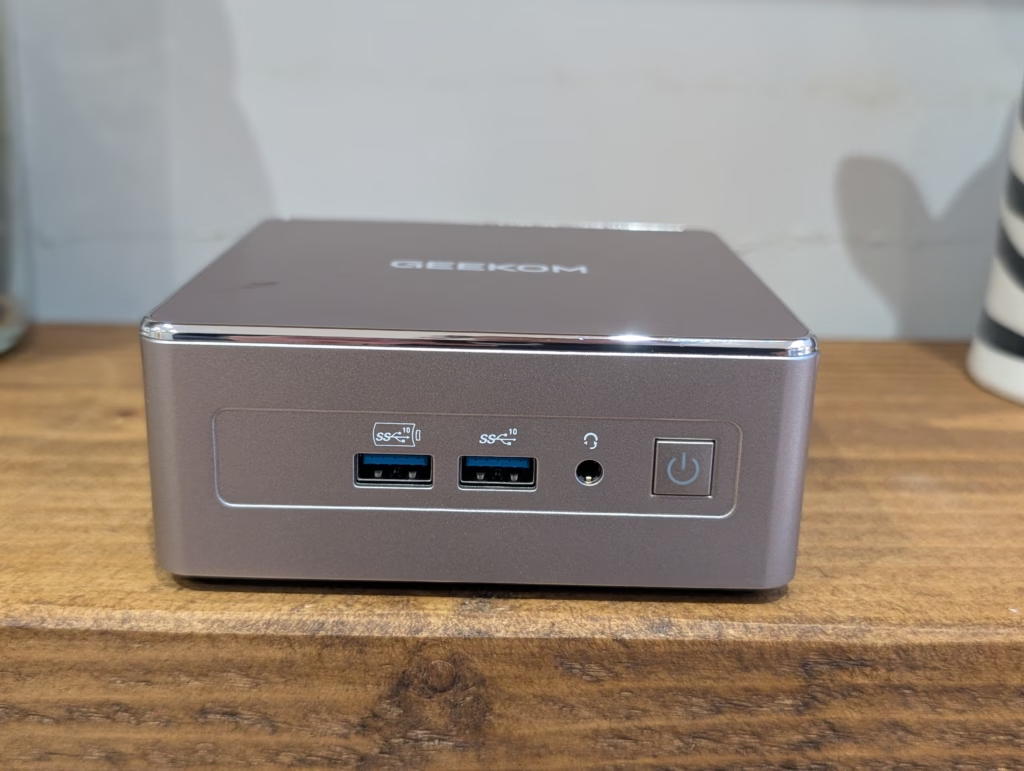
Slots on the left and right are used to draw air into the case, and then it is ejected through openings above the I/O area on the rear. The cooling is achieved efficiently because, at no point during my testing, even after several hours of constant use, did the fan become noticeably loud. Geekom calls this the IceBlast 2.0 cooling system, and it maintains temperatures around 72 degrees Celsius even under stress testing.
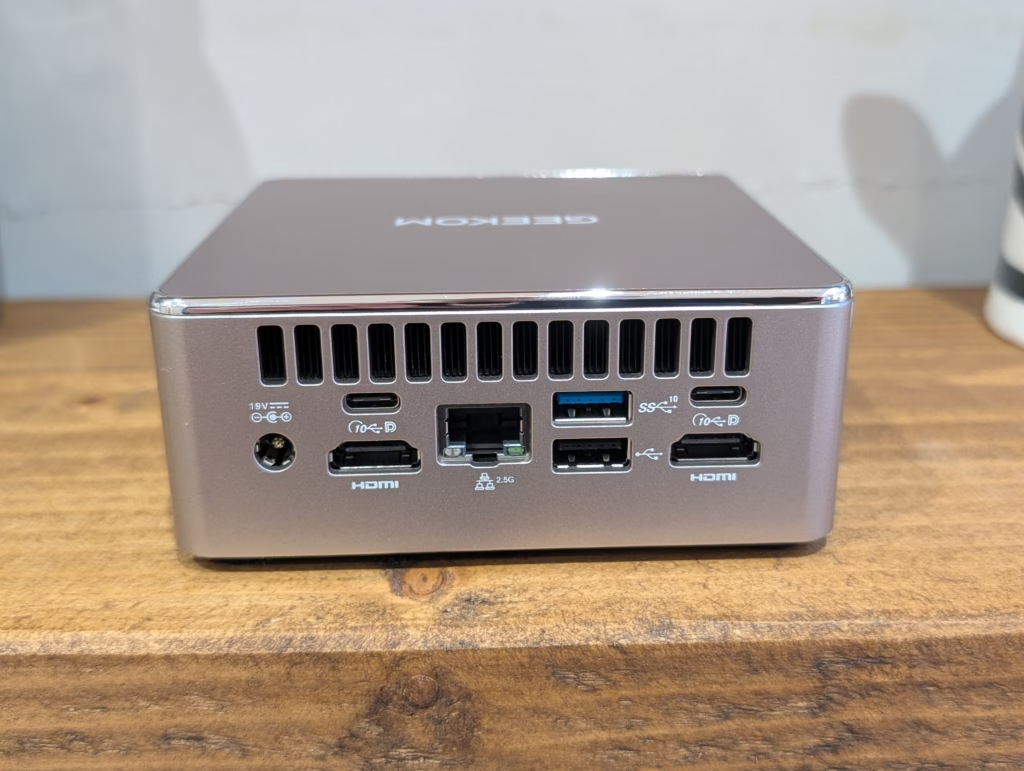
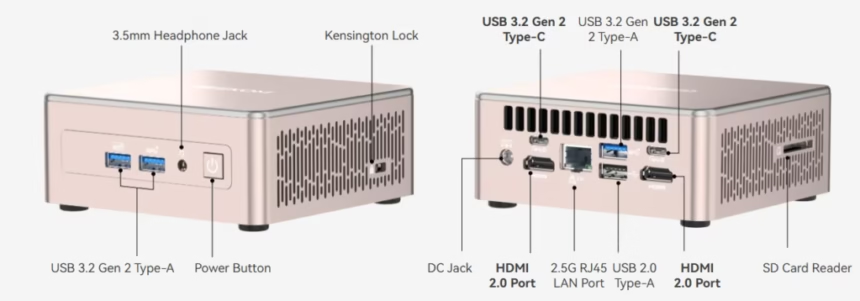
On the front, there are two USB-A 3.2 Gen 2 ports, a 3.5mm headphone jack, and a power button. On the rear, you have two HDMI 2.0b ports, two USB 3.2 Gen 2 Type-C ports (both supporting DisplayPort video output), a third USB 3.2 Gen 2 Type-A port, a USB 2.0 Type-A port, the 2.5GbE Ethernet jack, and the barrel jack for the power supply. The SD card reader sits on the side panel, which makes perfect sense for accessibility, especially if the A5 is mounted on the back of a monitor.
The number of USB 3.2 Gen 2 ports is particularly good at this price point, providing plenty of high-speed connectivity options. However, there is no USB4 or Thunderbolt connectivity, which limits expansion options for those requiring external GPU enclosures or high-bandwidth peripherals. The rear ports are quite tightly grouped, so you will need to take care when attaching or detaching cables, particularly with bulkier connectors.
A VESA mounting bracket and a short HDMI cable are included in the box, allowing the A5 to be easily attached to the rear of a monitor. The 65W external power supply unit is small and can be easily tucked away out of sight, with a usefully long 1.5 metre cable.
Power Adaptor / TDP
The 2025 edition comes with a smaller 65W (19V/3.42A) power adaptor compared to the 120W unit supplied with the 2023 model. This reflects the lower TDP of the Ryzen 5 7430U processor, which operates at 15-25W compared to the 35W TDP of the Ryzen 7 5800H.
In practical terms, this results in better power efficiency. During testing, idle power consumption measured just 6 watts, which is among the lowest I have seen for a mini PC of this capability. Maximum power draw reached 43 watts during stress testing, increasing to 47 watts when performance mode was enabled in the BIOS. For comparison, a typical desktop PC idles around 37 watts, making the A5 considerably more efficient for 24/7 operation or use as a home server.
Upgradeability
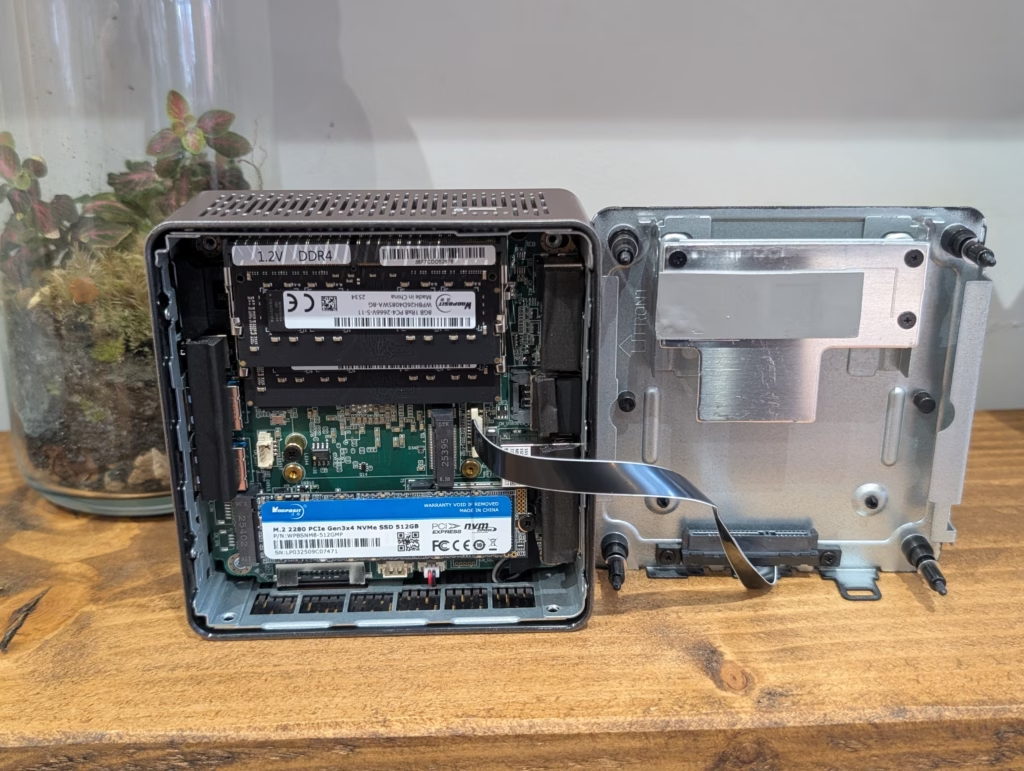
Getting inside the A5 is straightforward. Four captive Phillips screws on the base release the underside, allowing complete access to the internals. The captive design means you will never lose the screws during upgrades, which is a thoughtful touch.
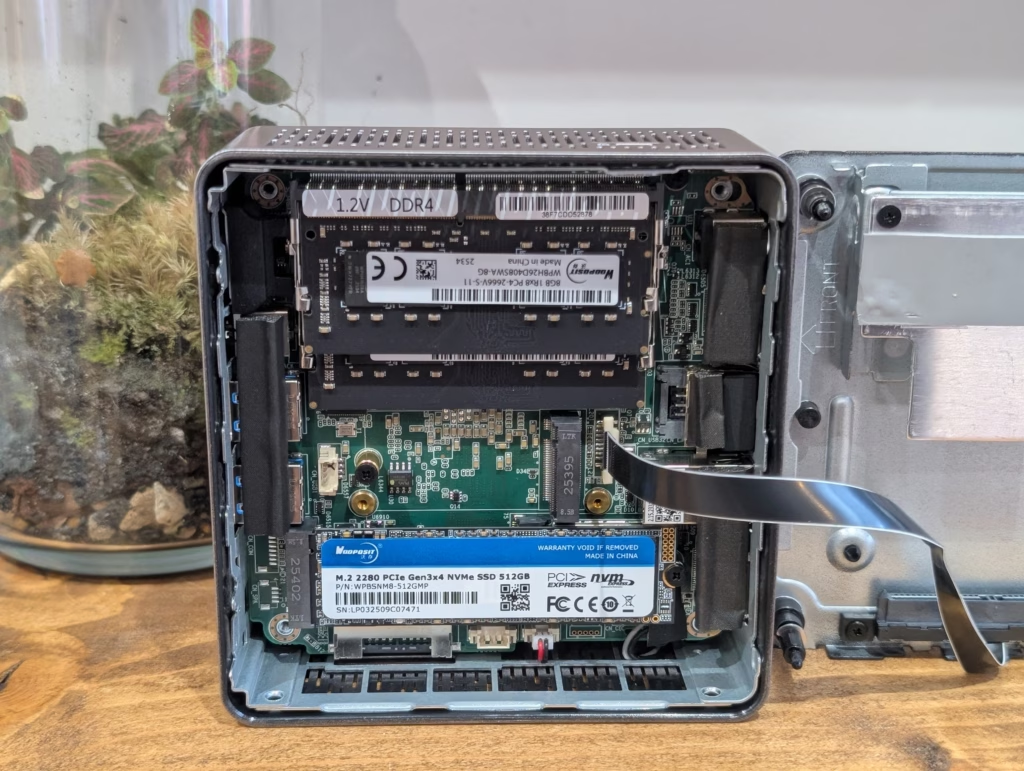
Once open, you have easy access to two DDR4 SO-DIMM slots supporting up to 64GB of memory, and the included 16GB configuration runs in dual-channel mode. There is a primary M.2 2280 slot for the NVMe SSD, plus a second M.2 2242 slot for additional SATA storage. The 2242 slot is worth noting as it limits your expansion options to the shorter drive format, which are less common and typically offer lower capacities than standard 2280 drives.
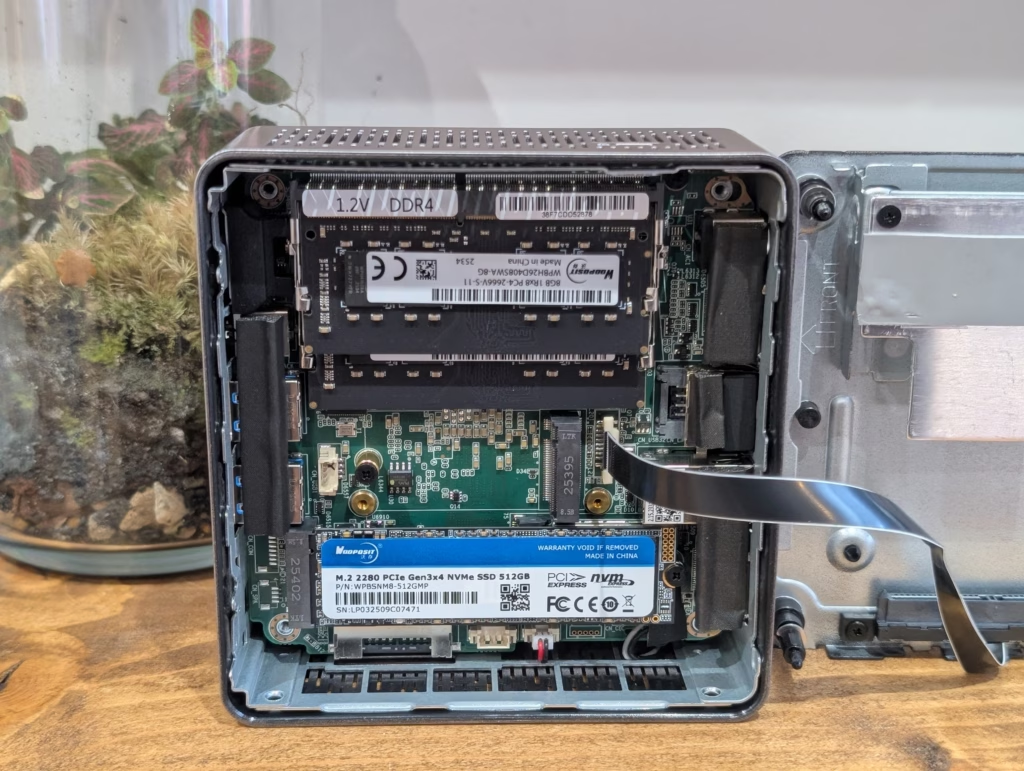
An additional storage option is provided in the form of a tray for a 2.5-inch 7mm SATA HDD or SSD, which connects to the system via a ribbon cable. With SATA SSDs falling out of fashion, I would have much preferred another 2280 M.2 slot.
BIOS
Geekom’s BIOS remains quite limited, as it was on the 2023 model. There is no overclocking or underclocking capability, and you cannot change RAM profiles or timings. For me, the main thing missing is Wake-on-LAN options or scheduled power on functionality.
There is, however, a performance mode toggle that can boost processing power at the expense of slightly higher power consumption and fan noise. Enabling this mode improved benchmark scores by approximately 7-13% depending on the workload.
On a positive note, I found the A5 to be Linux-friendly. Ubuntu 24.10 and Fedora 42 both ran without issues during my testing, with all hardware functioning correctly out of the box. I have also run Unraid on the 2023 using external drives, and this has worked well for an affordable but powerful NAS.
The AMD Ryzen 5 7430U belongs to the Barcelo-R 7030 series and is based on Zen 3 architecture with a GCN5 GPU structure. It features 6MB of L3 cache, six cores with hyperthreading, and a configurable 15-25W TDP. While this is a newer processor than the Ryzen 7 5800H in the 2023 model, it actually has fewer cores (6 vs 8) and a slightly lower boost clock (4.3 GHz vs 4.4 GHz).
One weakness of this platform is that the memory controller only supports DDR4, not DDR5. This impacts integrated GPU performance, even though it uses a 5th-gen GCN Radeon. However, the chip has more cores than cheaper Intel N-series silicon and is manufactured on TSMC’s 7nm FinFET process. It provides 20 PCIe lanes, of which sixteen are usable, and can address up to 64GB of DDR4.
3DMark Time Spy
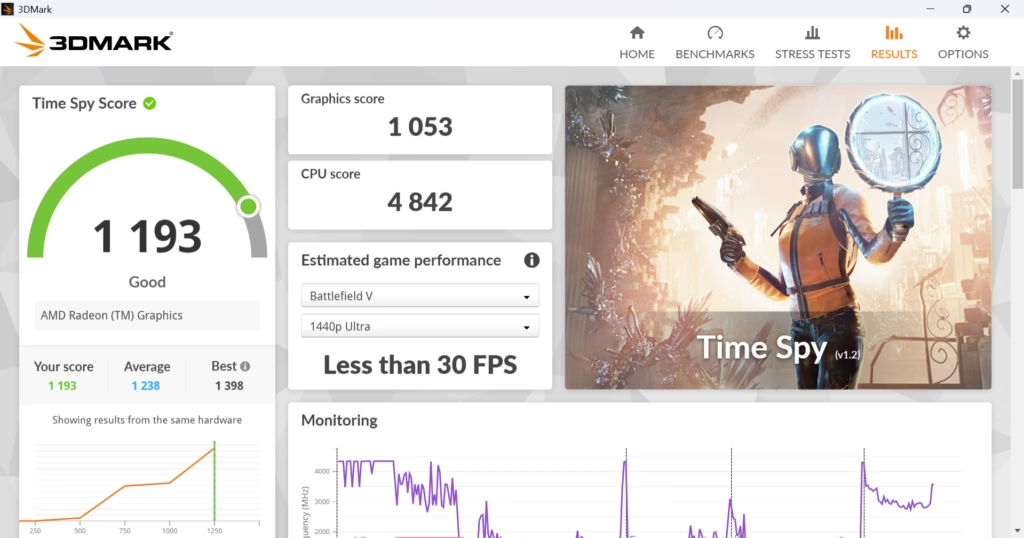
In 3DMark Time Spy, the Geekom A5 2025 scored 1193 points. For comparison, the 2023 model achieved 1604 points, showing the impact of fewer GPU compute units (Vega 7 vs Vega 8) and reduced core count. The Mini IT13 with Intel Core i9-13900H scored 1859 points, while the older Mini IT11 achieved 1405 points.
These mini PCs are not designed for serious gaming. They can play games with settings adjusted appropriately, but expectations should be tempered. In practical testing, Valorant at 1080p low settings achieved approximately 150 FPS, Counter-Strike 2 delivered around 79 FPS, and League of Legends maintained 157 FPS at very high settings. These results are acceptable for esports titles but not suited to modern AAA games.
3DMark Storage
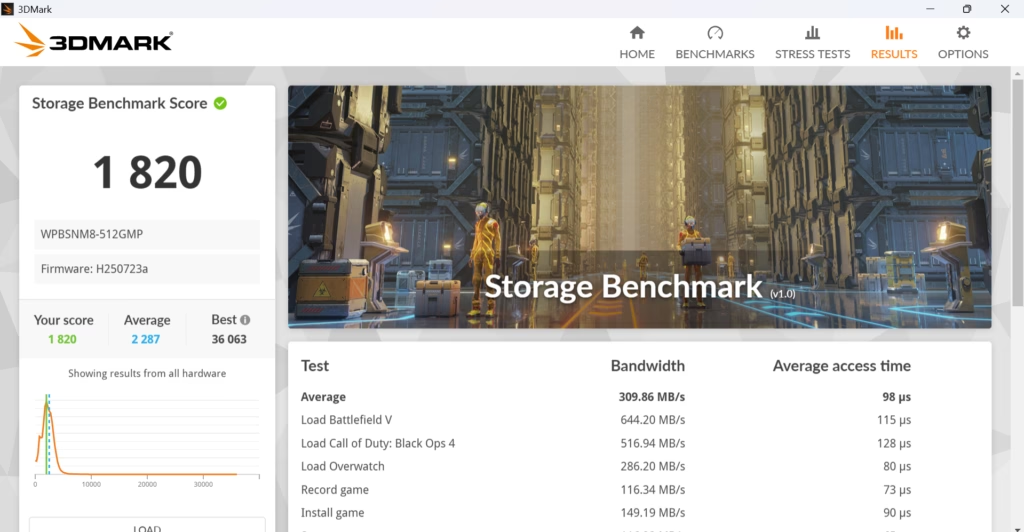
The 3DMark Storage benchmark returned a score of 1802 points. The included Foresee 512GB SSD (manufactured by Longsys, the same company behind Lexar) performed adequately for a PCIe Gen 3 drive. For reference, the 2023 model scored 1958 in this test, while the Mini IT13 achieved 3338 points with its faster storage.
3DMark CPU Profile
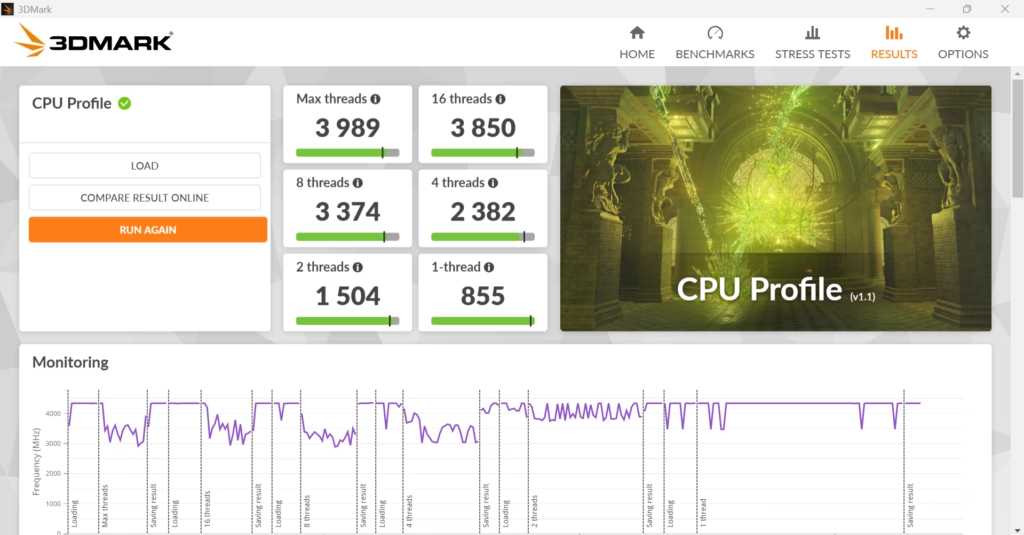
The 3DMark CPU Profile results showed the A5 2025 performing reasonably well in multi-threaded workloads despite having fewer cores than the 2023 model. In performance mode, the CPU achieved scores that positioned it well above budget Intel N100/N150/N200 systems while falling short of the more powerful 8-core chips.
PCMark 10
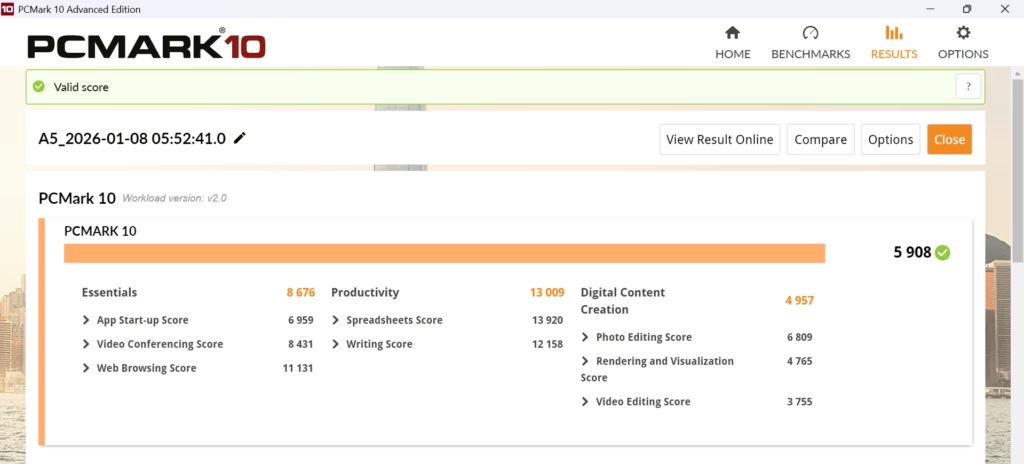
PCMark 10 returned an overall score of 5900. The 2023 model achieved 6100 in this test. For context, the Geekom Mini IT13 scored 5927, suggesting the 2025 A5 delivers approximately 80-90% of the productivity performance despite using a lower-tier CPU.
This level of performance proved more than adequate for typical office use during my testing. Running multiple browser tabs, Slack, Visual Studio Code, Outlook, Word, and Spotify simultaneously caused no performance issues.
Geekbench
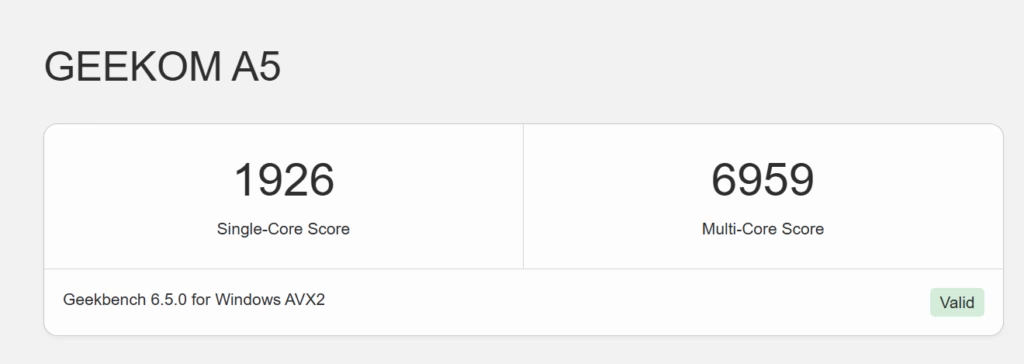
Geekbench 6 returned a single-core score of 1926 and a multi-core score of 6959. The 2023 model achieved 1976 single-core and 9132 multi-core, reflecting its additional cores. OpenCL GPU benchmark scores reached approximately 14325, while Vulkan testing showed 13895 points.
These numbers position the Geekom A5 as roughly double the performance of budget Intel N100 systems (which typically score around 3000-3500 multi-core) while being significantly more affordable than premium mini PCs.
Cinebench R23
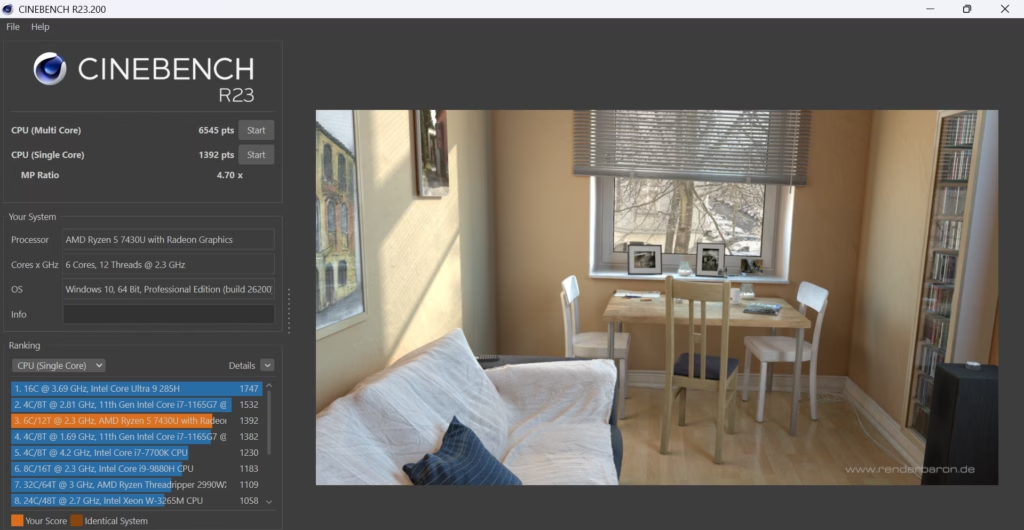
Cinebench R23 single-core performance reached 1392 points, with multi-core delivering 6545 points. The 2023 model achieved 1430 single-core and 12203 multi-core, demonstrating the significant multi-threaded advantage of the 8-core chip.
The consistency during testing was excellent, with no thermal throttling observed even during extended stress tests lasting several hours.
Crystal Disk
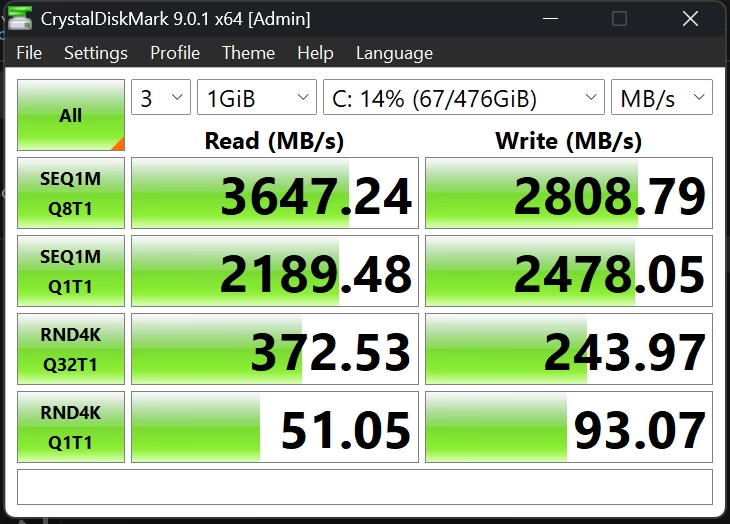
CrystalDiskMark returned sequential read speeds of 3647 MB/s and write speeds of 2808 MB/s. These figures are typical for a PCIe Gen 3 NVMe drive and should prove adequate for most use cases. The 2023 model achieved 3425 MB/s read and 3097 MB/s write with its included storage.
SSD temperatures remained well controlled at around 45 degrees Celsius even during intensive file transfers, thanks to thermal padding within the chassis.
Ethernet and WiFi Throughput
The 2.5GbE LAN port performed excellently in testing. With my home network running 2.5GbE infrastructure, I confirmed that throughput between the A5 and my NAS achieved approximately 2535 Mbps using LibreSpeed and over 240MB/s for large file transfers. This matches the performance of the 2023 model.
Wireless connectivity uses a Realtek RTL8852BE card supporting WiFi 6 (but not 6E, so no 6GHz band) and Bluetooth 5.2. The RTL8852BE does not have the greatest reputation for speed or stability, but it worked well during testing with strong reception and speeds matching other devices connected to the same access point. WiFi throughput reached approximately 898 Mbps in optimal conditions.
I previously criticised the older Geekom A5 for not having upgradable WiFi, but I was mistaken. The WiFi module is located under the NVMe drive. If you want to upgrade to WiFi 7 you will need either the Qualcomm NCM865 or the MediaTek MT7927.
Fan Noise
This is where the Geekom A5 2025 genuinely excels. The lower TDP of the Ryzen 5 7430U means the cooling system has considerably less work to do compared to higher-powered alternatives.
Noise levels measured 29 dBA at idle and just 33 dBA under load. These figures make it one of the quietest mini PCs available in its price range, essentially silent for most tasks. Unless you place your ear right against the case, you will not notice the fan spinning during typical use. The 2023 model with its 35W TDP chip was noticeably louder, particularly during sustained workloads.
For office environments or home theatre setups where noise is a concern, the A5 2025 is an excellent choice.
Power Usage and Running Costs
Power consumption is where the 2025 model demonstrates its efficiency advantage. Idle power measured just 6 watts, placing it among the most efficient mini PCs I have tested. Normal usage sits at around 20-30 watts depending on workload, while stress testing peaked at 43-47 watts.
Looking at the stats from my energy monitoring smart plug over a typical week with 14.5 hours daily use, the A5 2025 consumed approximately 0.35 kWh per day compared to 0.49 kWh for the 2023 model. That represents roughly 29% less electricity consumption.
The Geekom A5 7430U model I reviewed comes with 16GB of RAM and 512GB NVMe storage and has an RRP of £449, but Geekom has permanent discounts and was listing it at £349. At the time of writing, they had Boxing Day discounts with an additional 15% off, taking the final price down to £296.65.
There is also a configuration with 1TB storage at £389 before discounts. Additionally, Geekom offers a model with the AMD Ryzen 7 5825U (8 cores, 16 threads) with 16GB RAM and 512GB storage at £419 before the 15% discount.
The Geekom A5 I reviewed in 2023 had an RRP of £529 but was consistently discounted to £379, and it came with 32GB of RAM and 512GB of storage.
Geekom also has the A5 Pro, which includes a 7430U, 16GB RAM, 512GB storage and Windows 11 Pro for £449 / £419. The chassis is redesigned, but otherwise there does not appear to be a substantial difference versus the standard model.
The Geekom A6 with an AMD Ryzen 7 6800H (8 cores, 16 threads, 4.7 GHz boost) and 16GB DDR5 with 512GB storage was available for £459 / £413 at the time of writing, making it an interesting alternative for those wanting more performance.
The Geekom A5 7430U is admittedly a bit odd to review when I tested a very similar, but objectively better specified model back in 2023 with a negligible price difference.
Normally, this would be something to criticise heavily, but this is the unfortunate state of the PC market at the moment. Many people are looking at older generation technology so they can use cheaper DDR4 RAM to keep overall costs down. The exponential increase in memory prices has forced manufacturers to make difficult decisions about included specifications.
It is hard to be enthusiastic about this mini PC as it does not offer the same performance or price-to-performance ratio as models from the past, but that is simply the way things are currently.
I still use my old Geekom A5, and it remains a perfectly good mini PC for general use and very light gaming. The same is true for the 2025 model, and at under £300 for the cheapest configuration, it still represents a good purchase for anyone wanting an affordable mini PC, or perhaps as an affordable, low-powered server.
The strengths of this system are clear: exceptional quietness, excellent power efficiency, comprehensive connectivity with quad monitor support, premium build quality despite the budget price, and a generous three-year warranty.
The weaknesses are equally apparent: the Zen 3 architecture and Vega 7 graphics are showing their age, performance falls behind the 2023 model despite being newer, the second M.2 slot is limited to 2242 format, and there is no USB4 or Thunderbolt connectivity for future expansion.
For home office professionals needing a reliable, quiet workstation, home theatre PC users requiring silent 4K media playback, students and remote workers wanting solid performance with comprehensive connectivity, or enthusiasts setting up Proxmox home servers, the A5 2025 makes practical sense.
If you need maximum CPU performance for heavy rendering, modern gaming at high settings, Thunderbolt 4 or USB4 connectivity, or professional 4K video editing, you should look elsewhere at higher-priced alternatives.
Given the combination of performance and price, it is difficult to argue with the A5 as a value proposition. In terms of raw performance, connectivity, and capability, it sits comfortably ahead of Intel N100/N150/N200 systems while giving surprisingly little away to considerably more expensive alternatives. At around £300 with typical discounts, the Geekom A5 2025 Edition earns a solid recommendation for those seeking an affordable, capable, and exceptionally quiet mini PC.
Geekom A5 2025 Edition Review
Geekom A5 2025 Edition Review
Summary
The Geekom A5 2025 Edition is not a generational upgrade in performance over the 2023 model, but it remains a well-judged mini PC in the context of today’s distorted component pricing. By prioritising power efficiency, low noise, and aggressive discounting, Geekom has produced a compact system that comfortably outperforms budget Intel N-series mini PCs while costing far less to run than higher-powered alternatives. At around £300, it is a sensible and well-rounded choice for home office use, media playback, light productivity, and low-power server duties, even if it lacks the excitement or raw performance of older or more expensive models.
Pros
-
Exceptionally quiet operation even under sustained load
-
Very low power consumption with excellent efficiency
-
Strong connectivity with dual HDMI, dual USB-C and 2.5GbE
-
Compact, well-built chassis with easy internal access
-
Competitive pricing with frequent discounts
Cons
-
Lower CPU and GPU performance than the 2023 A5 despite being newer
-
Zen 3 CPU and Vega graphics are showing their age
-
No USB4 or Thunderbolt support
-
Secondary M.2 slot limited to 2242 form factor
-
Reduced included RAM compared to the previous generation
Last update on 2026-01-12 / Affiliate links / Images from Amazon Product Advertising API

I am James, a UK-based tech enthusiast and the Editor and Owner of Mighty Gadget, which I’ve proudly run since 2007. Passionate about all things technology, my expertise spans from computers and networking to mobile, wearables, and smart home devices.
As a fitness fanatic who loves running and cycling, I also have a keen interest in fitness-related technology, and I take every opportunity to cover this niche on my blog. My diverse interests allow me to bring a unique perspective to tech blogging, merging lifestyle, fitness, and the latest tech trends.
I’m proud to share that Vuelio has consistently ranked Mighty Gadget as one of the top technology blogs in the UK. With my dedication to technology and drive to share my insights, I aim to continue providing my readers with engaging and informative content.